Tag: Apple

  • Personal Digital Archaeology: The Power Macintosh Resource Page, Winning a Copy of BeOS, and Sharing Mac Info, February 1997

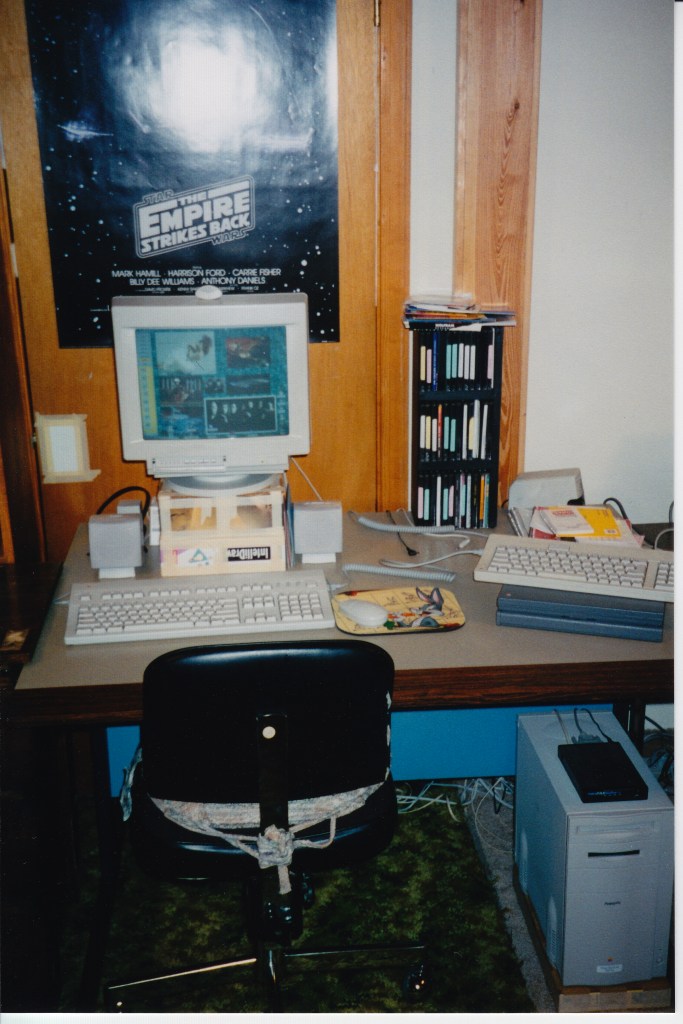
    My Apple PowerMacintosh 8500/120 and PowerBook 145B at home. August 1997.

    Continuing the work that I started in 2014 when I wrote about the rediscovery of a set of isometric Macintosh icons that I had created and shared in 1997, I wanted to share another rediscovery from February and March 1997 that spans a defunct Macintosh-focused blog called the Power Macintosh Resource Page and Usenet that involves BeOS, winning a magazine, and writing about a hard drive partioning trick that I developed using free BeOS and MacOS applications.

    This rediscovery came about after I sent a postcard to another computer enthusiast via Postcrossing.com. I wrote in my postcard about how great I thought BeOS was. She replied that she hadn’t used BeOS before but was interested in it.

    I remembered that the way that I came to use BeOS for a time was thanks to a now-defunct technology blog called The Power Macintosh Resource Page. It was operated by Steve Tannehill.

    On 1 Feb. 1997, Tannehill posted this message to his site (which you can find in the site’s archives saved on the Internet Wayback Machine here):

    1 February 1997:

    Trevor Inkpen wrote to mention that the Complete Conflict Compendium is about to have its 500,000th visitor. That visitor will win an Apple watch and an Apple hat.

    Not to be outdone… ;-)

    In the next 2-3 weeks, the Power Macintosh Resource Page will hit the half-million mark. If you send me a legitimate screen shot of the 500,000th hit, I’ll send you a copy of the January MacTech magazine, complete with the BeOS for the Power Mac demo CD-ROM!

    Power Macintosh Resource Page, Feb. 1997 Archive, Archive.org Wayback Machine.

    There are a few things to unpack here. First, Tannehill mentions Trevor Inkpen’s site visitor context for “an Apple watch and an Apple hat.” That Apple watch prize was not for what we think of as an Apple Watch today. It was an Apple-branded watch that Apple sold through their campus gift shop in Cupertino.

    Second, website operators used to pride themselves on how many site visitors they had. This was usually calculated with a public-facing counter enabled by a bit of code offered by a provider that logged page loads containing the code and presented a gif-based numerical counter of the number of page loads. Many of these counters only provided a simple calculation of page loads rather than the more granular information provided by webserver logs and the more advanced metrics of unique visitors, engagement, etc. used today.

    Third, like Inkpen’s website with a counter nearing 500,000, Tannehill’s Power Macintosh Resource Page’s counter was also nearing that number. So, he devised a contest to reward the person who was the 500,000th visitor. Unlike Inkpen, Tannehill offered what I considered a greater prize, a copy of the January 1997 issue of MacTech Magazine, which included a CD-ROM installer for the Preview Edition of BeOS.

    Before Tannehill offered this prize, I had heard about BeOS from articles in Mac magazines like MacUser, Macworld, and MacAddict. With the burgeoning world of online reporting and news, I had gleaned even more information about it. It sounded like the next big thing, especially in light of Apple’s financial troubles of that era.

    Also, I had gotten my PowerMacintosh 8500/120 only a year before, so I had a computer that was capable of running the PowerPC-based BeOS Preview Edition that came with the MacTech Magazine.

    After learning about Tannehill’s contest, I first thought that there is no way that I would be lucky enough to be the 500,000th visitor to his site. So, the practical solution was to find a copy of the magazine. I was attending Georgia Tech in Atlanta at the time, so I had access to bookstores with nice magazine selections–the best being Tower Records next Lenox Square Mall in Buckhead.

    Unfortunately, I was unable to find a copy of the magazine anywhere. Stores that sold MacTech said that they were sold out. Therefore, my only alternative to obtain a copy of BeOS was to be a super visitor to the Power Macintosh Resource Page. Thankfully, my efforts paid off on 13 Feb. 1997 after I revisited the page late that night and took the required screenshot of my browser window:

    13 February 1997:

    Jason Woodrow Ellis is the official 500,000th visitor to the Power Macintosh Resource Page! Jason sent the screen shot, so he gets the January MacTech magazine. Congratulations Jason, and thanks to everyone for making this page a success!

    Power Macintosh Resource Page, Feb. 1997 Archive, Archive.org Wayback Machine.

    Tannehill mailed the magazine to my campus address at Georgia Tech, and after receiving it, I promptly began partitioning my PowerMac’s 2GB SCSI hard drive so that I could boot into Mac OS or BeOS (more on this further below).

    And, I would be remiss not to remark on how grateful that I am to Tannehill for offering that magazine as a prize on his website. It was a touchstone in my memories of that era of my life and an important moment in my learning more about computers in general and Macs in particular. I owe him a debt of thanks!

    While reading the February 1997 archive page of the Power Macintosh Resource Page, I discovered that I had sent in a report about a presentation by an Apple Representative at the Georgia Tech campus:

    25 February 1997:

    Jason Woodrow Ellis wrote an interesting note regarding a recent presentation at Georgia Tech on the future of Mac OS:

    “Apple Computer, Inc.’s Higher Education Account Executive Steve VanBrackle” gave us a very good outlook for the upcoming Rhapsody and MacOS releases. Mr. VanBrackle told us about the NeXT engineers and how “cocky” they were. He explained that these guys say that they could get the NeXT OS to run on a cellular phone! The point was that they are able to port their OS to anything. …if Mr. VanBrackle is correct the engineers will have an easy time of creating it. First, NeXT had ported their OS to PowerPC several years ago to run on 601’s. Second, the Apple AU/X team had already figured out how to run System 7 apps on top of UNIX. Third, 80% of Copland’s old code will be used with Rhapsody, so Apple did not “totally” scrap those several years of research. Now their task lies in combining these things together which in effect is the “easy” part. …I asked him about Jobs and Wozniak’s role at Apple in respect to all of the rumors about Jobs “taking over.” According to Mr. VanBrackle, they are “10 hour per week advisors to Amelio.” They have no managerial responsibilities and no “code time.”

    Power Macintosh Resource Page, Feb. 1997 Archive, Archive.org Wayback Machine.

    I vaguely remember this presentation only because I recall receiving a copy of the first Mac Advocate CD-ROM, which contained useful software updates, Apple information, and Apple-related media, and Apple rainbow logo stickers, which I later applied to the rear window of my dad’s Toyota pickup truck that I often drove when I was back home (and earned me vulgar responses from homophobic locals who were not only bigoted but also apparently lived under a rock during the first 20 years of Apple Computer’s existence).

    It was exciting to me to find this email excerpt that I had taken the time to write and send to Tannehill. I have no memory of what I reported Steve VanBrackle talking about during his presentation, but the points about what would eventually become MacOS X are very intriguing. Behind these points there were a number of important developments. Apple scrapped Copland, the code-named operating system originally intended to become System 8, Apple’s consideration of purchasing Jean-Louis Gassée’s BeOS as the basis of its next-generation operating system, and Apple’s ultimate decision to purchase NeXT and bring Steve Jobs back to the company.

    As a side note, I often signed my online posts using my full name at that time, because I had discovered that there are a lot of Jason Ellis’s in the world. Even in my youth, I had to fight accusations of not having had all of my vaccines or needing additional dental work–things that applied to another guy who shared my first and last names and happened to be a patient at my doctor and dentist. When I got online, I found even more people with my name, and I tried to create an identity distinct from others. Eventually, I settled on Jason W. Ellis.

    Returning to an earlier point about multi-booting MacOS and BeOS, I found an old Usenet post (thanks to the remnants of Google Groups, which is unfortunately a poor instance of its former glory) that I had made on 13 Mar. 1997–a month to the day after I had won the MacTech Magazine with the BeOS Developer Preview CD-ROM. I cross-posted this short write-up called “Slick Disk Tricks” to comp.sys.mac.hardware.storage and comp.sys.mac.systems (I just didn’t know any better).

    Slick Disk Tricks

    Mar 13, 1997, 3:00:00 AM

    I was a crazy risk taker. I loaded up the BeOS for Power Macintosh on my 8500/120 with only one hard disk drive. Luckily I already had partitioned it when I first bought the computer. I created three partitions: HD1=340MB, HD2= 830, HD3= 830, and an allotment of 33MB of free space.

    When I installed the BeOS, I repartitioned HD1 as a BeOS˛ partition. Because I quickly found that I did not find enlightenment from using Be, I wanted to get rid of it. I just as quickly noticed that Apple’s DriveSetup application would not let me repartition without reformatting. This was not an option. Luckily Be came through.

    In order to reclaim my first partition I used Be’s included Mac application called BeOS Partition Utility˛ to rename the BeOS˛ partition to an Apple_HFS partition. Then I restarted my computer and a dialogue comes up at the desktop for me to choose to initialize the new partition or eject it. I opted to initialize it (which took all of five seconds) and suddenly I have my first partition back! No special programs or extra drivers necessary. Just as a precaution, I did use Norton’s Wipe Info application to do a nice government˛ sweep of all previously stored data. (OK, so I cheated a little bit!)

    I am about to loose my internet connection at Georgia Tech, so I have been trying to download everything under the sun to play with when I go back home this month. This need of space reminded me of my 33MB of free space. This takes a little bit more time and effort than regaining a BeOS˛ partition (but it is exactly the same procedure, almost). These are the steps that I used. First, I used the BeOS Partition Utility˛ to rename the Apple_Free to BeOS. Next I launched the BeOS from the CD-ROM and initialized this the free˛ partition for use by the BeOS (this gives the partition a name). Next I rebooted my computer after _not_ installing the BeOS and again used BeOS Partition Utility˛ to rename the BeOS˛ partition to Apple_HFS.˛ Now one can see that this is similar to the previous instructions. However when I restarted nothing happened! Well, undaunted, I used Apple’s DriveSetup app to update the disk driver. I rebooted and now my free space is a new partition asking to be initialized. I now have my full hard disk drive available for storage purposes.

    One should realize that what I did was very perilous and down right horrific. I don’t have any kind of backup solution or another disk drive to keep files on. Please use caution if you try this technique to reclaim disk space! And, remember, I am loosing my email address shortly so you have no ability for flames or other such nonsense.

    Jason Woodrow Ellis
    gt0…@prism.gatech.edu

    Google Groups, comp.sys.mac.system, 13 Mar. 1997.

    While I wrote this with the intent of sharing a neat way to use the BeOS Partition Utility and Apple’s DriveSetup programs to resize and reclaim hard drive space without the need of paid partitioning software, it is an embarrassing piece of writing. However, I try to remind myself that it was something that I wrote about 25 years ago, which puts it in its proper context.

    Also, I’m saddened to read that I wrote, “I quickly found that I did not find enlightenment from using Be.” I don’t recall exactly why I didn’t find it enlightening. From my viewpoint now, BeOS was exciting to use and had an excellent user interface (UI). But, I can imagine how it might not have been a daily driver OS due to its development stage and a fewer application options than MacOS. Also, hard drive space cost a premium, so I probably wanted to have the drive space back for other projects that I was working on at the time. So, while my 1997-self might have not found enlightenment from BeOS, my present self recognizes BeOS as something that had the potential to be insanely great (Steve Jobs would probably not appreciate my borrowing his phrase for this case, but I think it applies nevertheless). And I do know that despite my not keeping BeOS installed on my PowerMacintosh, I enjoyed using Greg Landwebber’s BeView to reskin MacOS as BeOS (and, I alternated between BeView and Aaron, for a Copland look–later, I switched to Kaleidoscope). And, I am certain that BeOS left an indelible imprint on my mind for me to think of it to this day, including its incredible design choices–isometric interface icons, tabbed windows, the application dock, and the finger pointer, as well as its amazing under-the-hood developments with its microkernel, preemptive multitasking, multithreading, etc.

    I am curious about the phrase that I used: “did not find enlightenment.” It makes me wonder if an advertisement or article about BeOS used that kind of language to describe using it. When I have some time, I’ll look into that with what’s available on archive.org, Google Books, and other places online that might have digital copies of mid-to-late 1990s Macintosh magazines.

    After upgrading its cache memory and its CPU daughter card to a faster 604e processor, I sold my PowerMacintosh to an ex-girlfriend. Later, I acquired another PowerMacintosh 8500/120, which I donated to the Georgia Tech Library’s Retrocomputing Lab before moving to NYC.

    A few final notes: Haiku OS is trying to build something new that captures what BeOS once was and could have been. I haven’t had a chance to try it out yet, but I certainly intend to! And, I owe a great deal of thanks to the Internet Archive for the Internet Wayback Machine and Google Groups (despite Google’s mishandling of this invaluable resource), both of which made this personal exploration possible. While many of our digital traces seem to linger, others disappear without the dedicated and important work of digital preservationists.
  • The Debut of the Apple Disk II, Ambiguous Terminology, and the Effects of Memory: Digging Deeper into an Anecdote from Kirschenbaum’s Mechanisms

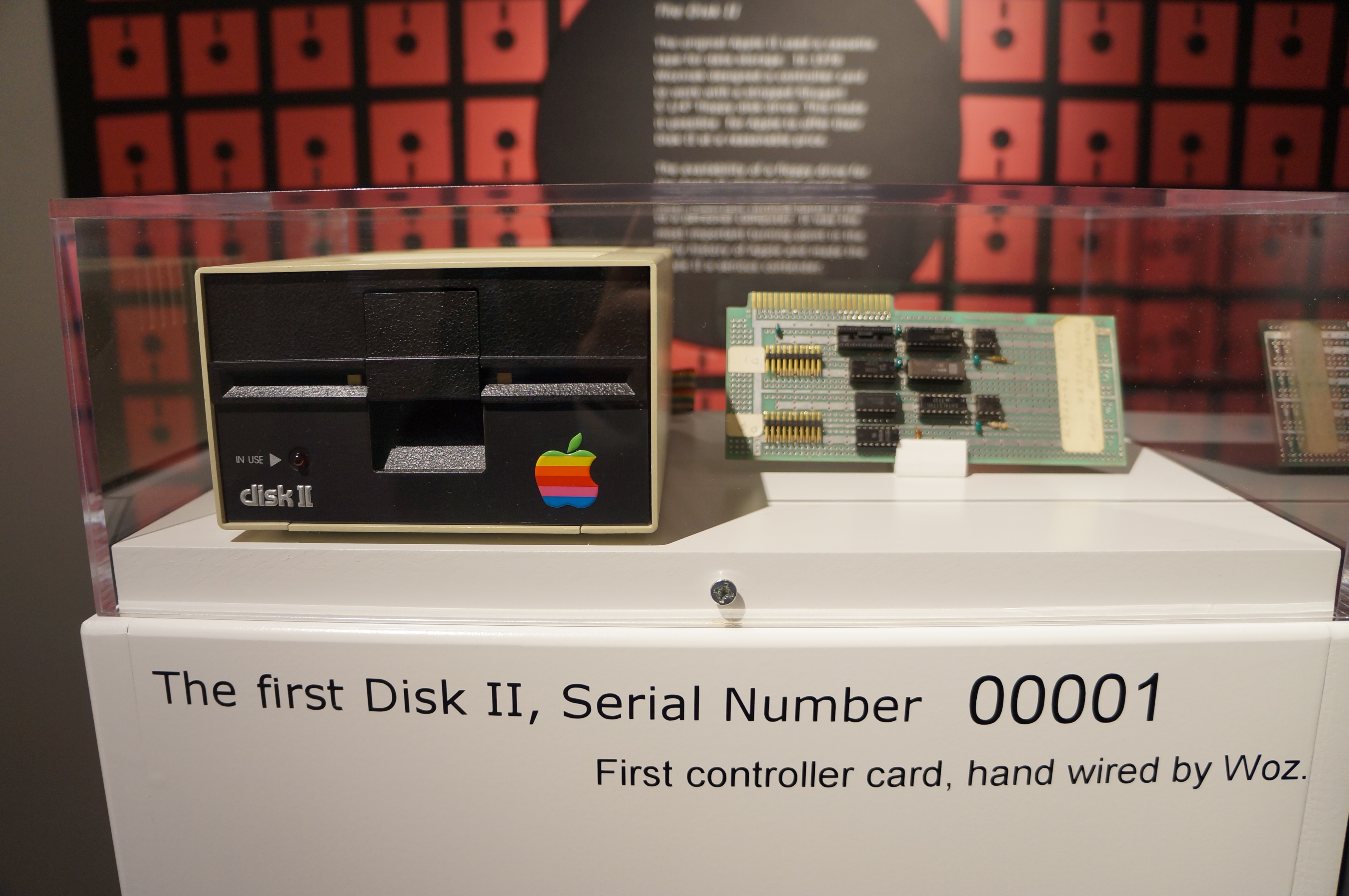
    The first Apple Disk II and controller card hand wired by Wozniak. Photo taken at the Apple Pop-Up Museum in Roswell, GA.
    The first Apple Disk II and controller card hand wired by Wozniak. Photo taken at the Apple Pop-Up Museum in Roswell, GA.

    Matthew Kirschenbaum constructs a compelling and interesting argument in his book Mechanisms: New Media and the Forensic Imagination (2008). He argues that while new media and computer software might seem ephemeral and intangible, it has in fact physicality, a many-layered history, and emerging archaeological protocols (developed by Kirschenbaum and many others).

    However, one section titled “Coda: CTRL-D, CTRL-Z” attracted my attention, because its use of the term “recover” in a story about the debut of the Apple Disk II seemed to imply computer disk data recovery instead of what historically happened, which was the manual rewriting of the software that had been accidentally overwritten during a botched disk copy operation.

    Kirschenbaum uses the story of Steve Wozniak and Randy Wigginton’s development of software to control the reading and writing of data to Apple’s Disk II, which was based on Shugart’s 5 1/4″ floppy disk drive, before its unveiling at the 1978 CES in Las Vegas to establish an analogy: “Nowadays we toggle the CTRL-D and CTRL-Z shortcuts, deleting content and undoing the act at a whim. Gone and then back again, the keyboard-chorded Fort and Da of contemporary knowledge work” (Kirschenbaum 69). The idea is that computer facilitate a kind of gone and back again play as described by Freud. Of course, the keyboard shortcuts that he refers to are not universal across platforms or software, but the concept is pervasive. Nevertheless, my focus is not on that concept per se but instead on the Apple Disk II debut anecdote, the terminology surrounding what actually happened, and how that relates to the kinds of work that we do in new media archaeology.

    After introducing the story of the Apple Disk II’s debut at CES, Kirschenbaum cites a passage from Steven Weyhrich’s Apple II History website:

    “When they got to Las Vegas they helped to set up the booth, and then returned to working on the disk drive. They stayed up all night, and by six in the morning they had a functioning demonstration disk. Randy suggested making a copy of the disk, so they would have a backup if something went wrong. They copied the disk, track by track. When they were done, they found that they had copied the blank disk on top of their working demo! By 7:30 am they had recovered the lost information and went on to display the new disk drive at the show.” (Weyhrich par. 13, qtd. in Kirschenbaum 69).

    First, it should be noted that Weyhrich uses the term “recovered” to describe the way that the “lost information” was brought back from the brink of the overwritten disk. Then, Kirschenbaum reads Weyhrich’s account above in the following way:

    “Thus the disk handling routines that took the nascent personal computer industry by storm were accidentally overwritten on the very morning of their public debut–but recovered and restored again almost as quickly by those who had intimate knowledge of the disk’s low-level formatting and geometry” (Kirschenbaum 69).

    Weyhrich uses the term “recovered” to refer to the software Wozniak and Wigginton had lost during the bad copy operation. Kirschenbaum borrows Weyhrich’s “recovered” and adds “restored” to describe the final state of the software on Wozniak and Wigginton’s floppy disks for use on the CES show floor. When I first read Kirschenbaum’s book, his reading seemed unncessarily ambiguous. On the one hand, Kirschenbaum does not directly say that the two Apple engineers used their knowledge of controlling the disk drive and reading low-level information on the floppy disks to “recover” the lost data–i.e., use the drive and disk technology to salvage, rescue, or retrieve what remains on the disk but otherwise might seem lost to someone with less advanced knowledge. On the other hand, Kirschenbaum’s reading of the incident–“recovered and restored again almost as quickly”–is implicitly aligned with his own project of the physicality of data stored on new media storage devices. One could mistakenly believe that Wozniak and Wigginton had restored the lost data from the overwritten floppy disk.

    Steven Wozniak writes about this episode in his autobiography, iWoz: Computer Geek to Cult Icon (2006). Before turning to Wozniak’s later recall of this event in 1978, I would like to look at the two sources that Weyhrich cites on the passage that Kirschenbaum cites in his argument.

    Weyhrich’s first of two footnotes on his passage points to page 168 of Gregg Williams and Rob Moore’s 1985 interview with Steve Wozniak titled, “The Apple Story, Part 2: More History And The Apple III” in the January 1985 issue of Byte magazine. In the interview, Wozniak tells them:

    “We worked all night the day before we had to show it [the disk drive] at CES. At about six in the morning it was ready to demonstrate. Randy thought we ought to back it up, so we copied the disk, track by track. When we were done, he looked down at them in his hands and said, “Oh, no! I wrote on the wrong one!” We managed to recover it and actually demonstrated it at CES” (Williams and Moore 168).

    In this primary source, we see Wozniak using  the term “recover” to indicate that they were able to get the demonstration operational in time for CES that day, but what form the “recovery” took place is not explained. Was it data recovery in the technical sense or data recovery in the hard work sense of re-writing the code?

    Weyrich’s second footnote on his passage points to Paul Freiberger and Michael Swaine’s “Fire In The Valley, Part Two (Book Excerpt)” in the January 1985 issue of A+ Magazine. While I have been unable to find a copy of this magazine, I did refer to the book that this excerpt was taken from: Freiberger and Swaine’s Fire in the Valley (1984). On page 286, they write in regard to Wozniak and Wigginton’s disk dilemma at CES:

    “Wigginton and Woz arrived in Las Vegas the evening before the event. They helped set up the booth that night and went back to work on the drive and the demo program. They planned to have it done when the show opened in the morning even if they had to go without sleep. Staying up all night is no novelty in Las Vegas, and that’s what they did, taking periodic breaks from programming to inspect the craps tables. Wigginton, 17, was elated when he won $35 at craps, but a little later back in the room, his spirits were dashed when he accidentally erased a disk they had been working on. Woz patiently helped him reconstruct all the information. They tried to take a nap at 7:30 that morning, but both were too keyed up” (Freiberger and Swaine 286).

    Unlike Wozniak’s “recover” in the Williams and Moore interview above, Freiberger and Swaine use the term “reconstruct” in their narrative about the pre-CES development of the Disk II demonstration software. Unlike the term recover, which means to regain what is lost, reconstruct means to build something again that has been destroyed. Freiberger and Swaine’s selection of this term seems more accurate when considering what Wozniak says about this episode in his autobiography:

    “We set up in our booth and worked until about 6 a.m., finally getting everything working. At that point I did one very smart thing. I was so tired and wanted some sleep but knew it was worth backing up our one good floppy disk, with all the right data. . . . But when I finished this backup, I looked at the two unlabeled floppy disks and got a sinking feeling that I’d followed a rote pattern but accidentally copied the bad floppy to the good one, erasing all the good data. A quick test determined that this is what happened. You do things like that when you are extremely tired. So my smart idea had led to a dumb and unfortunate result. . . . We went back to the Villa Roma motel and slept. At about 10 a.m. I woke up and got to work. I wanted to try to rebuild the whole thing. The code was all in my head, anyways. I managed to get the good program reestablished by noon and took it to our booth. There we attached the floppy and started showing it” (Wozniak and Smith 218-219).

    In this account, Wozniak says that he is responsible for overwriting the good disk with the bad (as opposed to what he said to Williams and Moore for the 1985 Byte magazine interview), but most important is the terms that he uses to describe how he made things right: “I wanted to try to rebuild the whole thing.” He “reestablished” the program by reentering “the code . . . in [his] head” into the computer that they had on-hand. Wozniak’s word choice and description makes it clearer than in his earlier interview that he had to remake the program from memory instead of attempting to “recover” it from the overwritten media itself. While, it might have been theoretically possible for someone as well versed in the mechanism that by that point he had had a significant hand in redesigning from the original Shugart drive mechanism and controller card and of course his development with Wigginton of the software that controlled the hardware to read and write floppy disks in the Apple Disk II system (computer-controller card-disk drive), Wozniak, who reports throughout his autobiography as an engineer who works things out in head meticulously before putting his designs into hardware or software, took the easiest path to the solution of this new media problem: write out the software again from memory.

    Memory, of course, is another tricky element of this story. It was my memory of Wozniak’s exploits that drew me to this passage in Kirschenbaum’s book. My memory of Kirschenbaum’s argument informed the way that I interpreted what I thought Kirschenbaum meant by using this episode as a way of making his Fort-Da computer analogy. Kirschenbaum’s memory of the episode as it had been interpreted secondhand in Weyhrich’s history of the Apple II informed how he applied it to his argument. Wozniak’s own memory is illustrated as pliable through the subtle differences in his story as evidenced in the 1985 Byte magazine interview and twenty-one years later in his 2006 autobiography.

    Ultimately, the episode as I read it in Kirschenbaum’s Mechanisms was caught in an ambiguous use of language. The use of certain terms to describe the work that we do in new media–in its development, implementation, or daily use–relies on the terminology that we use to describe the work that is done to others–lay audience or otherwise. Due to the kind of ambiguity illustrated here, we have to strive to select terms that accurately and explicitly describe what it is we are talking about. Of course, primary and secondary accounts contribute to the possibility of ambiguity, confusion, or inaccuracy. Sometimes, we have to dig more deeply through the layers of new media history to uncover the fact that illuminates the other layers or triangulate between differing accounts to establish a best educated guess about the topic at hand.

    Works Cited

    Freiberger, Paul and Michael Swaine. Fire in the Valley: The Making of the Personal Computer. 2nd ed. New York: McGraw-Hill, 1984. Print.

    Kirschenbaum, Matthew G. Mechanisms: New Media and the Forensic Imagination. Cambridge: MIT Press, 2008. Print.

    Weyhrich, Steven. “The Disk II.” Apple II History. Apple II History, n.d. Web. 13 Sept. 2015.

    Williams, Gregg, and Rob Moore. “The Apple Story, Part 2: More History And The Apple III”, Byte, Jan 1985: 167-180. Web. 13 Sept. 2015.

    Wozniak, Steve and Gina Smith. iWoz: Computer Geek to Cult Icon. New York: W. W. Norton & Co., 2006. Print.

  • My SFRA 2015 Conference Presentation: The Cyberspace Deck as a Mechanism: Gibson’s Sprawl Trilogy as a Voyager Expanded Book

    The presentation that I will be giving tomorrow afternoon at 1:00PM at the annual Science Fiction Research Association Conference (this year at Stony Brook University on June 25-27, 2015) will be nothing like the title and abstract that I submitted earlier this year, but that’s a good thing. Over the past several months, my reading and research has focused on one small corner of that original abstract: The Voyager Company’s Expanded Book Edition of William Gibson’s Neuromancer with Count Zero and Mona Lisa Overdrive (1992). I began to see the cyberspace deck as an important image and mechanism connecting Gibson’s fictional world with our contemporary shift from written to digital culture.

    Above,  you can watch a demo video that will accompany my presentation as a backdrop to my talk, and below, you can find my paper’s abstract, useful links, and my works cited list for reference. I will have handouts of this information available at the session tomorrow, too.

    Title:

    The Cyberspace Deck as a Mechanism: Gibson’s Sprawl Trilogy as a Voyager Expanded Book

    Abstract:

    Instead of focusing on the epistemology or ontology of cyberspace, this paper explores the cyberspace deck in William Gibson’s fictions as a mechanism of inscription. It does this by charting Gibson’s inspiration in the Apple IIc, his comparison of it to the first Apple PowerBooks, and the publication of his cyberspace deck-infused fictions as the Voyager Company Expanded Book edition in 1992. Through discussing these connections, it addresses other issues of importance for the current shift from written culture to digital culture, such as the effect of reading on screens as opposed to print, and the effect of digital culture on the human brain.

    Useful Links:

    Conference Demo Video (embedded above): http://youtu.be/fU8K2DuTfeE

    Google Glass, iPad, PowerBook 145 Demo Video: https://youtu.be/-XrIqLdx3EU

    Mini vMac Emulation Software: http://gryphel.com/c/minivmac/index.html

    Emaculation Emulation Community: http://www.emaculation.com/doku.php

    Works Cited

    Casimir, Jon. “Voyager Seeks to Improve Thinking.” Sydney Morning Herald (23 May 1995): n.p. Web. 18 May 2015.

    DeStefano, Diana and Jo-Anne LeFebre. “Cognitive Load in Hypertext Reading: A Review.” Computers in Human Behavior 23 (2007): 1616-1641. Web. 22 June 2015.

    Gibson, William. “Afterword.” Neuromancer with Count Zero and Mona Lisa Overdrive. Santa Monica, CA: Voyager Company, 1992. n.p. 3.5” Floppy Disk.

    —. Burning Chrome. New York: EOS, 2003. Print.

    —. Count Zero. New York: Ace, 1987. Print.

    —. Mona Lisa Overdrive. New York: Bantam, 1989. Print.

    —. Neuromancer. New York: Ace, 1984. Print.

    —. Neuromancer with Count Zero and Mona Lisa Overdrive. Santa Monica, CA: Voyager Company, 1992. 3.5” Floppy Disk.

    —. Package. Neuromancer with Count Zero and Mona Lisa Overdrive. Santa Monica, CA: Voyager Company, 1992. 3.5” Floppy Disk.

    Kirschenbaum, Matthew G. Mechanisms: New Media and the Forensic Imagination. Cambridge, MA: MIT Press, 2008. Print.

    Markley, Robert. “Boundaries: Mathematics, Alientation, and the Metaphysics of Cyberspace.” Configurations 2.3 (1994): 485-507. Web. 23 June 2015.

    Matazzoni, Joe. “Books in a New Light.” Publish (October 1992): 16-21. Print.

    Mazlish, Bruce. The Fourth Discontinuity: The Co-Evolution of Humans and Machines. New Haven: Yale UP, 1993. Print.

    Sellen, Abigail J. and Richard H.R. Harper. The Myth of the Paperless Office. Cambridge, MA: MIT Press, 2002. Print.

    Virshup, Amy. “The Teachings of Bob Stein.” Wired (April 2007): n.p. Web. 5 Jan. 2015.

    Wolf, Maryanne. Proust and the Squid: The Story and Science of the Reading Brain. New York: Harper Perennial, 2007.

  • Personal Digital Archaeology: Jason’s Icons 1.0, Feb. 7, 1997

    I have been spending some time digging through my past online and conducting personal, digital archaeology. While doing this research, I ran across a collection of Macintosh icons that I made back in 1997 and bundled on Feb. 7, 1997. I likely used ResEdit to make the icons (32 x 32 pixels).

    You can download the collection in its original HQX/SIT container from here on the Info Mac Archive.

    In the archive, I included a Read Me file with my reasoning behind making the icons set. Also, it reminded me of my first email address at Georgia Tech, which was replaced when I returned to complete my studies in 2001. The Read Me file includes this text:

    Jason’s Icons v1.0

    February 7, 1997

    Dear Downloader, These are some icons that I created out of pure desperation to label the folder contents of one of my hard drive partitions. This is how I use them:  After careful consideration I have decided to let other people enjoy the fruit of my labors and perhaps spread a little happiness throughout the world. (Hey, I can dream!) If you do happen to use these icons and have any suggestions for a new set or would just like to say “hi,” please feel free to contact me at my email address listed below.

    Sincerely, Jason Woodrow Ellis

    gt0567b@prism.gatech.edu

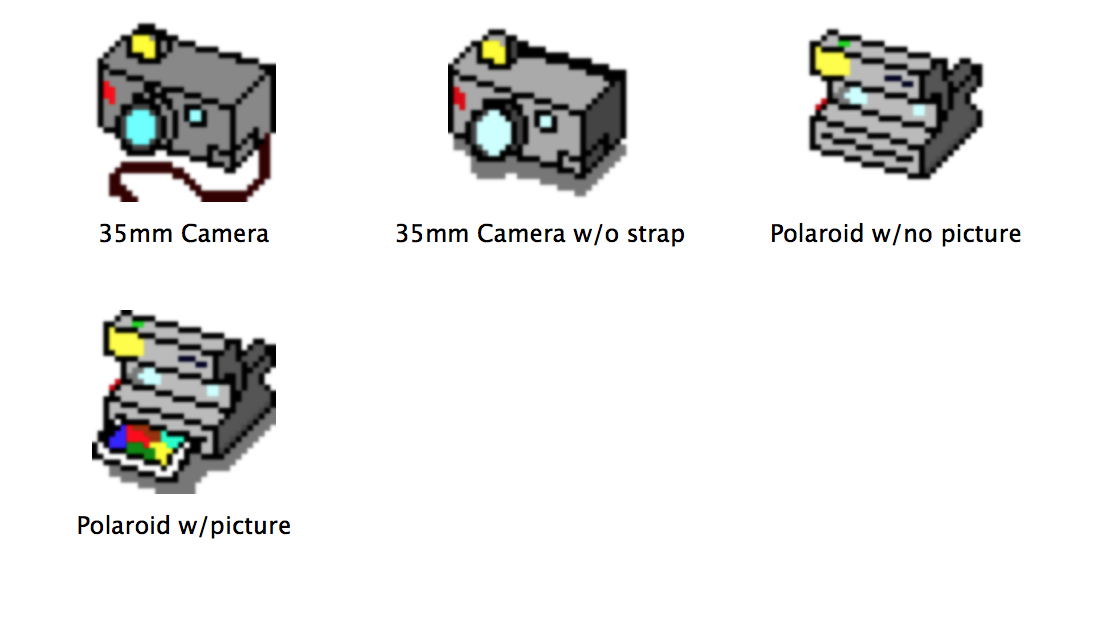
    I grouped the icons into these folders (some for reasons lost to me): Cameras, Enjoyment Icons, Internet Metaphor, Office Equipment, Tools of Torture, and Video Equipment.

    Jason's Icons: Enjoyment Icons
    Jason’s Icons: Enjoyment Icons

    Internet Metaphor
    Internet Metaphor

    Jason's Icons: Office Equipment
    Jason’s Icons: Office Equipment

    Jason's Icons: Tools of Torture
    Jason’s Icons: Tools of Torture

    Jason's Icons: Video Equipment
    Jason’s Icons: Video Equipment

    Jason's Icons: Cameras
    Jason’s Icons: Cameras

  • Second Donation to Georgia Tech Library Archive’s Retrocomputing Lab: Power Macintosh 8500

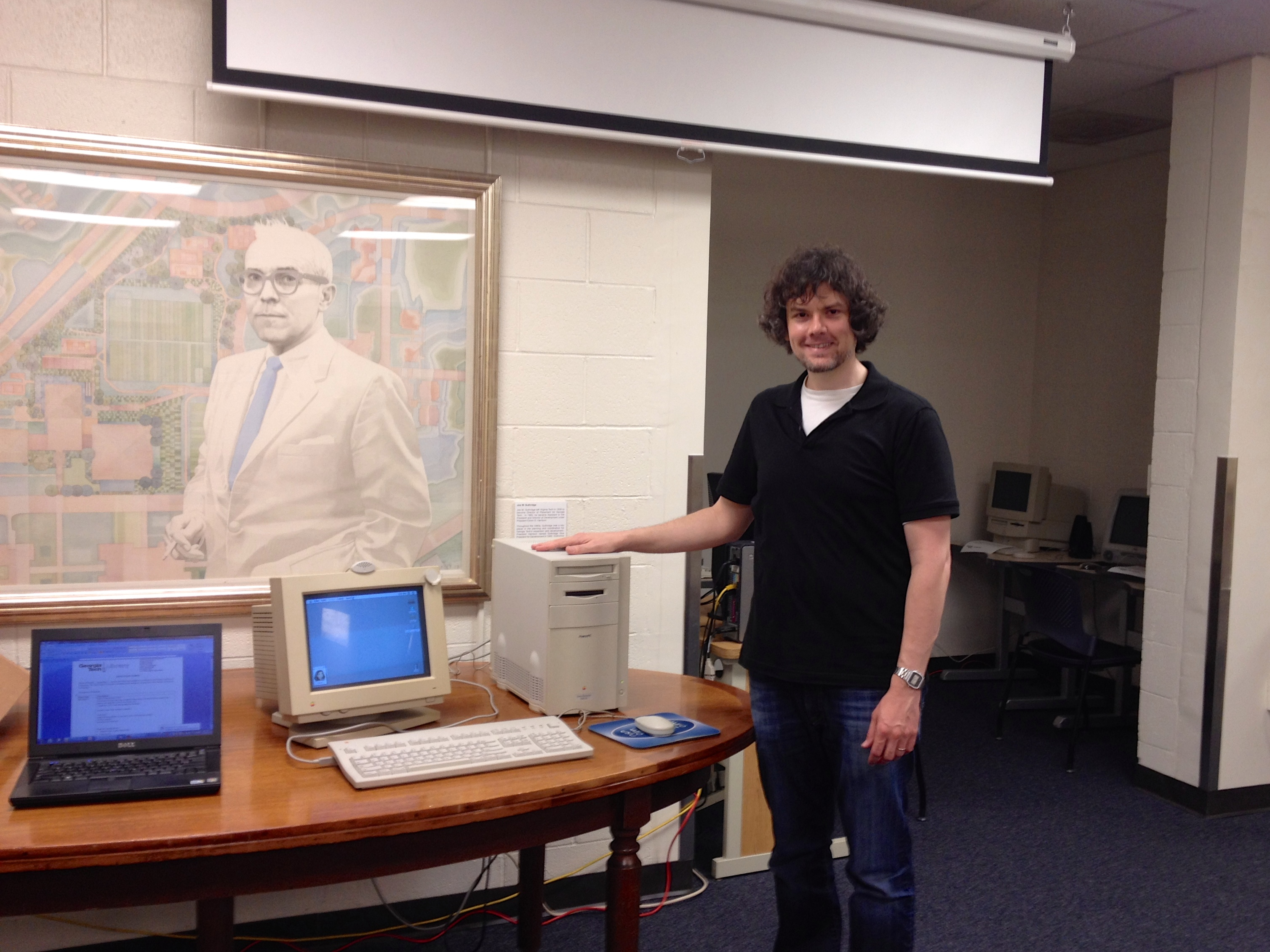
    Me and the Power Macintosh 8500/120 in the Georgia Tech Library Archives.
    Me and the Power Macintosh 8500/120 in the Georgia Tech Library Archives.

    When I met with Georgia Tech Library Archives’ Department Head Jody Lloyd Thompson and Digital Collections Archivist Wendy Hagenmaier to donate three vintage computers (a Dell Dimension 4100, Apple Performa 550, and Apple iMac) and other computing hardware a week and a half ago, I noticed that they had room for one more computer, so I pitched them the idea of my making another donation to fill the gap between the Performa 550’s 68030 processor and the iMac’s G3 processor:  an Apple Power Macintosh 8500/120. They agreed to accept, so I set about preparing the computer for them.

    IMG_5166

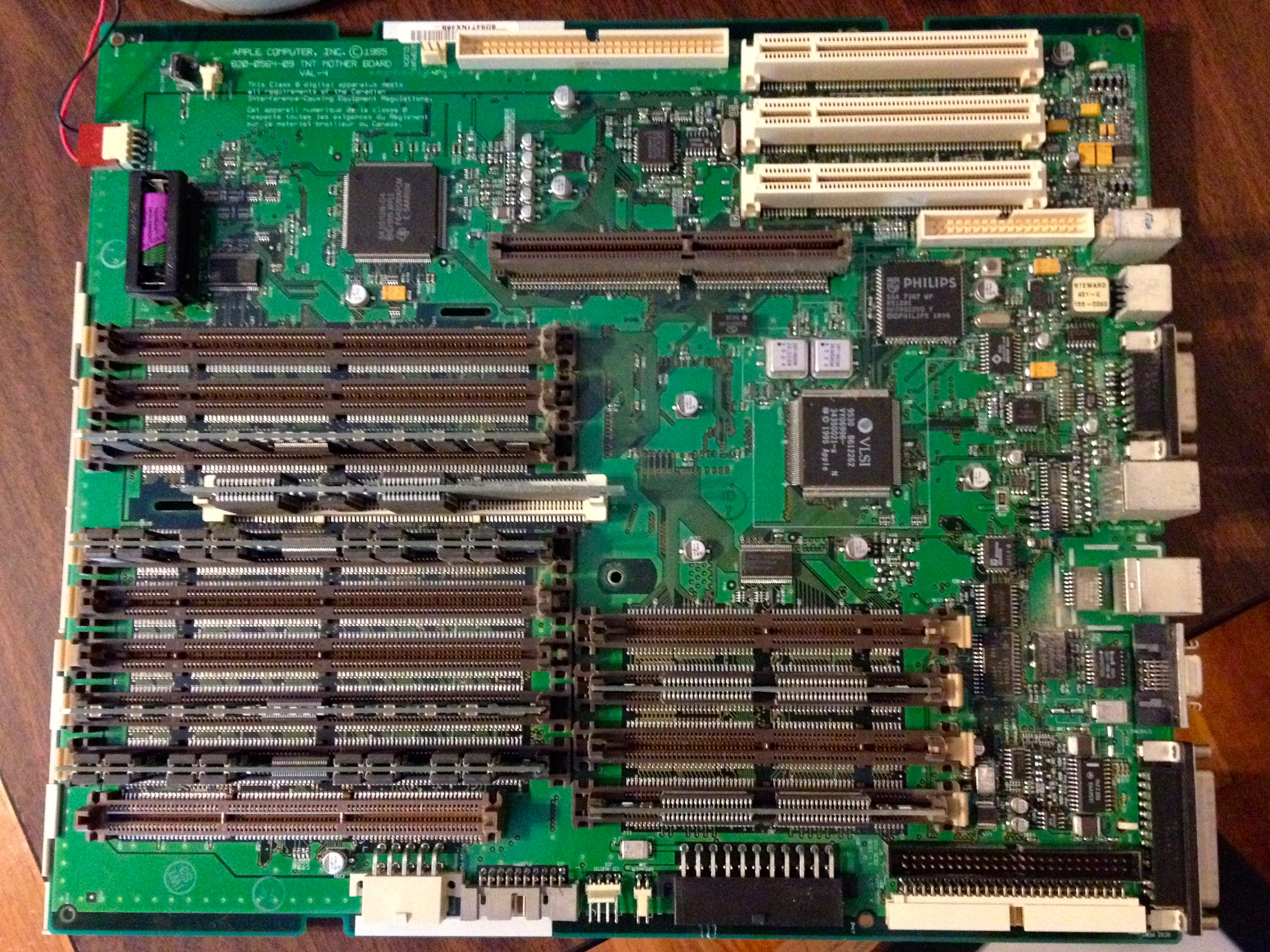
    My Power Macintosh 8500 was in very good shape, but like many vintage computers with persistent clocks, it needed a new lithium battery.

    To replace the Power Macintosh 8500's on-board battery (upper left corner of photo), you have to remove the motherboard.
    To replace the Power Macintosh 8500’s on-board battery (upper left corner of photo), you have to remove the motherboard.

    I replaced the battery, installed Mac OS 7.5.5, a number of different software titles (including Apple’s Plaintalk Speech Recognition–I threw in a Plaintalk powered microphone, Project X/Hot Sauce, and Cyberdog). I discovered that the plastic inside the case did not age well. The PowerMac 8500 has a lot of plastic components that are held together with flexible tabs or clips. When I applied a small amoung of pressure on the tip of these clips to release them, most of them would break. Luckily, the case ties together very well, so I only had to piece some parts back together with clear tape (the power button/light assembly) and metal duct tape (one drive plate cover on the front of the case). To help dissipate heat, I  added a rear slot fan made by Antec.

    I made a video demoing the finalized system, which I’m including embedded below (I apologize for the flicker, but my digital camera doesn’t have enough adjustment features to match the refresh rate on the Apple 14″ Color Display).

    In addition to the Power Macintosh 8500, I gave the Archives a box full of software and late-1990s/early-2000s video games for Macintosh. These might help facilitate more connections around campus (Computer Science, Media Studies, and Game Studies).

    As I’m leaving soon for City Tech, I believe that we can do more together in our work with vintage computing. I floated the idea of a symposium, conference, or some other kind of connected project. Also, from what little I have learned so far, there’s a lot of investment and interest in computer technology in NYC (and Brooklyn in particular). I am looking forward to making new connections with others studying retrocomputing and New Media. I know that many opportunities await.