
For the illustration of Lynn Conway and her co-authored textbook Introduction to VLSI Systems at the top of yesterday’s post, I used a locally hosted installation of Automatic1111’s stable-diffusion-webui, the finetuned model Dreamshaper 5, which is based on StabilityAI’s Stable Diffusion 1.5 general model, and the ControlNet extension for A1111.
Stable Diffusion is an image generating AI model that can be utilized with different software. I used Automatic1111’s stable-diffusion-webui to instruct and configure the model to create images. In its most basic operation, I type into the positive prompt box what I want to see in the output image, I type into the negative prompt box what I don’t want to see in the output image, and click “Generate.” Based on the prompts and default parameters, I will see an image output on the right that may or may not align with what I had in mind.
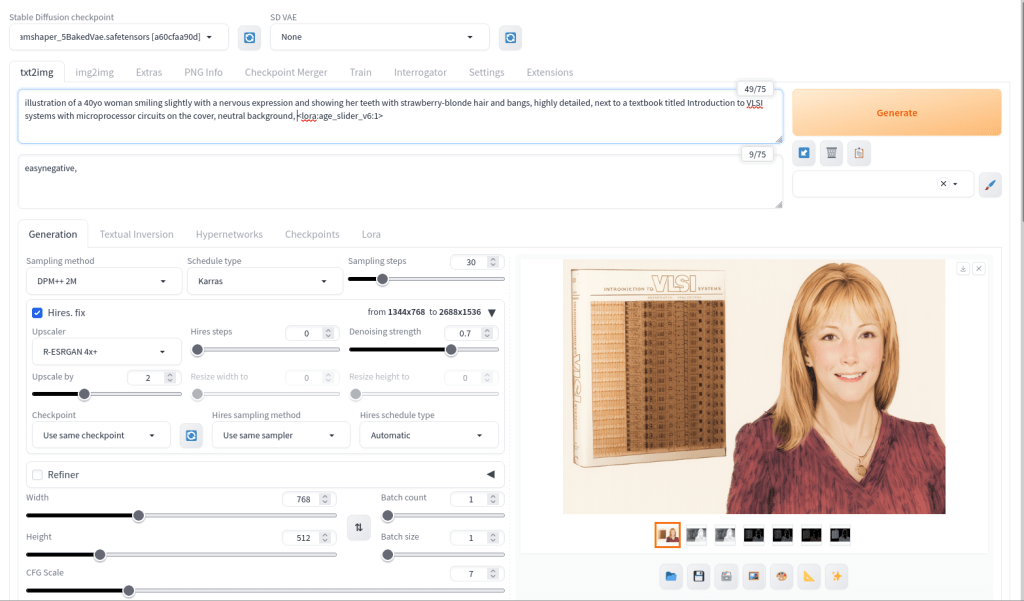
For the positive prompt, I wrote:
illustration of a 40yo woman smiling slightly with a nervous expression and showing her teeth with strawberry-blonde hair and bangs, highly detailed, next to a textbook titled introduction to VLSI systems with microprocessor circuits on the cover, neutral background, <lora:age_slider_v6:1>I began by focusing on the type of image (an illustration), then describing its subject (woman), other details (the textbook), and the background (neutral). The last part in angle brackets is a LoRA or low rank adaptation. It further tweaks the model that I’m using, which in this case is Dreamshaper 5. This particular LoRA is an age slider, which works by inputting a number that corresponds with the physical appearance of the subject. A “1” presents about middle age. A higher number is older and a lower/negative number is younger.

ControlNet, which employs different models focused on depth, shape, body poses, etc. to shape the output image’s composition, is an extension to Automatic1111’s stable-diffusion-webui that helps guide the generative AI model to produce an output image more closely aligned with what the user had in mind.
For the Lynn Conway illustration, I used three different ControlNet units: depth (detecting what is closer and what is further away in an image), canny (one kind of edge detection for fine details), and lineart (another kind of edge detection for broader strokes). Giving each of these different levels of importance (control weight) and telling stable-diffusion-webui when to begin using a ControlNet (starting control step) and when to stop using a ControlNet (ending control step) during each image creation changes how the final image will look.
Typically, each ControlNet unit uses an image as input for its guidance on the generative AI model. I used the GNU Image Manipulation Program (GIMP) to create a composite image with a photo of Lynn Conway on the right and a photo of her co-authored textbook on the left (see the screenshot at the top of this post). Thankfully, Charles Rogers added his photo of Conway to Wikipedia under a CC BY-SA 2.5 license, which gives others the right to remix the photo with credit to the original author, which I’ve done. Because the photo of Conway cropped her right arm, I rebuilt it using the clone tool in GIMP.
I input the image that I made into the three ControlNets and through trial-and-error with each unit’s settings, A1111’s stable-diffusion-webui output an image that I was happy with and used on the post yesterday. I used a similar workflow to create the Jef Raskin illustration for this post, too.

