Last night, I recorded this final exam review for my Introduction to Language and Technology ENG1710 students. These are the slides that I’m using in the background. The following are the readings that my students and I discussed over the past 14 weeks that comprise the exam review:
Lewis Carroll, “Jabberwocky”
Ted Chiang, “The Truth of Fact, the Truth of Feeling”
Victoria Fromkin, “What is Language?” from An Introduction to Language
Stephen Jay Klein, “What is Technology?”
Salikoko S. Mufwene, “Language as Technology: Some Questions That Evolutionary Linguistics Should Address”
Walter J. Ong, “Writing is a Technology That Restructures Thought,” in The Written Word: Literacy in Transition,
Bruce Mazlish, “The Fourth Discontinuity”
Jacques Derrida, “Linguistics and Grammatology,” translated by Gayatri Chakravorty Spivak
Donna Haraway, “A Cyborg Manifesto”
N. Katherine Hayles, How We Became Posthuman, Chapter 1: “Toward Embodied Virtuality”
Marshall McLuhan, Understanding Media: The Extensions of Man, Chapter 1: “The Medium is the Message”
Friedrich Kittler, “Gramophone Film Typewriter”
J. David Bolter and Richard A. Grusin, “Remediation”
Lisa Gitelman, Always Already New, “Introduction”
Fred Turner, “Where the Counterculture Met the New Economy: The WELL and the Origins of Virtual Community”
Lev Manovich, Language of New Media, Chapter 1: What is New Media?”
Alexander Galloway, “What is New Media? Ten Years After The Language of New Media”
Laurie McNeill and John David Zuern, “Online Lives 2.0: Introduction”
Anil Dash, “The Lost Infrastructure of Social Media”
David Nofre, Mark Priestley, and Gerald Alberts, “When Technology Became Language: The Origins of the Linguistic Conception of Computer Programming, 1950-1960”
Marie Hicks, Introduction to Programmed Inequality: How Britain Discarded Women Technologists and Lost Its Edge in Computing
Jacques Derrida, “Signature Event Context”
William Hart-Davidson, “On Writing, Technical Communication and Information Technology: The Core Competencies of Technical Communication”
Dan Milmo, Seán Clarke, and Garry Blight, “How AI Chatbots Like ChatGPT or Bard Work—Visual Explainer”
Alan F. Blackwell, “Are You Paying Attention?” from Moral Codes
Lorena O’Neil, “These Women Warned of AI’s Dangers and Risks Long Before ChatGPT”
Maria Christoforaki and Oya Beyan, “AI Ethics—A Bird’s Eye View”
While Spring 2025 semester classes began this past Saturday at City Tech, my teaching schedule begins today. I’ll be teaching two classes in the Professional and Technical Writing Program: Introduction to Language and Technology (ENG1710) and Introduction to Professional and Technical Writing (ENG2700).
In Introduction to Language and Technology, I have students read an article (though, we begin with Ted Chiang’s “The Truth of Fact, the Truth of Feeling), which they write about in the following class and we discuss it. We work out what we mean exactly when we say “language” and “technology” before looking more closely at how these two aspects of humanity interrelate, interoperate, and influence one another. In parallel to our class discussions, students research and write a paper about one specific technology and its relationship to language. I’ll include a past final exam review below, which will need updating due to some additions to the reading list.
For Introduction to Professional and Technical Writing, I developed a dual approach that combines theory and praxis as a general welcoming of students to what the field they are entering is like. For each class, students read about the history, work, and deliverables created by technical communicators, which they write about in short in-class assignments and we discuss together. The final readings in the class include one paper about how reading Science Fiction can make you a better technical writer and William Gibson’s “Burning Chrome.” Additionally, students are given short deliverable assignments (e.g., write an email, a letter, a memo, a technical definition, an instruction manual, etc.) each week or so. They receive one grade on these first drafts, and they revise them and write reflections on them for creating a final portfolio, which receives a separate grade.
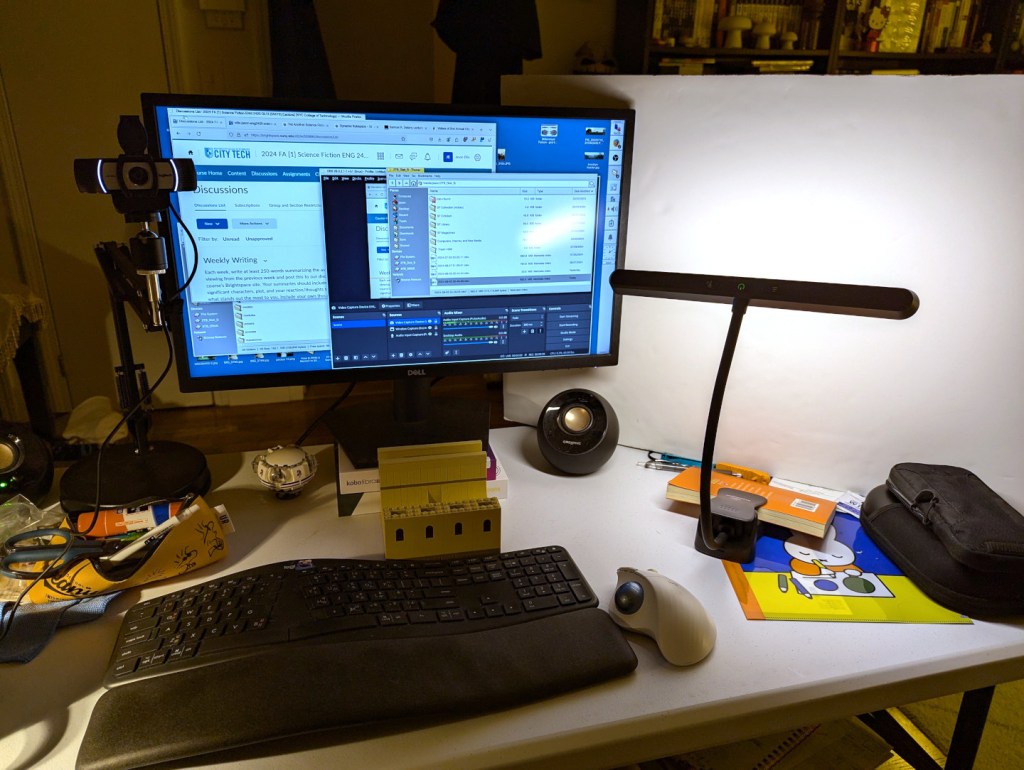
For my online, asynchronous Science Fiction (ENG 2420) class at City Tech this semester, I am recording my weekly lectures at my desk at home. I think the setup that I created for the second week’s lecture shown above will work out well for my recordings.
I have a 1080p Logitech webcam with stereo mics on the left of my monitor. I have a 2 x 3 ft. foam board propped up on the right side. Originally, this was to cut down on the sound from the living room air conditioner. But, tonight, I setup a temperature controlled LED light to reflect light off the foam board onto me. This produced a much better picture than with the overhead pot lights and even provided nice illumination with the overhead lights turned off as shown.
I used OBS Studio to record my lecture, and I edited the footage with Shotcut. Then, I uploaded the edited MP4 to YouTube.
Due to COVID-19, City Tech (and all of CUNY) shifted its in-person classes to online, distance learning instruction. In this post, I reflect on my current class’s transition to distance learning, show how I have configured my office and computer for screencasting and video conferencing, describe some software and services that support distance learning, and give instructions for uploading a video to YouTube.
My Transition to Distance Learning
For my current Science Fiction (ENG2420) class, this was not too much of a disruption, because I was already leveraging online technologies to support student learning and course material accessibility. I designed the course as a zero textbook cost class, meaning I find resources that I can make available to students via PDFs and handouts, and choose readings that are available freely online, such as the unparalleled Archive.org.
Also, I redesigned some of the course assignments to emphasize the importance of note taking by teaching good note taking practices and evaluating students on the quality of their notes. To support this, I recorded each lecture during our earlier in-person classes and posted them on YouTube after class ended, so that students could use the videos to fill in gaps in their notes and allow those students who missed a class to make their own notes based on the video lectures.
I collect student work via email and on OpenLab, “an open-source, digital platform designed to support teaching and learning at City Tech (New York City College of Technology), and to promote student and faculty engagement in the intellectual and social life of the college community.” I joined the OpenLab team as a co-director of the project this year, but I have been using OpenLab in all of my classes since joining City Tech in 2014.
Now with classes meeting asynchronously online, I have tweaked assignments and the schedule to accommodate students accessing materials and completing their assignments. I hold office hours once a week at a regularly scheduled time via Google Hangouts, and I can hold private office hours by appointment with students. I use email to respond to questions and concerns on a daily basis.
Now that I have reconfigured a space in my apartment to support my class and the many other online meeting responsibilities that I have with OpenLab and other projects, I wanted to share some tips and ideas to help others transitioning to facilitating their classes with distance learning.
Office Configuration
I know how easily distracted I am by busy backgrounds, I wanted to provide as neutral a space for my lectures and online meetings. To this end, I appropriated my apartment’s closet as a distance learning and video conferencing studio.
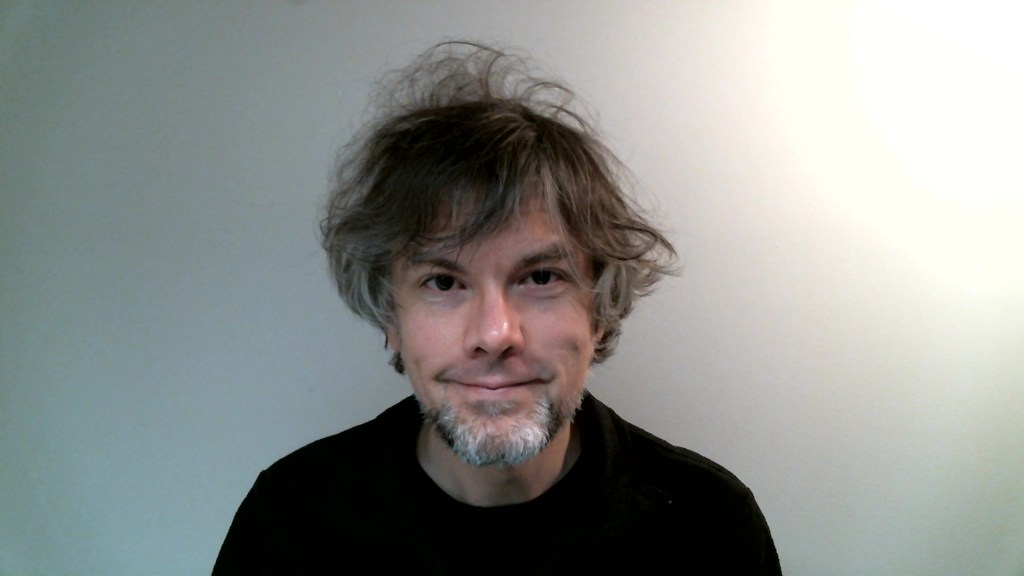
I positioned the Logitech C615 webcam so that I am centered in the frame when video conferencing or recording myself lecture. Above the camera, I positioned a white light to illuminate my face.
I arranged the desk so that my back would be against a solid white wall as pictured above looking from behind my monitor towards where I would be sitting facing the monitor and webcam.
Notice that I taped a small piece of cardboard above the webcam. This blocks glare on the camera lens from the light above that illuminates my face. I was careful to cut and position it so that it is out of frame of the camera lens. Depending on your webcam, be careful not to cover the microphone if you build a similar lens shade.
To the side of my desk, I have a larger lamp that points against the wall and behind me. This reduces my shadow from the desk lamp in front of me.
The end result looks like this:
Software and Online Services for Distance Learning
As mentioned above, I use email and the OpenLab for interacting with students, disseminating materials, and collecting student work. And, I am using Google Hangouts for regular office hours since it is a far easier lift for students than official CUNY supported video platforms like Skype and WebEx.
To create my class lectures, I do the following things.
First, I create a presentation slide deck using Slides in Google Docs.
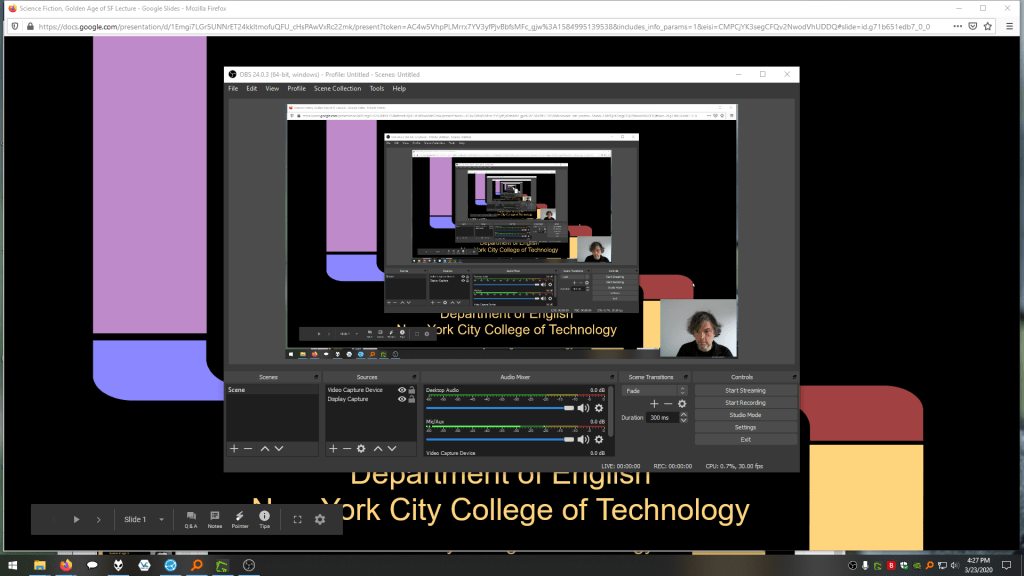
While presenting my slides in full screen mode, I use OBS Studio, a “free and open source software for video recording and live streaming” that supports Windows, Mac, and Linux, to record a video of my desktop (the Slides presentation) and my webcam video and audio in a smaller picture-in-picture that positioned in the lower right corner of the screen, which produces a video like my recent lecture embedded below.
Before I can post the video to YouTube, I like to edit it (though, editing isn’t absolutely necessary). I like to use Shotcut, a “a free, open source, cross-platform video editor.” After trimming the video, I then upload it to YouTube, get the video’s sharable link, and embed the video with the link in my class’ OpenLab site.
OBS Studio and Shotcut have steep learning curves, but each have extensive online documentation and there are communities of users online who share tips and advice about how to setup and use these powerful tools.
In some cases, you might not even need a computer. iPhones with iOS and Android phones can use video recording software that’s built-in or with an app to record and edit video, and there’s a YouTube app for both platforms that you can use for uploading the resulting video.
In the next section, I will show you step-by-step instructions for uploading a video made on a computer to YouTube.
Uploading a Video to YouTube
Once you have a video ready to share with students, the following step-by-step guide for uploading your video to YouTube shows you how to upload and share a link to your video.
First, navigate to YouTube.com and login to your account. Then, click on the camera icon in the upper right corner and then click “Upload Video.”
Second, drag-and-drop your video from your computer into the center of the window that opens, or click on “Select File” to navigate to and select your video file on your computer.
Third, while your video is uploading and processing (updates are shown along the bottom edge of this window shown above), fill out the Title and Description boxes and choose a thumbnail for how the video will initially display before the play button is pressed. Then, scroll down the window.
To comply with the COPPA law, select if your video is for kids or not. Then, click Next in the lower right hand corner.
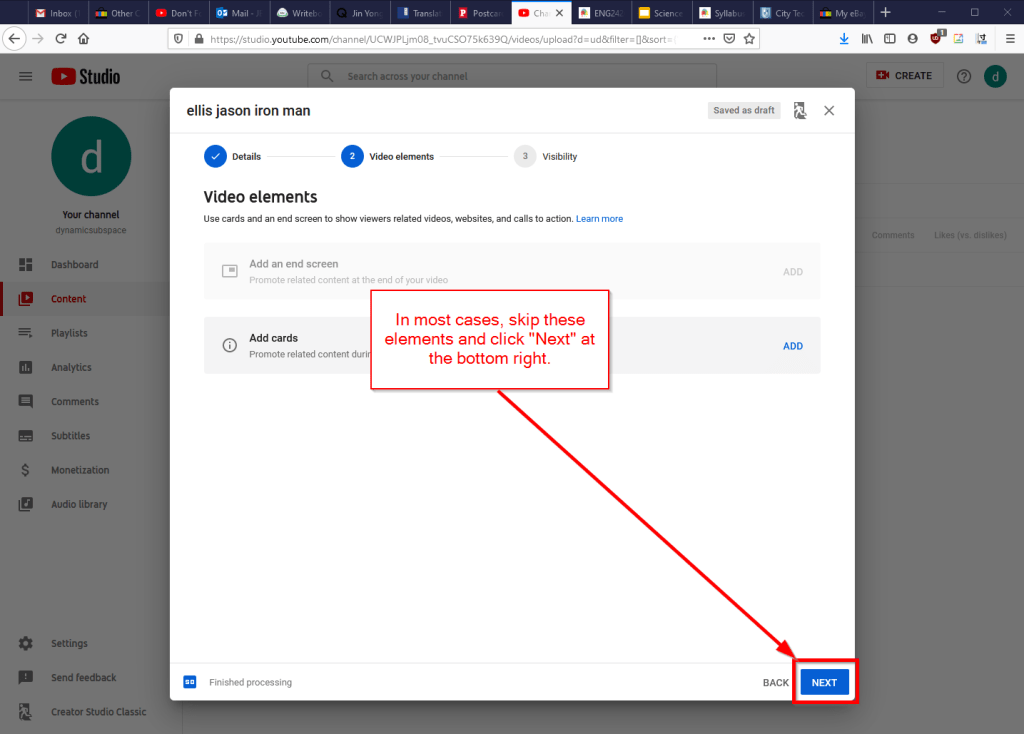
Fourth, you can skip the options on the Video Elements screen and click Next in the lower right corner.
Fifth, select the Visibility option for your video. The most versatile choices are Public (this is what I choose) and Unlisted. In these cases, you will have a sharable video link that you can send via email or easily embed in a webpage. Private is also an option, but you have to choose who is permitted to see the video, which requires students having a Google account and you knowing those accounts to grant permission to each one. After making your selection, click Publish in the lower right corner.
Finally, highlight and copy the video link on the resulting screen, or click on the copy icon on the right to automatically copy the video link to the Clipboard. Click “Close” on the lower right to return to your list of videos on YouTube. With the link on your Clipboard, you can go to email, OpenLab, or another platform to paste and share the video link with your students.
On OpenLab and WordPress-based sites, pasting the link into a post or page will automatically embed the video so that students can simply navigate to your class site and watch the video on the class site instead of going over to YouTube as an additional step.
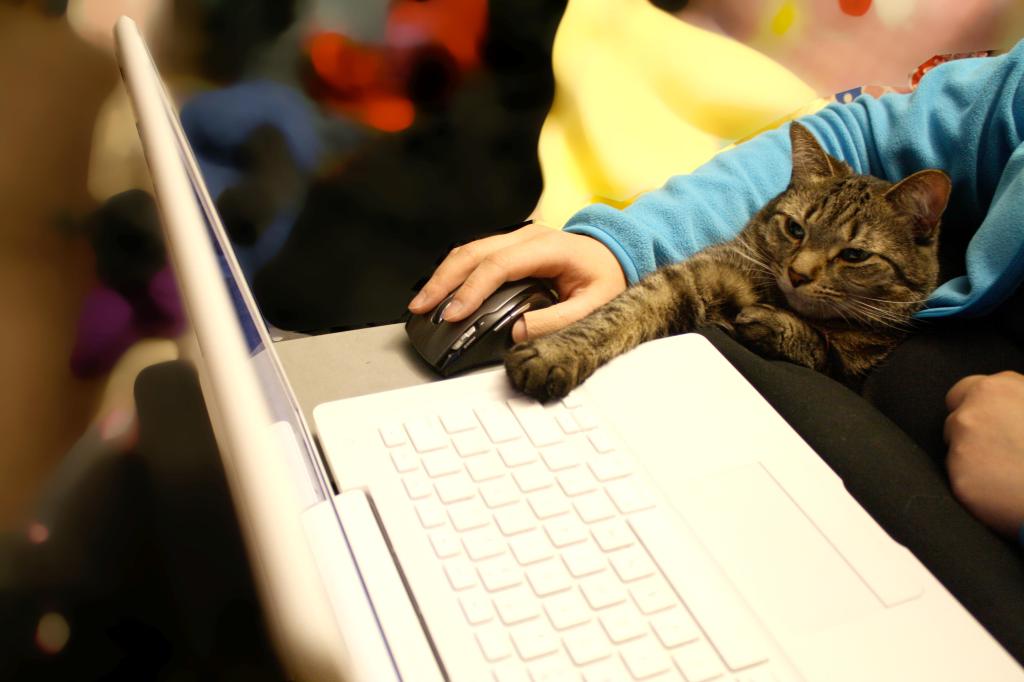
If you’re working on transitioning your classes to distance learning, it’s okay to feel overwhelmed and frustrated like Miao Miao below. Just don’t give up. We’re doing good work for our students, and it takes time to think through and implement distance learning. Also, it’s okay to let your students know that this is a work-in-progress and things might change based on what works and what doesn’t.
With nearly 100 registered attendees and more unregistered, the 2nd Annual City Tech Science Fiction Symposium on Extrapolation, Interdisciplinarity, and Learning on Wednesday, December 6, 2017 was a great success! We were honored to have Samuel R. Delany give the event’s keynote address, and we had excellent presentations and panel discussions from scholars, graduate students, and undergraduates! Below, I’m embedding video of all of the presentations from the symposium. Visit this site for a copy of the program.