Category: Brain

  • Workaround Solution to Spinning Blue Circle Next to Mouse Pointer (Working in Background) in Windows 10

    pointer-workingEver since I installed Windows 10 on this desktop computer build (detailed here), I have been distracted by a tiny spinning blue circle next to my mouse pointer about every 5 minutes. This mouse pointer change indicates that a process is working in the background. I could still move the mouse around and click on things, but the mouse pointer change visually distracted me from the work that I was doing. The user interface, which should facilitate my focused work on the computer, was pulling my attention away from my work and towards what should otherwise fade into the background: the user interface and the operating system.

    There are many discussions about what causes Working in Background mouse pointer change, such as here, here, and here. I tried troubleshooting what was causing the regularly appearing “Working in Background” pointer change on my computer, but I couldn’t definitively pin down the cause and resolve it.

    Nevertheless, I found a solution to the distraction caused by spinning blue circle: change the “Working in Background” pointer to match the “Normal Select” pointer icon. Here’s how to do this:

    Click Start > Settings > Device

    settings

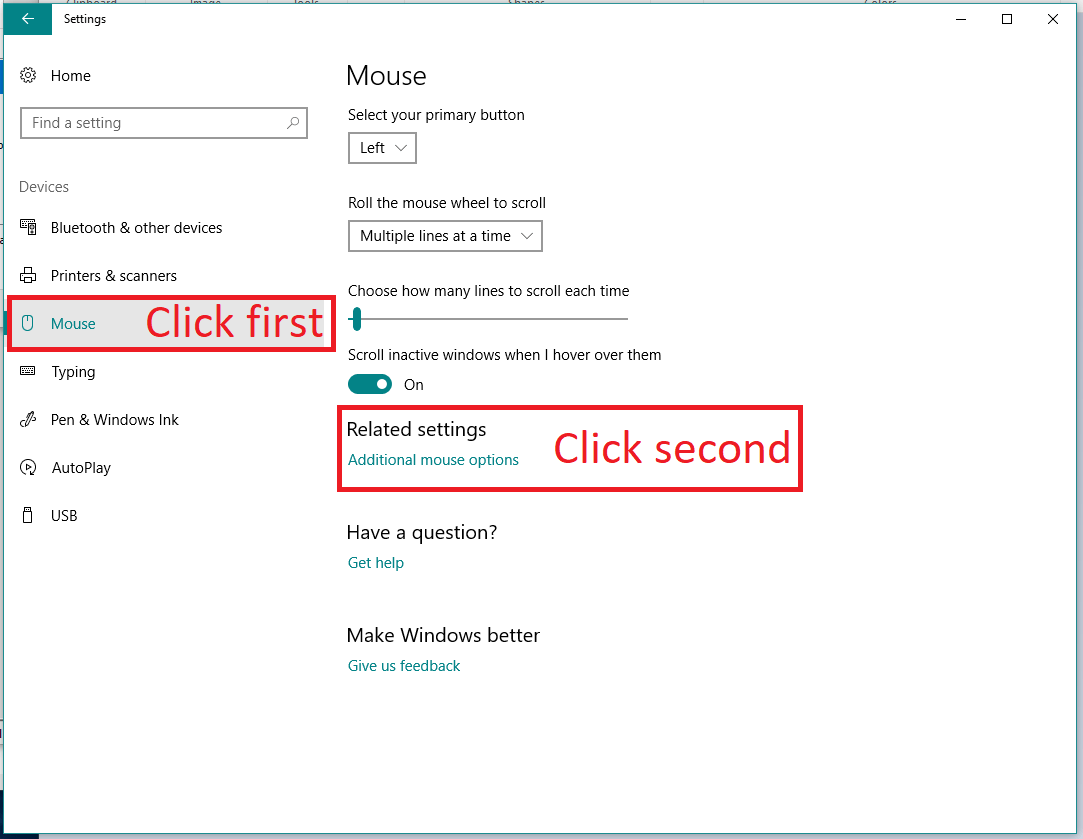
    In Devices, click Mouse on the left, and then click “Additional Mouse Options” on the right.
    settings-mouse

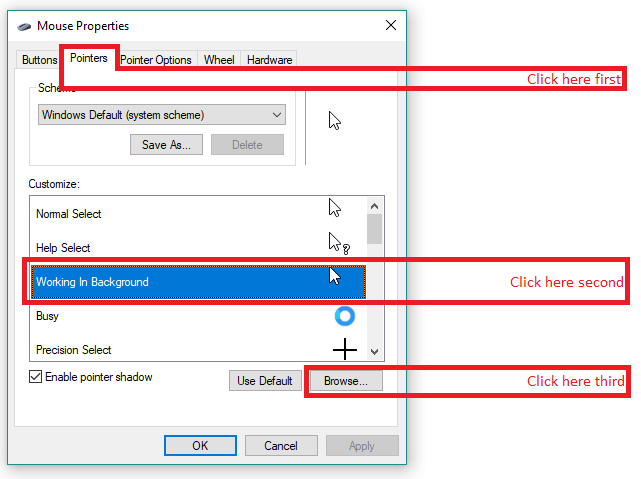
    This pops up a new window with additional mouse settings. Click Pointers > Working in Background > Browse.
    mouse-properties

    This pops up a pointer selection window. Choose “aero_arrow.cur” and then click “Open.” mouse-pointer-select

    This returns you to the previous window where you will click “Apply” and “Okay.” Finally, you can close Settings. Now, your mouse pointer should remain as the arrow pointer icon even when a process is working in the background.

    Since I have made this change to my computer, I am not distracted by the mouse switching intermittently between the arrow and the arrow with spinning blue circle. Of course, the underlying cause of the spinning blue circle remains, but at least with this solution, whatever is working in the background is no longer disturbing my attentional focus by leaping front-and-center into the UI.

  • Why Do I Build LEGO Sets Before Creating My Own Models? Thoughts on Haptics and Star Wars Rebels 75053 The Ghost

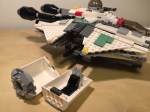
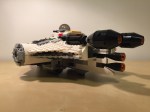
    IMG_1629

    I recently purchased the LEGO Star Wars Rebels 75053 The Ghost set to cannibalize for a MOC project. However, before I parted out the set and sold off the minifigures, I built the set one time and purposefully spread the build time across several days even though the set itself should only take a couple of hours of concentrated build time to complete. Why?

    A personal reason stems from the enjoyment and stress relief that comes from building something with my hands. I see the model take shape as I place brick after brick. I take joy in the innovative techniques employed by the model’s designers. I reflect on the relationship of the model to its source material–in this case, the television program Star Wars: Rebels.

    From a learning perspective, the haptic experience of building the model by following its instructions teaches the builder the process and techniques of the designer. Combined with the builder’s experience gained from model building and creative expression, one can reflect on the model’s design and guess about alternative methods and potential roadblocks encountered by the designer in earlier versions. In a sense, LEGO bricks serve as an interface between builder and designer, and through the interface, the builder learns and imagines new possibilities, which the builder can turn toward future projects. Building, pulling apart, rebuilding, redesigning, and creating forms the basis of a self-perpetuating active learning experience–one that begins guided and ends self-directed.

    By spreading the build across several days, it allowed me to enjoy an extended building experience while giving my brain the space to think about and reflect on the building techniques employed by the sets designers. Had I built the model as quickly as I could have otherwise, I would not necessarily learn as much from the instructions and haptic experience of following the instructions to construct the model.

    Based on my extensive first-hand experience as a LEGO builder and an educator who uses LEGO in his Technical Writing and Science Fiction classes, the transition from guided to self-directed learning is one of the powerful characteristics of LEGO as a learning platform. Furthermore, its orientation as a technology of play opens engagement and enables learning that is fulfilling because of the enjoyment that it can bring about (of course, LEGO might not be for everyone and the source of enjoyment in learning differs from person to person–as with the projection learning with lecture and PowerPoint, or other forms of active learning exercises, I propose that LEGO is another tool in the educator’s toolbox that can be used, repurposed, hacked, etc. as the case and need arises).

    Before I disassemble The Ghost, here are some images of a nice model that accurately captures its source while adding play elements that fans of the series–young and old–will likely enjoy.

  • Spring Recess 2015: Reading, Exploring, and Making

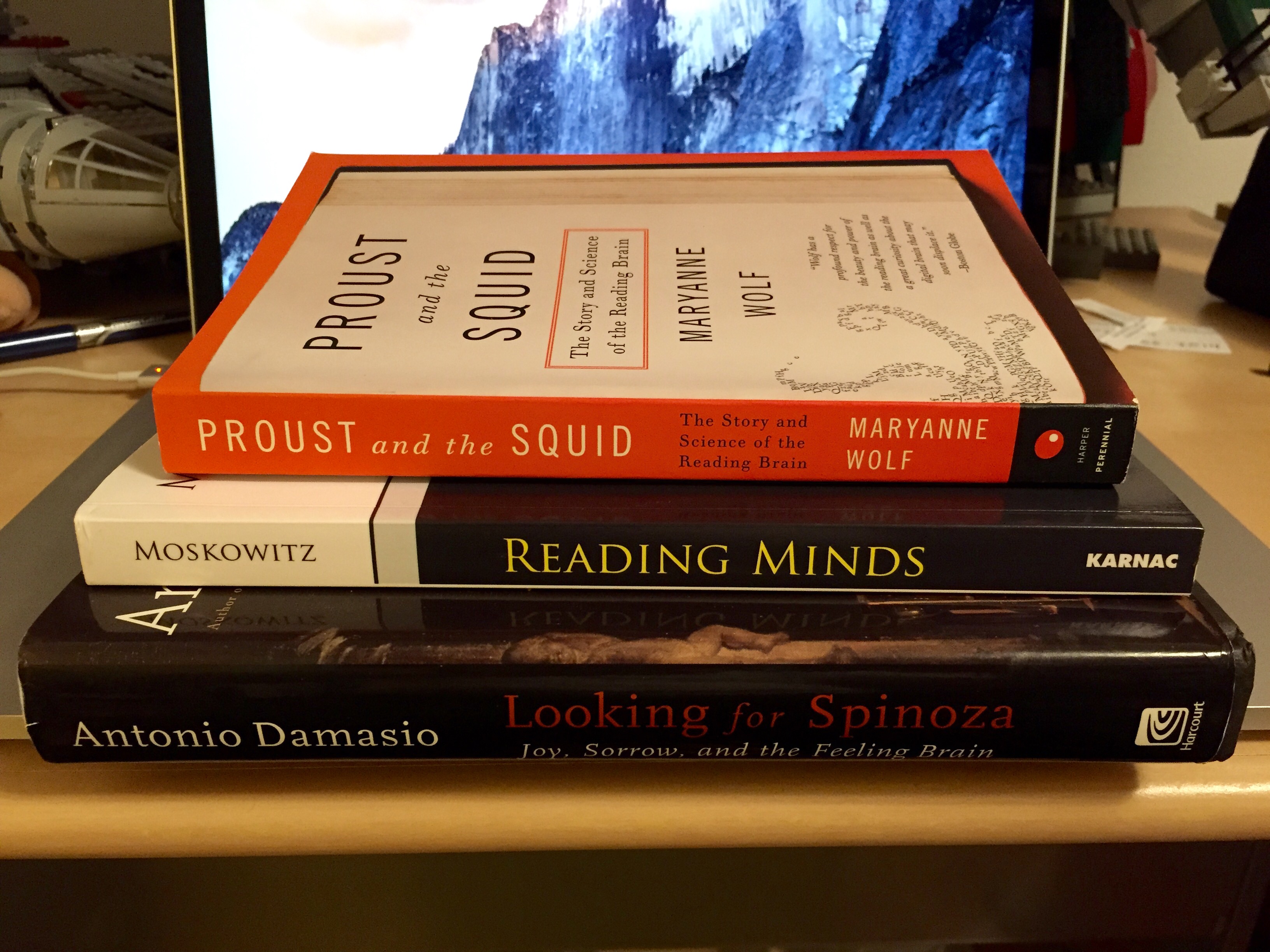
    Spring Break reading list.
    Spring Break reading list.

    I had a fun and productive time during this year’s Spring Recess in our new home of Brooklyn. I read three brain-related books: Maryanne Wolf’s Proust and the Squid, Michael Moskowitz’s Reading Minds, and Antonio Damasio’s Looking for Spinoza. I took the subway to Manhattan twice with Y and Little My to visit Kinokuniya Bookstore, Sun Rise Market, Uncle Sam’s Army Surplus, the New York Public Library, and Washington Square. I picked up an M65 field jacket and put together an EDC kit. I walked to Microcenter twice–each time scoring a free 16GB flash drive thanks to a new coupon promotion. To cap the week off, I completed a draft of my PARSE documentation for advancement at City Tech and posted assignments for tomorrow’s classes on OpenLab. Now, I feel ready to see this semester through to the end.

    A question for my students: how did was your week away from the college? Are you ready to see things through?

  • My Brain in 3D: Rendered Videos and Images of My fMRI Scan Data

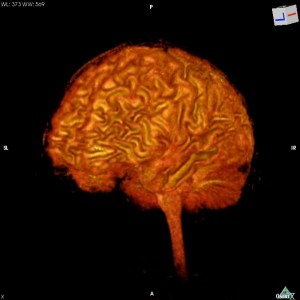
    My brain (c 2007).
    My brain (c 2007).

    Back in 2007, I made a deal with a friend to participate in his fMRI brain scan study at the University of Liverpool in exchange for a copy of the DICOM data from my scan. He agreed to the trade.

    Since then, I occasionally pull my scan data off the shelf and dust off the cobwebs and disk errors, and import it into the DICOM Viewer, OsiriX (e.g., as I did in 2009). With the latest versions, I have had a lot of trouble importing the files as they were given to me into OsiriX. Luckily, I saved the installers for earlier versions including the venerable version 3.5.1, which still runs fine on MacOS X Mavericks and Yosemite.

    Using OsiriX’s many features, I created these four videos and an album of images of my 2007 brain. I wonder how it has changed since that time–completing my MA, then PhD, taking a postdoc at Georgia Tech, and now, working at City Tech. Also, I think about the technologies of representation that make it possible for me to see my brain without injury or invasion–OsiriX and unseen software libraries for working with, manipulating, and displaying DICOM data, MacOS X and its technology APIs, my MacBook Pro retina, disk and flash drives, email (how I originally received the scan data), the fMRI machine that I sat in for 30 minutes to an hour, the physical laws behind each technology and the biology of myself, etc. What do you think about when you see my brain represented below?

    Final Videos

  • Recovered Writing, PhD in English, Dissertation Paragraph Summaries Before Defense, May 2012

    This is the sixty-third post in a series that I call, “Recovered Writing.” I am going through my personal archive of undergraduate and graduate school writing, recovering those essays I consider interesting but that I am unlikely to revise for traditional publication, and posting those essays as-is on my blog in the hope of engaging others with these ideas that played a formative role in my development as a scholar and teacher. Because this and the other essays in the Recovered Writing series are posted as-is and edited only for web-readability, I hope that readers will accept them for what they are–undergraduate and graduate school essays conveying varying degrees of argumentation, rigor, idea development, and research. Furthermore, I dislike the idea of these essays languishing in a digital tomb, so I offer them here to excite your curiosity and encourage your conversation.

    When my dissertation defense date approached and my dissertation was completed, I wanted to help myself recall my arguments and examples more clearly. To that end, I wrote out by hand short summaries of each paragraph in my dissertation, which you can read as this PDF. I divided my handwritten notes by chapter and section. Each paragraph summary contains the main thought and a brief synopsis of examples or other supporting evidence. In some ways, it is like a reverse outline, but the dissertation was already completed and the summaries were not used for reorganizing the layout/arrangement of the dissertation’s logic. I am currently sending an expanded version of my dissertation around for possible publication. This PDF of my dissertation paragraph summaries are not the original form of the dissertation–only a summarization of each of its constituent paragraphs. For my students, I recommend this exercise–summarizing essay paragraphs during drafting to help you think about the logical order of your essay/argument and to help you know the material better for discussing, teaching, or presenting your work.

    In my next Recovered Writing entry, I will post my dissertation defense opening statement. Stay tuned!