Category: Computers

  • Personal Digital Archaeology: New Computer Price List.doc, April 17, 2004

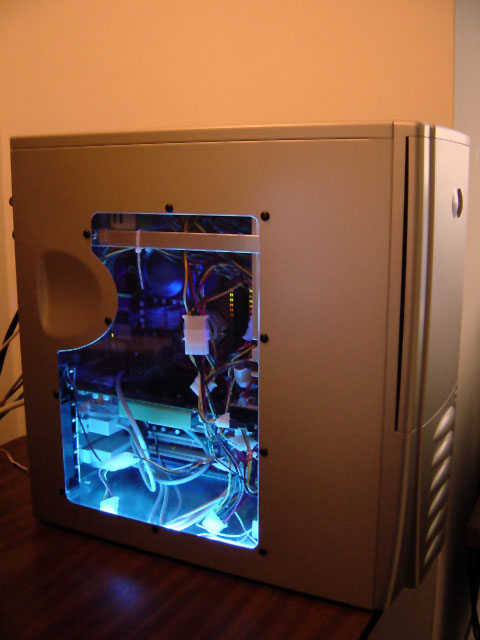
    Athlon XP 2500-based Computer Build, Spring 2004.
    Athlon XP 2500-based Computer Build, Spring 2004.

    While looking through old files, I came across a Word document file dated April 17, 2004 and titled “New Computer Price List.doc.” The list is for the materials that went into the PC that I built and used before I upgraded to a Power Macintosh G5 a year later. It’s an interesting artifact of that time–not only of the choices and components available, but also of the computer parts companies no longer around (Monarch and CompUSA). Here’s the list:

    CPU                AMD AthlonXP 2500+ Retail                       $89.00             Monarch Computers

    Motherboard   MSI NForce2 K7N2-Delta-ILSR D               $118.00           Monarch Computers

    RAM              Corsair 1GB XMS3200 CL2 Pro                   $299.99           Microcenter

    Hard Drive      Western Digital 160GB Special Edition         $120.00           Sam’s Club

    Optical Drive  Sony Combo Drive DVD/CD-RW 52x          $89.99             CompUSA

    Video Card      eVGA Geforce FX 5950 Ultra 256mb           $499.00           Microcenter

    Case                Antec Lanboy w/ 350watt power supply      $79.99             CompUSA

    Power Supply Antec True 480watt (replaced 350watt)        $50.00             Perry (his old PS)

    Lighting           Cold Cathode Blue Light 2pk                         $14.99             Microcenter

    Lighting           LED Blue spotlight                                         $6.99               Microcenter

    Total:                                                                                      $1367.95

    – Rebates:                                                                                $90.00

    Final Total:                                                                             $1277.95

  • Second Donation to Georgia Tech Library Archive’s Retrocomputing Lab: Power Macintosh 8500

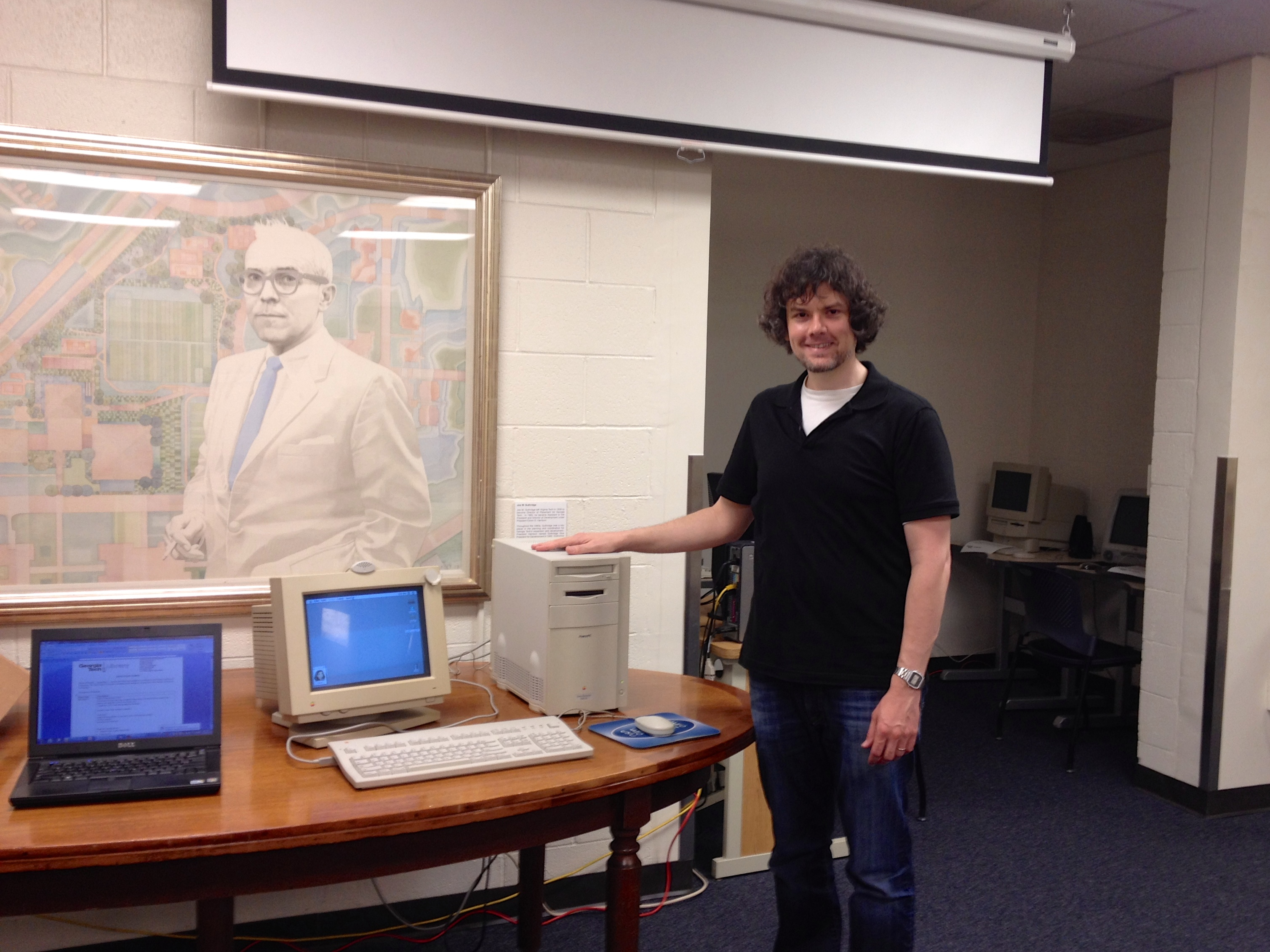
    Me and the Power Macintosh 8500/120 in the Georgia Tech Library Archives.
    Me and the Power Macintosh 8500/120 in the Georgia Tech Library Archives.

    When I met with Georgia Tech Library Archives’ Department Head Jody Lloyd Thompson and Digital Collections Archivist Wendy Hagenmaier to donate three vintage computers (a Dell Dimension 4100, Apple Performa 550, and Apple iMac) and other computing hardware a week and a half ago, I noticed that they had room for one more computer, so I pitched them the idea of my making another donation to fill the gap between the Performa 550’s 68030 processor and the iMac’s G3 processor:  an Apple Power Macintosh 8500/120. They agreed to accept, so I set about preparing the computer for them.

    IMG_5166

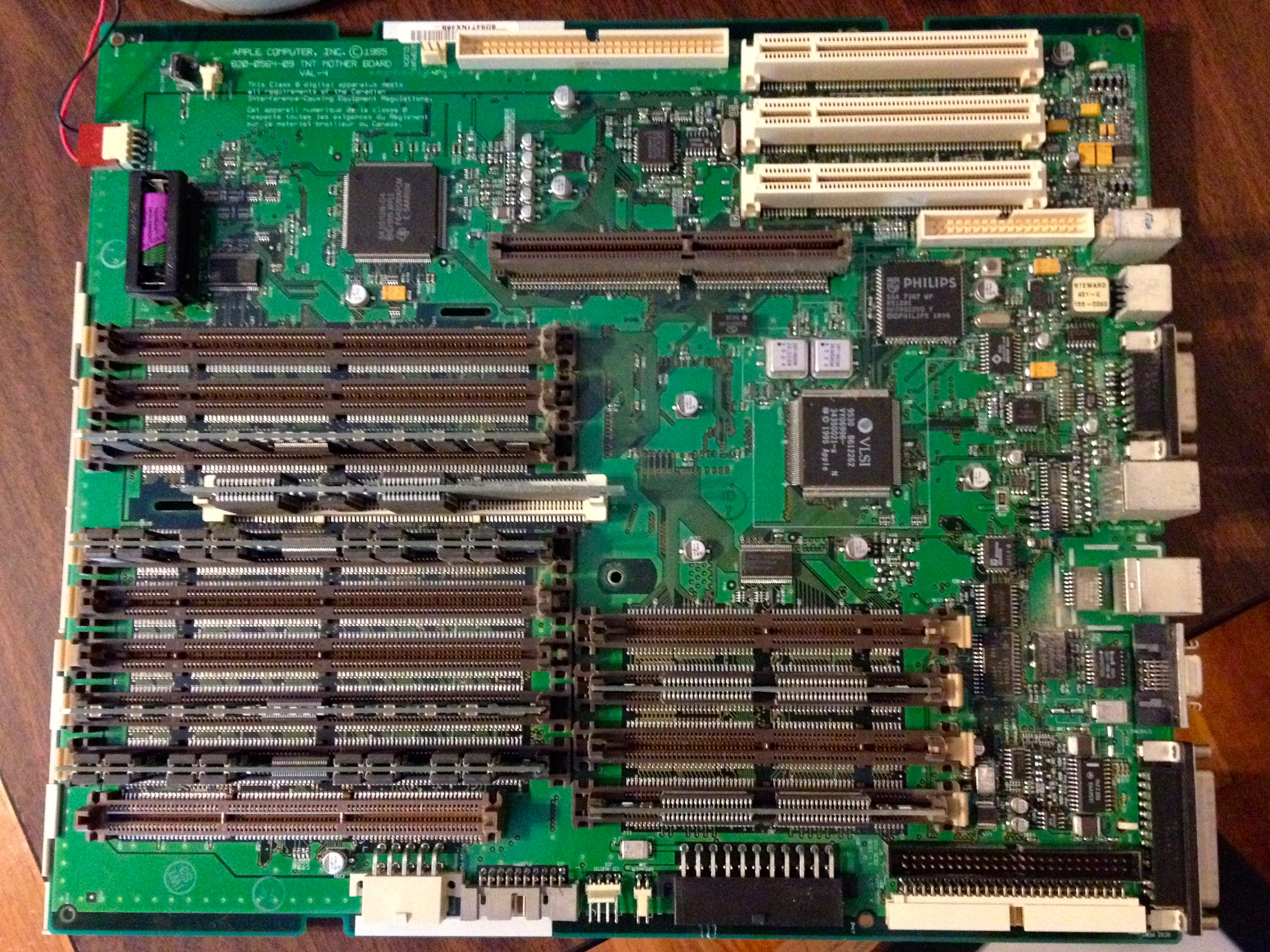
    My Power Macintosh 8500 was in very good shape, but like many vintage computers with persistent clocks, it needed a new lithium battery.

    To replace the Power Macintosh 8500's on-board battery (upper left corner of photo), you have to remove the motherboard.
    To replace the Power Macintosh 8500’s on-board battery (upper left corner of photo), you have to remove the motherboard.

    I replaced the battery, installed Mac OS 7.5.5, a number of different software titles (including Apple’s Plaintalk Speech Recognition–I threw in a Plaintalk powered microphone, Project X/Hot Sauce, and Cyberdog). I discovered that the plastic inside the case did not age well. The PowerMac 8500 has a lot of plastic components that are held together with flexible tabs or clips. When I applied a small amoung of pressure on the tip of these clips to release them, most of them would break. Luckily, the case ties together very well, so I only had to piece some parts back together with clear tape (the power button/light assembly) and metal duct tape (one drive plate cover on the front of the case). To help dissipate heat, I  added a rear slot fan made by Antec.

    I made a video demoing the finalized system, which I’m including embedded below (I apologize for the flicker, but my digital camera doesn’t have enough adjustment features to match the refresh rate on the Apple 14″ Color Display).

    In addition to the Power Macintosh 8500, I gave the Archives a box full of software and late-1990s/early-2000s video games for Macintosh. These might help facilitate more connections around campus (Computer Science, Media Studies, and Game Studies).

    As I’m leaving soon for City Tech, I believe that we can do more together in our work with vintage computing. I floated the idea of a symposium, conference, or some other kind of connected project. Also, from what little I have learned so far, there’s a lot of investment and interest in computer technology in NYC (and Brooklyn in particular). I am looking forward to making new connections with others studying retrocomputing and New Media. I know that many opportunities await.

  • Inaugural Donation to Georgia Tech Library Archive’s Retrocomputing Lab

    Wendy Hagenmaier, Jason W. Ellis, and Jody Thompson next to Apple Performa 550 and iMac.
    Wendy Hagenmaier, Jason W. Ellis, and Jody Thompson next to Apple Performa 550 and iMac.

    Yesterday, I had the pleasure of making the first donation of three computers to the Georgia Tech Library Archives, which is launching its own Retrocomputing Lab for scholars and students to use. The Georgia Tech Library Archives is already well-known for its significant Georgia Tech Science Fiction Collection and other holdings.

    I met with Department Head Jody Lloyd Thompson and Digital Collections Archivist Wendy Hagenmaier to setup the three computers and talk about each machine’s provenance and current operation. We set the computers up on the right side as you enter the Georgia Tech Library Archives. This is a temporary location as the Archives makes plans for their use in Archives for the time being and possibly more in the future as part of the on-going Georgia Tech Library renovation project.

    Apple Performa 550 and iMac.
    Apple Performa 550 and iMac.

    From my personal collection–which I am having to cull before moving to Brooklyn for my new job at City Tech, I donated three computers: an Apple Performa 550 (1994), Apple iMac (1999), and Dell Dimension 4100 (2001). Before donating the computers, I refurbished each to be in as factory-fresh condition as possible.

    For the Peforma 550, I installed a PDS ethernet NIC and replaced the SCSI hard drive with one that was less noisy than its original one. Then, I installed Mac OS 7.6.1 and some software including the AfterDark Star Trek: The Next Generation screensaver and ClarisWorks, and utilities for working with files and disk images.

    For the slot-loading, DV iMac, I replaced the motherboard battery and performed a fresh install of Mac OS 9.2.1. The optical drive suffers from a weak ejection mechanism. I made sure that the bottom plastic bezel fit properly, but reseated it had no effect on improving the drive’s ability to eject discs correctly. I warned the librarians about this, and recommended buying an external, Firewire optical drive and using the paperclip ejection method in the meantime.

    Dell Dimension 4100.
    Dell Dimension 4100.

    For the Dell Dimension 4100, I installed a 3Com NIC donated by Mark Warbington. I installed Windows 98 Second Edition and painstakingly installed the drivers for the components in the Dell (this was a laborious process, because despite having the Service Tag number, some recommended drivers did not work on all of the components).

    I provided two sets of speakers–one for the Performa 550 (it’s internal speakers had stopped working about a year ago) and one for the Dell Dimension 4100. In the event of future hardware problems, I gave them spare AGP video cards, optical drives, a 3.5″ floppy disk drive.

    Also, I gave them some spare motherboards, controller cards, and hard drives that might be useful for displays in the Library.

    The Georgia Tech Library Archives have big plans for making digital archival work and learning an integral component of what they do. If you have functional and working computer hardware or software, you should consider donating it to the Georgia Tech Library Archives, or if you have technical skills for working on older hardware and software, you can donate your expertise and time, too. Contact Jody and Wendy by email or phone here: Georgia Tech Library Archives contact information here.

    Oct. 21, 2023 Update: Video link removed as it no longer exists.
  • Digital Archives and Vintage Computing @ Georgia Tech, Co-Presentation by Wendy Hagenmaier and Jason W. Ellis, VCF 2.0

    Screen Shot 2014-05-03 at 11.02.38 PMOn May 4, 2014 at 11AM, Wendy Hagenmaier and I will give a co-presentation on Digital Archives and Vintage Computing @ Georgia Tech at the Vintage Computing Festival 2.0 in Roswell, Georgia. This post includes a support video embedded below, a link to our PowerPoint presentation, and a transcript of our talk.

    During my part of the presentation, I will discuss this Google Glass captured demo of the Voyager Expanded Books series ebook of William Gibson’s Sprawl Trilogy on a Powerbook 145:

    We have provided a transcript of Jason’s part of the presentation below (and Wendy’s follows):

    Digital Archives and Vintage Computing at Georgia Tech

    Jason W. Ellis and Wendy Hagenmaier

    Jason:

    [OPENING SLIDE-COMPUTERS]

    Hello and welcome to our presentation on Digital Archives and Vintage Computing at Georgia Tech. I am Jason Ellis, a Marion L. Brittain Postdoctoral Fellow, and this is Wendy Hagenmaier, Digital Collections Archivist at the Georgia Tech Library.

    In the first part of our presentation on digital archives and vintage computing at Georgia Tech, I will describe how these fit into my research and teaching before suggesting how the library can fulfill those needs for the communities it serves. Wendy will conclude with a discussion of the trajectory of the Georgia Tech Library as a place of research, learning, and making beyond the traditional image of a library.


    [JASON W. ELLIS]

    My primary work at Tech is to teach first year composition, tech comm, and occasionally, science fiction.

    [HOW I CAME TO FOLD VINTAGE COMPUTING INTO MY WORK]

    While I have long considered myself a computer hobbyist and I was an IT professional before going back to school to finish my degrees, I have leveraged my interest in computer technology and the human brain to do innovative research on the interplay between the digital and the biological. This raises issues of accessing digital culture on older media and making meaning from these significant forms of culture. These things are important to my research, but I want to enrich my teaching and help my students develop their digital literacies, too.

    [AUTHOR’S AFTERWORD]

    What specifically led me down this path professionally was that I needed to find a citation for a text I found online. It was an intriguing article attributed to the cyberpunk SF writer William Gibson on a Russian website (cyberpunk.ru). In it, he talks about the ephermerality of technologies—a very interesting idea in light of the fact that he wrote his novel Neuromancer on a typewriter. The afterword seemed ephemeral, too, because I couldn’t find a trace of this afterword in any printed book. A friend of my tweeted Gibson (@GreatDismal) and gave me a lead on a floppy disk-based ebook by the Voyager Company. After a search in Worldcat, the massive library database, I found a copy at the Michigan State University Library: the pictured Voyager Expanded Book series floppy disk of Gibson’s Sprawl Trilogy (Neuromancer, Count Zero, and Mona Lisa Overdrive). Unfortunately, I had no way of reading it.

    [POWERBOOK 145]

    After calling around northeast Ohio area schools and libraries without any luck finding a Macintosh with a 3.5” floppy disk drive, I turned to eBay where I acquired this Powerbook 145 (one much like the first computer I carried to Georgia Tech as a freshman in 1995). While I could have purchased an external floppy disk drive that connects with USB to access the ebook software, I wanted to experience the ebook as it was meant to be.

    [VOYAGER EBOOK SOFTWARE]

    With my Powerbook 145 and the Voyager Expanded Books floppy disk, I copied the self expanding archive’s contents to the Powerbook’s 80 MB hard drive. I observed that the Voyager ebook software is Hypercard-based. While it is made for the Macintosh Portable, it works fine on the later model Powerbook 145.

    You can navigate the complete text of the novels and afterword with the trackball or arrow keys. While it has a global search box, you can also search by clicking on a word to see where else the word appears (much like Apple’s iBooks today). It supports annotations and bookmarking with virtual paperclips—an issue of remediation.

    [AUTHOR’S AFTERWORD IN VOYAGER EBOOK]

    This was the prize that I was looking for—the original author’s afterword available only in this ebook. In fact, Gibson did not even include it in his recent collection of nonfiction writing—Distrust That Particular Flavor. If you visit my blog at dynamicsubspace.net, you can watch an experimental video that I made with the Powerbook 145, Gibson’s ebook, an iPad Air, and my Google Glass.

    [LET ME DO THAT FOR YOU]

    Besides my research with and on vintage computing, I believe that these technologies should be an important part of teaching. Our students and young people need to have an idea about how the technology we enjoy today came to be the way that it is and to know that the past is full of ideas that might be repurposed, retried, or rediscovered as we continue developing ever new digital technologies.

    For example, when I was researching Philip K. Dick in the Eaton Science Fiction Collection at the University of California at Riverside—the largest SF collection in the US if not the world—I had to stop a young, special collections librarian-in-training from jamming a one-of-a-kind cassette tape interview into a VHS machine on the AV cart. I directed her attention to the record/cassette combo on the bottom rack and offered, let me show you how to do that. These issues of use, operation, and support are passed on through teaching and first-hand experience.

    [HOW I CONNECT RESEARCH AND TEACHING]

    In my research, I have built a personal “Retrocomputing Lab” of Macs and PCs that support my research in the development of reading on screens just prior to and after the widespread adoption of the Internet. You can learn more about these on dynamicsubspace.net.

    Most recently, I have embarked on a new way of sharing my research with others. In addition to writing essays for publication in journals and online, I am using Google Glass to record my experiences as a raw dataset that I can share on YouTube to support my scholarship and connect with others.

    In my teaching, I encourage my freshmen students to learn how our computing technologies in the past and present have an influence on our neurobiology—put another way how we create computers with our brains and how do computing technologies change the way that we think over time. In Tech Comm, I have students research problems on the Tech campus that can be fixed with a technical communication solution. In one case, students resurrected an online printing solution that had died before they were students. Finally, in Science Fiction, I invite students to read Gibson’s afterword on the Powerbook and play the DOS video game interpretation of Neuromancer on an IBM-compatible PC.

    [A VISION FOR THE FUTURE OF GEORGIA TECH]

    My suspicion is that the need for accessing older media, studying vintage computing hardware and software, and teaching others how to use and preserve these technologies is not limited to literary and cultural studies. Obviously, computing is an interdisciplinary endeavor— specifically, I am thinking what Steve Jobs said about Apple being at the intersection of technology and the liberal arts—I think that this is a long tradition in computing not confined to the fine work at Apple.

    I told Wendy, Sherri Brown, Alison Valk, and Elizabeth Rolando about my hopes for the Georgia Tech Library to serve as a synthesis of vintage computing research and teaching. The library’s archival mission can simultaneously maintain access to knowledge while preserving hardware and software as important artifacts of study. The library’s learning mission can support theoretical issues such as archival work and the history of science and technology alongside practical issues of training, using, and making. The library can do this through acquisition and on-going support, providing space for this kind of work, coordinating across institutions and the private sector, outreach, and more. Already, the Georgia Tech Library is a nexus of research and teaching that evolves to meet the research and learning needs of the communities that it serves. Wendy will tell us more about that in the next part of our presentation.

    We have provided a transcript of Wendy’s part of the presentation below:

    Hi everyone, I’m Wendy Hagenmaier, the Digital Collections Archivist at the Georgia Tech Library. I’m responsible for digital archives (similar to the work Al and Anne have discussed).


    Reimagining the Georgia Tech Library

    In light of Jason’s insights, I want to talk about some exciting changes happening at the Georgia Tech Library—changes we’ve been referring to as “reimagining the Library.” Though some of these changes are unique to Georgia Tech, many of them reflect how libraries everywhere are evolving to anticipate the needs of future library users, including people like Jason and all of you, the attendees here today.

    The GT Library is transforming into a technological research library for the 21st century, but its mission remains the same: to be a creative partner and essential force in the learning community and the Institute’s programs.

    At the GT Library lately, we’ve been asking ourselves: How can we support the research and teaching needs of faculty like Jason and inspire the scholarship of our broader community? And how can we invite the community to explore the past and design the future? As an archivist, I’m always interested in what the past can teach us about the future, so let’s take a quick look at the GT Library of long ago…

    The Georgia Tech Library of the Past

    Welcome to the Library of the 1960s.

    Like many research libraries of the era, the GT Library provided services to support traditional, print book and journal-based research. The emphasis was on creating the most massive collection of print material possible, to position the library as a secluded, exclusive repository of knowledge that could only be found within a print collection. Imagine the shushing librarian, no food, no drink, no talking.

    This worked well for a while, but radical changes in research and daily life on campus—mobile/ubiquitous/wearable technologies, Massive Open Online degrees, flipped classrooms, project based learning, digital repositories, university history now enacted on YouTube and Twitter—have made it essential that the Library undergo its own transformation. Print book checkouts are declining, but the number of visitors to the Library is exploding and users are accessing our e-resources over a million times a year. So here we are, at the Georgia Tech Library of the Present:

    The Georgia Tech Library of the Present

    In light of the cultural shifts I mentioned, the Library is presently planning its own shifts, both literally and metaphorically, on several fronts:

    Here’s the first literal shift: the GT Library and Emory Libraries are partnering to construct a large climate-controlled facility to house the majority of our collection. This means we’re moving perhaps as much as 90% of our print collection to Emory’s Briarcliff campus. Books will be delivered to users on demand, and traditional browsing of physical library stacks will have to be translated into the digital realm.

    Another shift: the Library is conducting user research with students and faculty, including focus groups, interviews, and surveys, to develop a shared vision for the Library’s future.

    The walls of our 1960s buildings are now covered with post-it notes from dozens of internal brainstorming sessions, where we’re defining and innovating future services.

    And another literal shift: we’re working with an architectural team to completely redesign the interiors of our buildings over the next five years.

    Through reimagined spaces and services, the Library is becoming an interdisciplinary platform for scholarship, an integrated network of human and technological resources, and a champion of innovation.

    The Georgia Tech Library of the Future

    My colleague Sherri Brown and I interviewed Jason a few months ago as part of the Library’s user research, and he brought up the idea that the GT community has unmet retrocomputing needs. Faculty members from all sides of campus are encountering the need to access information stored on outdated media and to teach their students about the history of technology.

    This academic interest in retrocomputing parallels the digital archaeology work being conducted in libraries and archives—everywhere from Emory’s Digital Archives to the New York Public Library. Archivists at these institutions are using old hardware and software to access and preserve content created with obsolete technologies (such as Salman Rushdie’s manuscripts saved on floppy disks). To date, however, all of the retrocomputing work in the library world has been conducted by library staff. These digital archaeology labs are not accessible to the libraries’ user communities.

    My colleagues Jason, Sherri, Alison Valk, Lizzy Rolando and I are trying to imagine how we might do something different at the GT Library: offer our technologically-savvy patrons a chance to use the retrocomputing equipment typically restricted to library staff.

    This might take the form of one or two retrocomputing consoles—or perhaps a larger lab—within the Library, which would be available to users who would be vetted by Library staff.

    The idea is to take the digital forensics and archaeology work occurring behind the scenes in archives, plus the rise of hacker and makerspaces in libraries, plus collaborations with campus and community partners (perhaps even you?)…to imagine creating a retrocomputing lab. This space would not only serve as a hands-on historical reference point; it could activate new ideas about future technology and preservation of tools and ideas.

    So how could we make this space happen, and how might we collaborate? Collectors, experts, and community organizations like the Atlanta Historical Computing Society could support an idea like this through:

    -equipment sourcing

    -IT support and expertise, knowledge of the history of computing

    -and mentorship

    In return, a project like this might someday offer collectors, experts, and community organizations:

    -a collaborative meeting and hacking space, for making connections with like-minded people and hacking the past, present and future

    -space dedicated to preservation (libraries specialize in preservation environments in a way that most individuals and community groups can’t)

    -as well as infrastructure, branding, and support for community organizations seeking institutional allies

    In many ways, the retrocomputing space we’re envisioning resembles the high tech computing lab of Georgia Tech’s past, which once seemed so futuristic and advanced, bringing us full circle, so that imagining the future of our Library becomes an act of reimagining our past.

  • Lego Building Experiments with Google Glass, Thoughts on Its Potential for Interdisciplinary Humanities Research

    Since I received my Google Glass last week, I have been learning how to wear and use it. Ultimately, I want to incorporate Glass into my Retrocomputing Lab research workflow. I am interested in the experience of using computer hardware and software (something that I have been interested in for a long time and wrote about as an undergraduate), so Glass will provide a way of capturing some of my phenomenal experience–perspective, vision, and sound. I can provide oral commentary of my haptic and olfactic experiences (yes, computers have unique smells–something that helps store/recall memories and emotions) while also recording thoughts, memories, and asides that enrich my shared video experience. As one component of the digital humanities, I want to create an archive of my raw research of working with computers and their software that others can use, draw inspiration from, or comment on through their own research, writing, and teaching.

    For the work that I do in my personal Retrocomputing Lab, I will use Glass as one more tool among a variety of other technologies that enable my research. Glass will add another data layer–itself richly textured and layered with audio/video/Internet/software capabilities–to the research that I do. Due to the ease of sharing images and video in real time, I can immediately make my in-process research available on YouTube, Twitter, and here on dynamicsubspace.net. Furthermore, my research will be useable by others–hobbyists, students, and other researchers in many interdisciplinary fields. Glass will join my non-real time distribution of data on paper, computer written notes (though, I could make these freely viewable in realtime on say, Google Drive), and published research.

    Finally, I am interested in the mixing of old and new technologies. Glass meets its ancestors in the IBM PC and Macintosh. Glassware meets DOS, Windows 3.1, and System 7. I want to explore how the intermingling of these technologies leads to new insights, connections, and elaborations. While I am only speculating, I strongly believe that Glass and similar wearable computing technologies will elevate the outcomes and knowledge produced in humanities research–conceptualized as interdisciplinary like mine or not.

    The videos included in this post were tests of the manually extended video recording feature. They don’t involve the Retrocomputing Lab, because how I want to use Glass to record my work will involve more and different kinds of planning. I used what I had at hand to test out Glass’ video capabilities included below.

    Glass Video from Apr 22, 2014, Lego Build of The Batman Tumbler 30300 Polybag

    Glass Video from Apr 24, 2014, Target Exclusive Lego 30215 Legolas Greenleaf Polybag