Category: Computers

  • Recovered Writing: Undergraduate Technologies of Representation Final Essay Response on Communication Tech and World of Warcraft, Dec 8, 2004

    This is the fourteenth post in a series that I call, “Recovered Writing.” I am going through my personal archive of undergraduate and graduate school writing, recovering those essays I consider interesting but that I am unlikely to revise for traditional publication, and posting those essays as-is on my blog in the hope of engaging others with these ideas that played a formative role in my development as a scholar and teacher. Because this and the other essays in the Recovered Writing series are posted as-is and edited only for web-readability, I hope that readers will accept them for what they are–undergraduate and graduate school essays conveying varying degrees of argumentation, rigor, idea development, and research. Furthermore, I dislike the idea of these essays languishing in a digital tomb, so I offer them here to excite your curiosity and encourage your conversation.

    This is my final post of material from Professor Kenneth J. Knoespel’s LCC 3314 Technologies of Representation class at Georgia Tech. LCC 3314 is taught in many different ways by the faculty of the Georgia Tech’s School of Literature, Media, and Communication, but I consider myself fortunate to have experienced Professor Knoespel’s approach to the course during the last phase of my undergraduate tenure. The ideas that we discussed in his class continue to inform my professional and personal thinking. Also, I found Professor Knoespel a great ally, who helped me along my path to graduation with side projects and independent studies.

    This is my final paper assignment (I think given in lieu of a final exam) in LCC3314. The more exciting portion is question 2, which concerns Blizzard’s World of Warcraft. I break down how you navigate its space and I describe elements of its operation. It bears noting that at the time that I wrote this, WoW had been out for less than a month. I was rabidly playing it on my PowerMac G5 at 2560×1600 resolution on a 30″ Apple Cinema Display. While it might not have been the best essay, it certainly was one that I enjoyed writing to no end! I wish that I had found a way to make time for WoW since my days in Liverpool. I have played WoW on only rare occasions since returning to the States, but I continue to write about it from my memory of Azeroth.

    Also included below is my response to question 1, which seems to be focused on the telegraph, telephone, and cellular phone. In this question, I explore the material experience of using these different communication media and technological devices. I suppose WoW is another kind of communication technology wrapped up in a highly interactive gaming environment (cf. Hack/Slash).

    Jason W. Ellis

    Professor Kenneth J. Knoespel

    LCC3314 – Technologies of Representation

    December 8, 2004

    Final Paper Assignment

    1. On the telegraph, telephone, and cellular phone

    The telegraph, telephone, and cell phone each have a particular interface that works with different human senses and thus provide different experiences for the body.  The differences between these communication technologies lie in the physicality of the artifact as well as the technology underlying the technology for encoding and decoding communication.

    The telegraph is a wired point-to-point textual communication technology.  Telegraph operation involves trained operators who can encode and decode the Morse code messages transmitted over wires with telegraph machines.  The process of sending a telegram involves finding a business that offers telegraph service, going there in person, telling the telegraph operator the message to send, the telegraph operator encodes the message with the telegraph machine, it is received by the appropriate destination telegraph operator, that operator decodes the message, a delivery person is dispatched with the message, and the message is hand delivered to the recipient.  The experience of the telegram sender is standing at a counter and speaking with an operator.  The receiver interfaces with a delivery person who hands them a piece of paper containing the message.  The technology that makes the sending and receiving messages over great distances possible is removed from the experience of the sender and receiver.  The sender and receiver also have to rely on a network of operators and delivery persons.  These people are in a unique position to view the correspondence between the sender and receiver.  This fact is probably something that senders of telegrams were well aware of.

    The telephone is a wired point-to-point oral communication technology.  Telephones encode auditory information into electrical signals which travel over copper wires in a phone network to the receiving telephone that decodes the electrical signals into auditory information (the spoken voice).  Telephones allow users to hear the person’s voice that they are speaking with.  One problem with telephones is that the technology uses a narrow band of audible sound that can cause “m” to sound like “n” or “b” to sound like “d.”  Initially, telephones were prohibitively expensive and were direct wired from location to location.  After telephone networks were made possible with human operator switching technology, voice phone calls could be routed from the call initiator to the call receiver.  Therefore, over time the phone network mediation shifted from human operators to electrical switching technology.  When you would make a call you would speak to an operator first, and then the person that you were calling.  Now, one can dial a number and the phone network’s automatic switching technology connects the caller with the receiver.  Someone who makes a phone call assumes privacy when the call is made from home or within an enclosed space such as a phone booth.  The physical interaction between the user and the telephone is that a headset is lifted off the base and held to the ear and mouth.  The user taps out a phone number on the base or dials a number with a rotary phone base.  The telephone user experiences an interaction with a disembodied voice.

    The cell phone is an unwired point-to-point oral and textual communication technology.  Modern cell phones are a synthesis of the telegraph, telephone, digital photography, video technology, and radio technology.  Cell phones facilitate voice conversations between cell phone to cell phone or cell phone to wired telephone.  They also allow for text messaging, audio messaging, picture messaging, and video messaging.  Widespread cell phone use is shifting voice phone conversation into a more commonplace activity.  Additionally, the private sphere of telephone conversation is shifting to the public sphere of wherever the cell phone user answers or makes a phone call.  Cell phones also connect to the Internet and Internet-based text messaging networks such as AOL Instant Messenger.  The cell phone has become a place of contact for the individual in more ways than merely talking on the phone.  It builds connections between the individual and others as well as between the individual and information (e.g., online weather information, movie listings, online news websites, etc.).  With ear bud speaker/microphones that plug into cell phones or wireless Bluetooth headsets, one can interface with the auditory communication features of their cell phone without needing to hold the cell phone up to the ear and mouth as one would with a traditional telephone.  The cell phone users also interface with a disembodied voice, but the cell phone also has other means of interaction with people as well as information.

    The telegraph is not an interactive means of communicating in the way that the telephone and the cell phone are.  With the telephone or the cell phone, one can have a real-time conversation with someone else whereas with the telegraph, there is a delay between sending a message, delivery, and if need be, a return message.  The amount of information capable through transmissions has increased over time.  The telegraph had a finite amount of information that could be conveyed because of the time and cost of sending messages with Morse code.  The telephone increased the amount of conveyed information because it was a disembodied voice that could carry nuances of speech and emotive information (e.g., happiness, sadness, anger, etc.).  The cell phone has brought these communication systems full circle with the creation of a synthesis of voice and text.  Along with oral communications, there is so much textual and graphic information that can be conveyed through a cell phone.  Barbara Stafford writes, “we have been moving, from the Enlightenment forward, towards a visual and, now, an electronically generated, culture” (“Presuming images and consuming words” 472).  The cell phone represents the bringing together of communication, both between people and between people and sources of information.  Walter J. Ong writes in Orality and Literacy, “By contrast with vision, the dissecting sense, sound is thus a unifying sense.  A typical visual ideal is clarity and distinctness, a taking apart…The auditory ideal, by contrast, is harmony, a putting together” (71).  The modern cell phone brings together the visual and the oral in a way that previous communication technologies had not.  This unification ties two of the powerful human senses (sight and sound) to the cell phone that distinguishes it from the telegraph and telephone.

    An interesting development in these technologies is that the perception is that better communication technologies lead to better communication between individuals (i.e., a bringing together of individuals).  George Myerson writes in Heidegger, Habermas, and the Mobile Phone, “There’s no real gathering at all.  Instead, there are only isolated individuals, each locked in his or her own world, making contact sporadically and for purely functional purposes” (38).  Thus, the cell phone has disconnected the individual from the wall phone where one might be “waiting on an important call.”  Casualness and importance are intertwined in the use of the cell phone.

    I used Paul Carmen’s paper on the telegraph, Amanda Richard’s paper on the telephone, and Kevin Oberther’s paper on the cell phone as starting points for this essay.

    2. On World of Warcraft

    Blizzard Entertainment’s World of Warcraft video game was released on November 23, 2004 for both Windows and Mac OS X.  It is a massively multiplayer online role playing game (MMORPG) that immerses the player in a 3D fantasy world where the player is able to create a character based on several layers of identity (e.g., allegiance:  alliance or horde, races:  humans, dwarves, night elves, gnomes, orcs, tauren, trolls, or undead, and classes:  warrior, mages, druids, hunters, rogues, etc.).  After building one’s character (including designing a unique appearance), you choose a realm in which to play.  These realms correspond to computer servers that are in a particular time zone.  Other players around the world pick one of these realms to play in that best corresponds to when they will be playing, or when their friends will be playing.  The player is able to meet up with friends within a realm to go on adventures together, and if the player doesn’t know anyone, he or she can communicate with other players to form groups (large and small) to go on adventures with.  The objective of the game is to gain levels, complete quests, and to battle the forces opposite of your allegiance.  Working with others is the key to success in World of Warcraft.

    When the player first enters the game, a movie clip is played that gives some introductory backstory information so that the player has a general idea about what is going on.  This movie is actually a fly-through of the area in which the player is going to begin playing.  This gives the player a chance to get his or her bearings before they are “on the ground.”

    The screen space has pertinent information regarding the character as well as the character’s location within the game.  The upper right corner of the screen has a round map that has the cardinal directions with the character centered on this small map.  The character is represented as an arrow so that the player can see which direction they are pointing without having to move around to get one’s bearings.  This player-centered map is similar to the Blaeu Atlas because it is centered around the idea of the person needing to do the orientating is “inside the map.”  The Blaeu Atlas has lines emanating from points on open water toward landmarks.  These lines assist the person on the ocean to determine their approximate position from the landmarks that they see on particular lines of sight.  The system within the game takes this a step further by providing instant feedback of the direction the player is pointed in as well as the location of the player in relation to roads and landmarks.  Another feature that assists the player with recognizing one’s location is that as the character enters a new area or approaches a landmark, the name of that place will fade into the center of the screen for a few moments and then disappear.

    Walking around is accomplished by using the keyboard with the mouse.  The W, A, S, and D keys (corresponding to forward, left, backward, and right) are used for walking around.  The mouse orients the “camera” around the player’s character on-screen.  Moving the camera around allows the player to better see up, down, or to the sides without having to walk in that direction (i.e., if the character’s neck were in a brace).

    The ground, buildings, hills, mountains, and caves are textured so that they appear like one would think these things would like.  There are clouds and sky above, and the ponds and lakes have shimmering water.  There are small and large animals in the forests that the player can interact with.  Other players’ characters are walking around in the same area that you may be in.  There are also characters that are controlled by the game and the central game servers called non-player characters (NPCs).  These are characters that you can buy equipment from and some will invite you to undertake quests in return for rewards.  Because the world that the game is set in involves fantasy, magic, and mythical beings, the buildings and inhabitants can be fanciful.

    The organization of the map, equipment, and battle function icons around the peripheral of the play area of the screen (the world and the character centered on the screen) works very well.  They do not take up that much area so that the player feels immersed in the game, but they are large enough to be meaningful and they all have unique icons (i.e., adheres to HCI principles).  The player interaction with other players and the NPCs is good, but it does require referring to the help system or the user manual.  When playing World of Warcraft on Mac OS X, they choose to do something differently than one would expect.  Within the Mac OS X Finder, you hold down the Control key while clicking with the mouse to emulate a right mouse button (because most Macs do not have a mouse with two buttons).  Inside the game however, you have to hold down the Command key (also known as the Apple key) while clicking with the mouse in order to perform a right click (which is used for picking up loot and for communicating with players and NPCs.  If the Blizzard developers had kept this consistent with what the player was expecting from using the operating system, interaction in the game space would have been more transparent.

    The world in which the player navigates through is immersive.  The player’s character is modeled in three dimensions and the world that the character walks through is also modeled in three dimensions.  Physical principles such as gravity and optics are built into the game’s underlying technology.  Features in the distance are faded from view while those things up close have a tremendous amount of detail.  Because believability and level of detail can reach a point of diminishing returns, the look of the game is not photorealistic.  The Blizzard developers strike a balance between the look and feel of the world within the game and the amount of realism necessary for an immersive 3D environment.  Some physical laws are suspended however because of the mythic and fantasy elements of the world.  These elements have to be accepted on faith by the player in order for the game to have any meaning for the player.

    The narrative is carried by the exploration and fulfillment of quests by the player/character.  Because the environment is so expansive (like the real world), the narrative created by the exploration of the player is successful.  The terrain that the character walks through is based on models that do not change.  There are certain assumptions about perspective that are upheld within the game.  If a cliff appears to rise about three hundred yards ahead, that distance will not shift.  This is a technical consideration regarding the way that the “camera” focuses and presents perspective of the 3D world.  The game models a space of fantasy but it must present it in a familiar way to the experiences of its intended audience.

    There is a learning curve inherent in playing a game like World of Warcraft.  As Barbara Stafford writes in “Presuming images and consuming words,” “It is not accidental that this overwhelming volume of information—likened to drinking from the proverbial firehose—coincides with a mountain concern for bolstering and maintaining language ‘literacy’” (462).  Stafford is writing about the literacy of visual images.  There are subtle cues embedded in the game that the player has to recognize in order to play the game successfully (e.g., exclamation points over NPCs that have quests to offer and question marks over NPCs who are connected to quests in progress).  Iconic information provides the best way for quick access to game controls and functions.  The player has to develop a level of literacy of these icons in order to be a proficient game player.

    Additionally, the 3D environments presented in the game are similar to the descriptions of Renaissance gardens in Kenneth J. Knoespel’s “Gazing on Technology.”  The 3D environment of the game is promoting the underlying technology that makes 3D computer graphics possible in the same way that Renaissance technology was employed in building those gardens.  Knoespel writes, “Gardens, whether set out in Renaissance poetry or on the estates of the nobility, offer a controlled means for assimilating the new technology.  In each case, the audience views the machinery at a privileged distance as it would an entertainer…In fact, the garden conceals technology in its mythological narrative” (117-118).  The player does not have to understand how his or her 3D graphics accelerator works in order to enjoy the immersive experience of playing World of Warcraft.  This game is the “controlled means for assimilating the new technology” of 3D computer graphics.

  • Recovered Writing: Undergraduate Technologies of Representation Essay on a Future Technology, Personal Computing Device, Nov 18, 2004

    This is the thirteenth post in a series that I call, “Recovered Writing.” I am going through my personal archive of undergraduate and graduate school writing, recovering those essays I consider interesting but that I am unlikely to revise for traditional publication, and posting those essays as-is on my blog in the hope of engaging others with these ideas that played a formative role in my development as a scholar and teacher. Because this and the other essays in the Recovered Writing series are posted as-is and edited only for web-readability, I hope that readers will accept them for what they are–undergraduate and graduate school essays conveying varying degrees of argumentation, rigor, idea development, and research. Furthermore, I dislike the idea of these essays languishing in a digital tomb, so I offer them here to excite your curiosity and encourage your conversation.

    In the next few Recovered Writing posts, I will present my major assignments from Professor Kenneth J. Knoespel’s LCC 3314 Technologies of Representation class at Georgia Tech. LCC 3314 is taught in many different ways by the faculty of the Georgia Tech’s School of Literature, Media, and Communication, but I consider myself fortunate to have experienced Professor Knoespel’s approach to the course during the last phase of my undergraduate tenure. The ideas that we discussed in his class continue to inform my professional and personal thinking. Also, I found Professor Knoespel a great ally, who helped me along my path to graduation with side projects and independent studies.

    This is another example of a WOVEN multimodal essay assignment. In it, I used WVE/written, visual, electronic modes to discuss a specific technology. These essays (focused on past, present, and future technologies) gave me a chance to use technology to explore the meaning behind and impact of technologies. The next essay will focus on a future technology of my own design.

    In this essay assignment, we were tasked with exploring an imagined future technology. At the time, I was fascinated with wearable computing. However, I only knew about it from my reading in magazines and online. I could not afford a 2004-era wearable computing rig, so I thought about how to improve on an idea of wearable computing for everyone. If only I had made a few more connections–namely touch and the phone.

    Nevertheless, I had a lot of fun designing the PCD and writing this essay.

    Jason W. Ellis

    Professor Kenneth J. Knoespel

    LCC3314 – Technologies of Representation

    November 18, 2004

    Artifact of the Future – Personal Computing Device

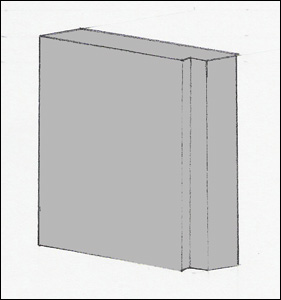
    Personal Computing Device - PCD (Drawing by Jason Ellis)
    Personal Computing Device – PCD (Drawing by Jason Ellis)

    The Artifact

    The Personal Computing Device (PCD) is an inexpensive and portable computer that can interface with many different input/output (I/O) components.  It is a one-piece solution to the ubiquity of computing and information storage in the future.  Its plain exterior hides the fact that this artifact is a powerful computing platform that transforms “dummy terminals” into points of access where one may access their own computer that is small enough to fit in a shirt pocket.

    Description

    The device measures 3″ wide by 4″ tall by 3/4″ thick.  On one of the long sides there is a small 1/4″ notch.  This notch matches with a similar notch on the interface port of wearable computer networks, computing stations, and entertainment systems.  The notch allows user to insert the PCD in only one orientation.  This protects the PCD and the interface port it is being plugged into.  The PCD is housed in a thin aluminum shell.  As the PCD does computing work, its circuits emit heat which needs to be removed from the system.  Because of the very small (< 90nm) circuit manufacturing process, the PCD uses very little power which translates to it emitting less heat than today’s Pentium 4 or Athlon64 processors.  Aluminum is an excellent choice for its metal housing because it is thermally conductive (removes heat), it is lightweight, and it is inexpensive.

    Dimensional view of PCD (Drawing by Jason Ellis)
    Dimensional view of PCD (Drawing by Jason Ellis)

    There are no switches or indicators on the PCD.  It has only one interface port as pictured in the top-left of the drawing above.  This interface makes the PCD unique.  This standardized interface allows the PCD to be used on any computing system that is designed for the PCD.  Computer hardware, wearable computer networks, and home entertainment systems are “dummy terminals” which rely on the PCD to be the “brains.”

    The PCD is a full featured computer.  It processes data, runs programs, and stores data on built-in solid-state memory.  Engineers were able to build a complete “computer on a chip” using new silicon circuitry layering techniques.  The result of this is the Layered Computing System as drawn in the internal schematic of the PCD (below).  Reducing the number of chips needed for a computing application has been a long-standing goal of electrical and computer engineering.  Steven Wozniak at Apple Computer was able to design elegant layouts for the original Apple I, and later, the Apple II.  He designed custom chips that brought the functions of several chips into a single chip.  AMD is continuing the trend today after integrating the CPU memory controller onto the new Athlon64 processor.  NVIDIA introduced the nForce3 250 GB chipset which integrated the system controller chip, sound, LAN (networking), and firewall all onto one chip.

    Internal layout of the PCD (Drawing by Jason Ellis)
    Internal layout of the PCD (Drawing by Jason Ellis)

    The solid-state memory is similar to today’s flash memory (e.g., USB Flash Drives or compact flash digital camera memory).  The difference lies in the density of the memory on the PCD.  Layering techniques are used in building the solid-state memory so that it is very dense (more data storage per unit area than today’s flash memory).  Typical PCD solid-state memory storage is 120 GB (gigabytes).  The PCD’s large memory area has no moving parts because it is made out of solid-state memory.  Traditionally, computers need a hard drive to store large amounts of information for random access.  Hard drives are a magnetic storage that depends on round platters rotating at high speed while a small arm moves across the platters reading and writing information.  Flash memory does not need to spin or have a moving arm.  Data is accessed, written, and erased electronically.

    The PCD has a built-in battery for mobile use.  When the PCD is plugged into a wall-powered device such as a computer terminal or entertainment system, it runs off power supplied by the device it is plugged into and its battery will recharge.

    Social Significance

    The introduction of the PCD revolutionizes personal computing.  The PCD empowers users to choose the way in which they interface with computers, networks, and data.  Computer displays, input/output, and networks have become abstracted from the PCD.  A user chooses the operating system (the latest Linux distribution, Windows, or Mac OS X) and the programs (e.g., Office, Appleworks, iTunes) for his or her own PCD.  That person uses only their own PCD so that it is customized in the way that they see fit and they will develop an awareness of its quirks and abilities in the same way that a person learns so much about his or her own car.

    The “faces” of computers (i.e., monitors, keyboards, mice, trackballs, and printers) are abstracted away from the “heart” of the computer.  The PCD is the heart because it processes data through it (input/output) much like the heart muscle moves blood through itself.  A PCD also acts as a brain because it stores information and it can computationally work on the stored data.  The traditional implements of computer use are transformed into dummy terminals (i.e., they possess no computational or data storage ability).  Each of these devices have an interface port that one plugs in their personalized PCD.  The PCD then becomes the heart and brain of that device and it allows the user to interface with networks, view graphics on monitors, or print out papers.

    Computer Terminal and Entertainment Systems with PCD Interfaces (Drawing by Jason Ellis)
    Computer Terminal and Entertainment Systems with PCD Interfaces (Drawing by Jason Ellis)

    Both the PCD and the dummy terminals are a standardized computing platform.  Consumer demand, market forces, and entrepreneurial insight led to the evolution that culminated with the PCD as the end product.  Consumers were overburdened with desktop computers, laptop computers, and computer labs.  Every computer one might encounter could have a very different operating system or set of software tools.  The data storage on one computer would differ from the next.  A new standard was desired to allow a person to choose their own computing path that would be accessible at any place that they might be in need of using a computer.

    Computer manufacturer businesses saw ever declining profits as computers were becoming more and more mass-produced.  Additionally, no one company built all of the parts that went into a computer so profit was lost elsewhere as parts were purchased to build a complete computer for sale.

    New integrated circuit manufacturing techniques allowed for greater densities of transistors and memory storage.  These manufacturing techniques also allowed for lower power consumption and thus reduced heat from operation (which was a long-standing problem with computers).

    With the consumer, desire for something new and innovative coupled with a new way of building computer components led to the founding of a new computer design consortium.  Hardware and software manufacturers came together to design a computing platform that would fulfill the needs of consumers as well as improve failing profits.  The PCD design consortium included computer and software businesses, professional organizations, and consumer/enthusiast groups.

    The PCD almost didn’t see the light of day because of influence from large lobbying groups in Washington.  This involved copyright groups such as the Recording Industry Association of America (RIAA) and the Motion Picture Association of America (MPAA).  These groups decried the potential copyright violations possible with the PCD.  Epithets, curses, and bitching issued from the RIAA and MPAA lobbyists’ mouths.  Consumer outrage over these large business groups attempting to throw their weight around caused a surge of grassroots political involvement that unseated some Congressional members and scared the rest into line.  The public wanted to see what would come out of the PCD Design Consortium before judgment was passed on its useful and legal purposes.

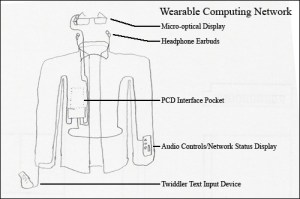
    With the legal hurdles temporarily under control, the PCD was released to the public.  New and inventive uses were immediately made of the PCD.  One of the first innovations involved the Wearable Computer Network.  Wearable computing was a long researched phenomenon at the Wearable Computing Lab at MIT and Georgia Tech’s Contextual Computing Group.  The two factors holding back wide adaptation of wearable computing were the cost of the mobile computing unit and the mobile computing unit’s singular purpose.  These two factors were eliminated by the PCD because it was cheap and it could be removed from the wearable computing network and used in other computing situations (e.g., at a desktop terminal or in an entertainment system).

    Wearable Computing Network with Integrated PCD Interface Pocket (Drawing by Jason Ellis)
    Wearable Computing Network with Integrated PCD Interface Pocket (Drawing by Jason Ellis)

    Entertainment systems and desktop terminals became popular receptacles for the PCD.  Music and movies purchased over the Internet could be transferred to the PCD and then watched on a home entertainment system that had a PCD interface port.  Desktop terminals and laptop terminals also began to come with PCD interface ports so that a computer user could use their PCD at home or on the go, but still be able to use their PCD in other situations such as at a work terminal.  Being able to carry a PCD between work and home allowed for easier telecommuting because all of a person’s files were immediately available.  There was no more tracking down which computer had downloaded an email, because a person’s email traveled with that person on his or her PCD.  Easier teleworking helped the environment in metropolitan areas because more people could do their work from home without needing to drive their fossil fuel consuming cars down the highway.

    Instant computing access meant that PCD users were able to expand the possibilities of the human-computer dynamic.  There was more Internet use and that use was more often on the go.  As people began donning wearable computing networks for their PCD, they would chat with friends while riding a commuter train or they would spend more time getting informed about what was going on in the world with NPR’s online broadcasts or with the BBCNews’ website.  Social networks like Orkut and Friendster received even more users as friends began inviting friends who may have just got online (with a mobile setup) with their new PCD.

    As more computer, clothing, and HDTV terminals began to support the PCD, more jobs were created, more units were sold, more raw materials were consumed, more shipping was taking place, more engineering and design was going on, and new business models were being created.  The web of connections built upon itself so that more connections were made between industries and businesses.  The popularity of the PCD boosted tangential industries involved in building components that went into the PCDs as well as entertainment services.  Aluminum and silicon processing, chip manufacturing, battery production and innovation (for longer battery life), new networking technologies to take advantage of the greater number of computing users who purchase PCDs, and PCD interface devices (such as HDTVs and wearable computing networks) all ramped up production as demand for the PCD rose.  New services popped up such as computer terminal rental and new entertainment services that would allow customers to purchase copy-protected versions of music and movies that could easily be transported for enjoyment wherever the user took his or her PCD.  Some entertainment companies held out too long while others reaped rewards for modifying their business models to take advantage of this new (and popular) technology.

    Choice is the driving factor behind the PCD’s success.  Wrapped in the PCD’s small form is the choice of human-computer interaction, choice of where to use a PCD, and choice of data (visual and auditory) to be accessed with a PCD.  These choices are made available by the choices made by many people such as consumers, industrialists, and entertainment antagonists.  Those who embraced the PCD and found ways of interfacing with it (literally and figuratively) succeeded while those that did not were left by the wayside.

    Works Cited

    Contextual Computing Group at Georgia Tech.  September 29, 2004. November 14, 2004 <http://www.gvu.gatech.edu/ccg/&gt;.

    Hepburn, Carl.  Britney Spears’ Guide to Semiconductor Physics.  April 7, 2004.              November 14, 2004 <http://britneyspears.ac/lasers.htm&gt;.

    Owad, Tom.  “Apple I History.”  Applefritter.  December 17, 2003.  November 14, 2004 <http://www.applefritter.com/book/view/7&gt;.

    “Single-Chip Architecture.”  NVIDIA.  2004.  November 14, 2004 <http://www.nvidia.com/object/feature_single-chip.html&gt;.

    Wearable Computing at MIT.  October 2003.  November 14, 2004 <http://www.media.mit.edu/wearables/&gt;.

  • Recovered Writing: Undergraduate Technologies of Representation Essay on Present Technology, Airport Express, Oct 28, 2004

    This is the twelfth post in a series that I call, “Recovered Writing.” I am going through my personal archive of undergraduate and graduate school writing, recovering those essays I consider interesting but that I am unlikely to revise for traditional publication, and posting those essays as-is on my blog in the hope of engaging others with these ideas that played a formative role in my development as a scholar and teacher. Because this and the other essays in the Recovered Writing series are posted as-is and edited only for web-readability, I hope that readers will accept them for what they are–undergraduate and graduate school essays conveying varying degrees of argumentation, rigor, idea development, and research. Furthermore, I dislike the idea of these essays languishing in a digital tomb, so I offer them here to excite your curiosity and encourage your conversation.

    In the next few Recovered Writing posts, I will present my major assignments from Professor Kenneth J. Knoespel’s LCC 3314 Technologies of Representation class at Georgia Tech. LCC 3314 is taught in many different ways by the faculty of the Georgia Tech’s School of Literature, Media, and Communication, but I consider myself fortunate to have experienced Professor Knoespel’s approach to the course during the last phase of my undergraduate tenure. The ideas that we discussed in his class continue to inform my professional and personal thinking. Also, I found Professor Knoespel a great ally, who helped me along my path to graduation with side projects and independent studies.

    This is another example of a WOVEN multimodal essay assignment. In it, I used WVE/written, visual, electronic modes to discuss a specific technology. These essays (focused on past, present, and future technologies) gave me a chance to use technology to explore the meaning behind and impact of technologies. The next essay will focus on a future technology of my own design.

    In this essay assignment, we were tasked with exploring an example of a present technology. I chose to write about Apple’s Airport Express, which my roommate Perry Merier had recently purchased. At the time, the idea of an extremely small computing/routing/audio device was new and innovative. Also, it was incredibly useful.

    Jason W. Ellis

    Professor Kenneth J. Knoespel

    LCC3314 – Technologies of Representation

    October 28, 2004

    Artifact of the Present – Apple Airport Express

    Apple Airport Express (Image from Apple Computer)
    Apple Airport Express (Image from Apple Computer)

    The Artifact

    The Apple Airport Express is a multifunction wireless Internet router (i.e., base station) that first hit shelves in June 2004.  It can serve as a wireless Internet base station, extend the range of an existing wireless network, receive streaming music and transfer that to a home stereo, and share a USB printer on a wireless network.  It can do all of these things and yet its small rectangular shape can be inscribed in the circumference of an audio CD.

    Description

    The Airport Express is only 3.7 inches tall, 2.95 inches wide, and 1.12 inches deep.  It is about the size of a Powerbook G4’s power brick (AC to DC converter).  If you do not need the included power cord extender, then the Airport Express is completely self-contained.  Unlike most other wireless routers, the Airport Express has its power converter built-in.  The electronics that allow it to juggle all of its functions lie within the glossy white plastic housing.

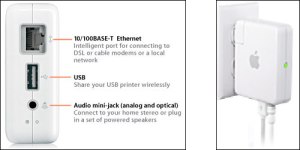
    On the back edge of the Airport Express there is a fold-out AC power connector.  The power prongs fold back into the unit so that it is easily carried in a bag without snagging on anything.  The bottom edge has three connectors.  The first is the ethernet RJ-45 connector.  This can be connected to a DSL or cable modem so that the Airport Express can wirelessly transmit Internet access to computers with wireless capabilities that are within range.  Next is the USB connector.  This can be hooked to a USB printer so that the printer can be shared with anyone on the wireless network.  The last connector is an audio mini-jack that supports both digital and optical audio output.  This can be connected to a home stereo so that music can be streamed from a computer running iTunes to the Airport Express.  In the event of a lockup, there is a small reset button on the bottom of the device.  The front edge of the device has an LED.  This LED lights up as amber or green.  The color of the LED and its state (i.e., on, off, blinking) can indicate different things about the status of the Airport Express.

    Airport Express Connectors (left) and Airport Express Plugged-In (right)(Images from Apple Computer)
    Airport Express Connectors (left) and Airport Express Plugged-In (right) (Images from Apple Computer)

    The components inside the Airport Express are tightly packed.  A good deal of engineering had to go into making function follow form in this artifact.  Home wireless routers are usually two or three times the size of the Airport Express and they have an external power brick (that may be the same size as the Airport Express).  This device has to contain a power converter, wireless networking components, wired networking components, network routing components, USB printing components, and audio components.  Some of these parts are combined on a single piece of silicon to save space on the circuit board.

    Airport Express split in half.  Note the circuit boards on the left and power converter on the right.  (Image from ipodding.com)
    Airport Express split in half. Note the circuit boards on the left and power converter on the right. (Image from ipodding.com)

    Social Significance

    Apple Computer introduced its Airport technology in July 1999.  The choice to use the name “Airport” was a deliberate one.  It is easy to remember and it evokes certain images of what the technology is able to do.  The bits of data seem to fly through the air on invisible radio waves.  Airport technology is the place where these bits take off and land–from the base station to the computer and vice versa.  Speed, travel, and mobility are some of the images that Apple intended the Airport Extreme to conjure for potential buyers.

    The Airport Express uses the two most widely adopted wireless networking standards:  802.11b and 802.11g.  A working group within the Institute of Electrical and Electronics Engineers (IEEE) established those standards.  The IEEE 802 standards committee develops the standards for local area networks as well as for metropolitan area networks.  Work group 11 focuses on wireless networking standards.  Publicly available standards such as these are part of the success of computer and networking hardware.  Standards allow for components manufactured by different companies to be interoperable.  Because the Airport Express uses several open standards it will work along side other wireless hardware and it will work with Macs as well as PCs.

    The Federal Communications Commission (FCC) and the National Telecommunications and Information Administration (NTIA) regulate the radio frequency spectrum.  The NTIA is part of the Executive Branch of the US Government that “manages the Federal government’s use of the spectrum” while the FCC is an “independent agency” that “regulates the private use of the spectrum” (NTIA).  The 802.11b and 802.11g wireless networking standards are approved by the FCC to use the 2.4GHz radio band for transmitting and receiving bits of data carried on radio waves.

    The US Radio Spectrum Frequency Allocations.  The red ellipse approximately marks where in the spectrum 802.11b and 802.11g operate. (Image from NTIA)
    The US Radio Spectrum Frequency Allocations. The red ellipse approximately marks where in the spectrum 802.11b and 802.11g operate. (Image from NTIA)

    Each person with a computer with wireless capability, a copy of iTunes, a stereo, and an Airport Express is in effect a one-person radio station.  Music can be streamed from the computer to the Airport Express which passes it along to the home stereo via an audio cable.  Digital music is now freed from the computer and transferred back to the home stereo.  This capability points to one of the Airport Express’ weaknesses.  Music streaming from a computer can only be played on one Airport Express at a time.  There is no technology barrier keeping more than one Airport Express from receiving the streaming music so there is some reason that Apple restricted this capability on the Airport Express.  If this were enabled customers would buy more than one Airport Express so that they could stream music to multiple rooms.

    The music travels wirelessly to the Airport Express and then to the stereo via wires.  (Image from Apple Computer)
    The music travels wirelessly to the Airport Express and then to the stereo via wires. (Image from Apple Computer)

    The Airport Express’ limitations might be due to pressure from the music industry.  Apple gives the music playing software, iTunes, away for free.  It can play CDs, MP3s, and it can access Apple’s Online Music store.  This software can copy (i.e., rip) CDs that may or may not be owned by the iTunes user.  Additionally, iTunes will play legitimate MP3s as well as those that are obtained in violation of current copyright law.  The Recording Industry Association of America (RIAA) and some music recording artists find this unacceptable.  Apple has tried to work on the side of the consumer, but they have to appease the music industry as well.  To do this Apple has integrated special encryption in music downloaded from the Apple Online Music Store so that only the authorized buyer can play those MP3s.  Additionally, iTunes establishes a secure connection to the Airport Express by encrypting the music stream with Advanced Encryption Standard (AES) encryption, which is in turn protected by RSA encryption.  This prevents others from recording an iTunes music stream.

    Encryption is also employed to protect the wireless users on the Airport Extreme’s network.  Part of this protection comes from encrypting the wireless network traffic and the other part comes from the built-in firewall.  The older encryption is called Wired Equivalent Privacy (WEP) and the newer security is called Wi-Fi Protected Access (WPA).  WPA was built to supercede WEP.  The built-in firewall uses network address translation (NAT) to create a network that uses private IP addresses instead of public (and thus directly connected to the Internet) IP addresses.  NAT exchanges data between the public world and the private network.  Generally, only the NAT server can directly connect to the computer on its private network and not a computer in the outside world.

    Security and privacy is a growing concern for people in a more wired world.  Identify theft is becoming a boon for some (e.g., the thieves, private investigators, lawyers, politicians) and a bust for others (i.e., the person whose identity is stolen).  One way that a person’s private identifying information is stolen is by an individual “sniffing” a wireless network’s data traffic for that precious information.  New industries and groups have grown out of this problem of identity theft.  Wireless devices like the Airport Express need to have protections built-in so that a user’s private information will be better protected.

    The physical construction of the Airport Express involves electrical engineering, computer engineering, and industrial design.  Electrical engineering and computer engineering overlap in a project such as this.  Custom chips have to be designed and built that handle data traffic, digital-analog conversion of sound, configuration software, controlling of a radio transmitter/receiver, and print control software.  Simplicity and elegance of design are demanded in order to fit such a feature rich artifact into a very small package.  Apple has a history of taking an artifact that is assumed to look or work in a particular way and transforming its appearance into something new and fresh (e.g., the original Macintosh, iMac, and iPod).  Airport Express works similarly to any other wireless router, but it pushes the elements of design (both as a physical artifact and with the internal circuits and chips) so that it is identified by the user as something more than its function.

    Sleek and new shapes also reinforce the perception of speed.  Airplanes are fast and this artifact is the Airport (sending and receiving these fast airplanes of data) Express (quick, fast, simple).  Computer technology has been a long progression of speed.  How fast does this computer perform the tasks that I will be using it for?  Can it play Doom 3?  The same is true for networking technologies.  Wired networking is hands down the fastest networking technology so wireless has to compete with wires in speed, but it can distinguish itself by its convenience.

    (Photo by John M. Dibbs.)
    (Photo by John M. Dibbs.)

    These new designs effect a change in the way people think about their computer technology.  Soft colors, translucent plastics, curves and gentle transitions give technology a friendlier “face.”  It isn’t imposing and the technology can now fit into a color scheme in your home.  Computer technology shifts from utility to lifestyle.  Apple brings together these networks of technology, government oversight, music industry muscle, and industrial design principles so as to provide customers with the technology desired but in a package that makes it less technical and more like a streamlined appliance.

    Works Cited

    “Airport Express Gallery.”  Ipodding.com.  2004.  October 26, 2004           <http://ipodding.com/modules.php?set_albumName=album10&op=modload&na            me=gallery&file=index&include=view_album.php>.

    “Apple – Airport Express.”  Apple Computer, Inc..  2004.  October 26, 2004 <http://www.apple.com/airportexpress/&gt;.

    “Apple – Support – Airport Express.”  Apple Computer, Inc..  2004.  October 26, 2004 <http://www.apple.com/support/airportexpress/&gt;.

    Dibbs, John M..  “Concorde Takeoff.”  Planepix.com.  October 26, 2004    <http://www.planepix.com/pp/servlet/template/Detail.vm/id/2940&gt;.

    “Myths vs. Reality.”  National Telecommunications and Information Administration.       October 14, 2004.  October 26, 2004             <http://www.ntia.doc.gov/ntiahome/myths.html&gt;.

  • Recovered Writing: Undergraduate Technologies of Representation Essay on Past Technology, the Altair 8800, Sept 28, 2004

    This is the eleventh post in a series that I call, “Recovered Writing.” I am going through my personal archive of undergraduate and graduate school writing, recovering those essays I consider interesting but that I am unlikely to revise for traditional publication, and posting those essays as-is on my blog in the hope of engaging others with these ideas that played a formative role in my development as a scholar and teacher. Because this and the other essays in the Recovered Writing series are posted as-is and edited only for web-readability, I hope that readers will accept them for what they are–undergraduate and graduate school essays conveying varying degrees of argumentation, rigor, idea development, and research. Furthermore, I dislike the idea of these essays languishing in a digital tomb, so I offer them here to excite your curiosity and encourage your conversation.

    In the next few Recovered Writing posts, I will present my major assignments from Professor Kenneth J. Knoespel’s LCC 3314 Technologies of Representation class at Georgia Tech. LCC 3314 is taught in many different ways by the faculty of the Georgia Tech’s School of Literature, Media, and Communication, but I consider myself fortunate to have experienced Professor Knoespel’s approach to the course during the last phase of my undergraduate tenure. The ideas that we discussed in his class continue to inform my professional and personal thinking. Also, I found Professor Knoespel a great ally, who helped me along my path to graduation with side projects and independent studies.

    In this essay assignment, we were tasked with exploring an example of a past technology. I chose to write about the Altair 8800–the first personal computer. Coincidentally, I am re-watching Robert X. Cringely’s Triumph of the Nerds, which discusses and demonstrates the Altair 8800 in the first episode.

    I enjoyed writing this essay, because it was one of the  first that permitted me to combine words and images (thinking about WOVEN). I had done this before on webpages, but not in an essay that I would hand in to my professor.

    Jason W. Ellis

    Professor Kenneth J. Knoespel

    LCC 3314 – Technologies of Representation

    September 28, 2004

    Artifact from the Past – The Altair 8800

    The Altair 8800 (image from Computer Closet).
    The Altair 8800 (image from Computer Closet).

    The Artifact

    The Altair 8800 is credited as the first personal computer.  H. Edward Roberts invented the Altair 8800 after being approached by the magazine, Popular Electronics, to build a kit computer that could be sold through the magazine.  It utilized a central processing unit microprocessor and a bus that “signals and power traveled from one part of the machine to another on” (Ceruzzi 228).  When it was introduced in 1975 by Roberts’ company, MITS, you could purchase an Altair as a kit for $397 or assembled for $498.

    Description

    The exterior of the Altair 8800 is a steel enclosure.  The front faceplate is black and it has two rows of lights and two rows of flip switches.  Each of the lights and switches are labeled.  The back had an opening for cooling and the power plug connector.

    The first Altair 8800 included a very small amount of computer memory (256 bytes–not kilobytes).  Also, when the computer was turned off, anything in the computer memory was lost.  This means that each time you used the Altair 8800 you had to input the program you were going to use and any data that the program was going to work with.  The input was handled through flipping of different switches on the faceplate.  The lights indicated the status of computer during input and the lights would later reveal the output of the program that was laboriously entered.  If the power went out during the programming of the Altair 8800, the program was lost and would have to be reentered when power was restored.

    In a sense, the Altair 8800 was as self-contained as a modern day iMac.  The difference being that teletypes and display technology was prohibitively expensive for the computer hobbyist.  When the hobbyist had completed the construction of the Altair there was only the Altair 8800 in its steel enclosure and a power cord that plugged into a wall outlet.  Input and output was handled through the lights and switches on the face plate.

    The inside of the Altair contained the electronics of the faceplate, the open bus, a CPU card, a memory card, and the power supply.  The open bus and the CPU chosen for the Altair 8800 are what ignited the possibility for the upcoming personal computer boom.

    image003
    The interior of the Altair 8800. Bottom left to top right: power supply, open bus with CPU and memory cards installed, and front control panel (image from Computer Closet).

                The open bus (also called S-100) was unique in that it was a board that was attached to the bottom of the inside of the enclosure that had four card connectors on it.  The open bus allowed for expansion possibilities and it was an open architecture which meant that others could build cards that would work in anyone’s Altair 8800.  Additionally, others could copy the open bus architecture so that they could build their own branded computer system that would use parts that were interchangeable with the Altair 8800 and other “clones.”

    The S-100 bus (image from Computer Closet).
    The S-100 bus (image from Computer Closet).

    The Altair 8800 used Intel’s latest microprocessor, the 8080.  The 8080 distinguished itself from the older Intel microprocessor, the 8008, because “it had more instructions and was faster and more capable than the 8008” (Ceruzzi 228).  The 8080 required fewer supporting chips than the 8008 to make a functional system, it could address more memory than the 8008, and it used the “main memory for the stack, which permitted essentially unlimited levels of subroutines instead of the 8008’s seven levels” (Ceruzzi 228).  The 8080 was the first microprocessor powerful enough to run this early iteration of the personal computer.

    The Intel 8080 CPU (image from CPU World).
    The Intel 8080 CPU (image from CPU World).
    The white chip in the middle of this CPU card is the Intel 8080 CPU (image from Computer Closet).
    The white chip in the middle of this CPU card is the Intel 8080 CPU (image from Computer Closet).

    Social Significance

    The Altair 8800 was a hobbyist computer.  The kit that one could buy for about $400 was a box full of individual components that had to be skillfully soldiered and connected together.  MITS did offer a pre-built Altair 8800, but even a completed Altair entailed a good deal of expertise to make it do anything.  This first model handled all input and output through the lights and switches on the front panel.  The “front panel of switches…controlled the contents of internal registers, and small lights [indicated] the presence of a binary one or zero” (Ceruzzi 228).  This was lightyears away from MS-DOS and it was even further away from the GUI of the Macintosh, but it was able to do calculations on data by using programmed instructions.  The representation of the program was stored (temporarily, while the power was on) in an integrated circuit.  The output was displayed in a series of lights in the same location where the program and data were entered earlier.  The output was given in the same format in which it was received, through binary code (i.e., ones and zeros).  Input required encoding into binary and output required decoding from binary into results that the computer user could more concretely understand.  The computer user had to have command of the the encoding and decoding process in order to use the Altair.

    Example Altair 8800 program written out (image from old-computers.com).
    Example Altair 8800 program written out (image from old-computers.com).
    The Altair 8800 operating.  Note the lights (image from Computer Closet).
    The Altair 8800 operating. Note the lights (image from Computer Closet).

    The open bus allowed others to follow in MITS footsteps in building a computer that was similar in design to the Altair 8800.  Also, hobbyists and other companies could build add-in cards that would interface with any computer based around the S-100 open bus that the Altair employed.  This meant that an aftermarket industry was created for the Altair and its clones.  More electrical components, memory chips, circuit boards, lead soldier, and etching materials would be sold and used in the creation of these add-on products.  More research and development took place both on the hobbyist’s workbench and in corporate research labs.  Some creations were sold as a final product whereas others would have been talked about at user group meetings or published as “how-to” guides in magazines like Popular Electronics.  A dynamic cycle of innovation was introduced to the personal computer that had not been present before.  This is what led to the personal computer becoming something different than an elitist computing device.  The critical mass was building for what led to the first Apple computer and the IBM PC.

    Within this creative cycle was Roberts’ choice to use the Intel 8080 microprocessor.  Intel had been selling this microprocessor for $360.00 if ordered in small quantities.  MITS was able to buy them from Intel for $75.00 each.  If MITS had not been able to secure this low price, the Altair would have failed because of its much higher cost.  Because MITS was able to buy these processors for the lower price they were able to sell the Altair to customers for a price that they were willing and able to pay.  When the Altair took off, this meant that each one had an Intel 8080 CPU in the kit.  This meant that Intel started selling a lot more of these new microprocessors that, up until that time, they really didn’t know how to market.  Intel began to see that microprocessors weren’t just for expensive, business computers, but they were also for smaller, personal computers.  When Intel saw that there was a demand they began to further develop and diversify the microprocessor line over time.  Later, other companies began to adopt the S-100 bus.  This meant that other companies were buying Intel’s microprocessor to use in those computers.  Every computer had to have a CPU and at the time these particular computers had to have an Intel microprocessor.  Then other companies, such as AMD, reversed engineered the Intel 8080 microprocessor and began selling their own model that was functionally identical to Intel’s offering.  Money was being made and more innovation and work was taking place as a result.

    Along with all of this building, research, and development new construction methods had to be developed and new distribution networks had to be employed.  The Altair was designed to be built at home by the buyer, but MITS also offered a pre-built turn-key system.  MITS did not anticipate the demand and customers quickly had to endure up to a one year wait for their Altair computer.  MITS (and others) learned from these delays.  Also, new buying and distribution channels had to be established.  MITS was buying microprocessors from Intel.  The many other components had to be purchased from other companies and distributors.  Parts had to be ordered and processed in order to send out kits and turn-key systems to customers.  Additionally, Intel had to be prepared to have microprocessors ready to sell to MITS and other companies.  When demand rose for the Altair it would have impacted each company that supplied the individual pieces that comprised the finished product.  Ordering systems, packing, and shipping had to be arranged to get the Altair from their headquarters to the customer’s home.  This involved materials for shipping, personnel, and the logistics of order processing.

    MITS tried to market the Altair 8800 as a business computing solution after they saw how popular it was.  This was made easier when teletype, CRT displays, disk drives, punch card rolls, and other computing technology was developed for the Altair and S-100 bus systems. Businesses liked easier interaction with the computer and dependable memory storage.  These business systems were not very successful because there was no “killer app” for the platform at that time.  MITS changed hands several times until its last remnant disappeared.

    Business version of the Altair advertisement (image from The Virtual Altair Museum).
    Business version of the Altair advertisement (image from The Virtual Altair Museum).

    The Altair 8800 began the desktop computing revolution.  Initially it was very complicated and elitist.  The very first kits had to be built and used by persons that were skilled in electronics and computer science.  The hardware had to be constructed from individual elements and then software had to be devised that would run on this built-from-scratch computer.  The Altair became more user friendly over time.  The aftermarket, MITS, and the clone manufacturers wanted to attract more customers.  The potential customers formed a triangle with the most knowledgeable at the peak with a gradation of less knowledgeable customers toward the bottom.  The early adopters of the Altair were at the top of this triangle but their numbers were few.  This meant that new computers with new input and output and new features had to be devised that would entice the greater number of potential computer users to want to buy their product.  This cycle continues to this day in the personal computer market.  Apple, Microsoft, Sony, HP, and many other companies continually work at making something feature rich, but easier and easier to use.  Note the utopian artwork below that was used for an early Altair advertisement.  It recalls Soviet artwork, utopian imagery, and an Altair on every desk.  The Altair was going to offer a leveling of the computing playing field so that all could take part in the use of computers.

    Early MITS advertisement for the Altair (image from The Virtual Altair Museum).
    Early MITS advertisement for the Altair (image from The Virtual Altair Museum).

    Along with this cycle there are those persons who are intrigued by the new technology and they learn more about it on their own or through school.  This bolsters the book industry that may sell computer programming or electrical engineering books (or today, the plethora of “Dummies” guides).  Schools began to introduce computers into the classroom.  At first, it was strictly computer science and programming classes.  Later, computers were added for other things such as graphic design, CAD, and word processing.  Universities saw more computer science, electrical engineering, and computer engineering majors.  These universities added more professors, classroom space, and equipment to compensate for this demand.  State and federal spending was sought to cover some of these expenses.  Private enterprise was also asked to help through different kinds of agreements that would assist the business while helping the school’s students in need of projects and equipment.  This work done by school research could in turn help the businesses with their products that will be sold on the open market.

    The Altair 8800 introduced computer enthusiasts to the possibility of working with digital information on their desktop.  Time sharing on large mainframes and minicomputers was still the primary interaction people had with computers in business and in schools.  With the flip of switches and the monitoring of lights, one could work problems and evaluate data at home or in the office.  There were early games, calculating problems, logarithms, and other numerical manipulation.  The early adopters questioned what other things could be manipulated with a personal computer.  With the introduction of new input and output systems, the list expanded a great deal because human-computer interaction became easier with the connection of a CRT monitor and a keyboard or punch card reader.  Also, the binary code and bits of information that were only ones and zero to the computer could be made to represent abstractions rather than mere numbers.

    The Altair 8800 was the pebble that began rolling down the snow covered mountain (figuratively and literally of the user base).  The concept of the personal computer gained mass and momentum that could not be stopped.  The development of the first microprocessor based personal computer created new networks and new demands that were met by computer enthusiasts, students, researchers, and business people.

    Works Cited

    “Altair 8800.”  Old-Computers.com.  October 6, 2004.  October 6, 2004

    <http://www.old-computers.com/museum/computer.asp?st=1&c=62&gt;.

    Ceruzzi, Paul E.  A History of Modern Computing.  Cambridge, Massachusetts:

    The MIT Press, 1998.

    “MITS Altair 8800.”  Computer Closet.  June 28, 1999.  October 6, 2004 <http://www.computercloset.org/MITSAltair8800.htm&gt;.

    Sanderson, William Thomas.  The Virtual Altair Museum.  April 28, 2004.

    October 6, 2004 <http://www.virtualaltair.com/&gt;.

    Shvets, Gennadry.  “Intel 8080 Family.”  CPU World.  2003.  October 6, 2004      <http://www.cpu-world.com/CPUs/8080/&gt;.

  • Followup to Adventures with a CustoMac: Installing Mac OS X Mavericks on Asus P8Z77-V PC

    Mavericks installed on CustoMac. NB: MBPr on desk and PowerMacintosh 8500/120 on right.
    Mavericks installed on CustoMac. NB: MBPr on desk and PowerMacintosh 8500/120 on right.

    Last summer, I wrote about my experiences installing Mac OS X 10.8 Mountain Lion on my Asus P8Z77-V and Intel i7-2700K PC here. What I neglected to say at the time was that an alarming number of creeping instabilities led me to ultimately abandon running Mountain Lion on my PC and return to Windows 7.

    I later learned that some of these instabilities were likely linked to a bad PSU and video card–both of which were replaced by the manufacturers under warranty (awesome kudos to Antec and EVGA). With the new PSU and video card, my PC returned to 100% stability under Windows 7. This made me wonder if I could try rolling out a Mavericks installation on my PC.

    Also, I wanted to use Mac OS X’s superior file content search technology and other third-party textual analysis tools in my research. I have a MacBook Pro 15″ retina (MBPr), but it lacks the hard drive capacity for my accumulated research files. The comfort that I feel in the MacOS environment and the need for lots of fast storage led me to turn my attention back to turning my PC into a CustoMac (aka “hackintosh”).

    This time, I wanted to streamline and simply my setup as much as possible and incorporate components that should work out of the box (OOB). Toward this end, I reduced my hardware configuration from this:

    • ASUS P8Z77-V LGA 1155 Z77 ATX Intel Motherboard (disabled on-board Intel HD 3000 video and Asus Wi-Fi Go! add-on card)
    • Intel Core i7 2700K LGA 1155 Boxed Processor
    • Corsair XMS3 Series 16GB DDR3-1333MHz (PC3-10666) CL 9 Dual Channel Desktop Memory Kit (Four 4GB Memory Modules)
    • evga 01G-P3-1561-KR GeForce GTX 560 Ti 1024MB GDDR5 PCIe 2.0 x16 Video Card
    • Antec High Current Gamer 750W Gamer Power Supply HCG-750
    • Corsair Vengeance C70 Gaming Mid Tower Case Military Green
    • Cooler Master Hyper 212 Plus Universal CPU Cooler
    • Samsung 22X DVD±RW Burner with Dual Layer Support – OEM
    • Intel 128 GB SATA SSD
    • Western Digital Caviar Green WD10EARX 1TB IntelliPower 64MB Cache SATA 6.0Gb/s 3.5″ Internal Hard Drive – Bare Drive
    Using on-board video and no ASUS wifi card.
    Using on-board video and no ASUS wifi card.

    to this:

    • ASUS P8Z77-V LGA 1155 Z77 ATX Intel Motherboard (using on-board Intel HD 3000 video and removing Asus Wi-Fi Go! add-on card)
    • Intel Core i7 2700K LGA 1155 Boxed Processor
    • Corsair XMS3 Series 16GB DDR3-1333MHz (PC3-10666) CL 9 Dual Channel Desktop Memory Kit (Four 4GB Memory Modules)
    • evga 01G-P3-1561-KR GeForce GTX 560 Ti 1024MB GDDR5 PCIe 2.0 x16 Video Card (removed to simply setup and save power–who has time for gaming?)
    • Antec High Current Gamer 750W Gamer Power Supply HCG-750
    • Corsair Vengeance C70 Gaming Mid Tower Case Military Green
    • Cooler Master Hyper 212 Plus Universal CPU Cooler
    • Samsung 22X DVD±RW Burner with Dual Layer Support – OEM
    • Intel 128 GB SATA SSD
    • Three Western Digital HDDs for file storage and work space. 
    IoGear GBU521 and TP-Link TL-WDN4800 from Microcenter.
    IoGear GBU521 and TP-Link TL-WDN4800 from Microcenter.

    Also, I added two new components that were recommended from the TonyMacx86 Forums:

    • TP-Link 450Mbpx Wireless N Dual Band PCI Express Adapter (TL-WDN4800). It works in Mavericks OOB.
    • IoGear Bluetooth 4.0 USB Micro Adapter (GBU521). It works in Mavericks OOB.
    DSC01487
    ASUS’s Wi-Fi Go! card works great in Windows 7, but it caused problems with my Mavericks installation.

    As noted above, I physically removed my 560 Ti video card, because I wanted to simply my setup for installation purposes. Also, I removed the ASUS Wi-Fi Go! add-on card, because despite disabling it in BIOS, the Mavericks installer seemed to hang on a wi-fi device while attempting to set its locale (a setting that determines what radio settings to use based on the country that you happen to be in). After I removed the Wi-Fi Go! card, I had a nearly flawless Mavericks installation process (NB: removing the Wi-Fi Go! card required removing the motherboard, turning it over, removing a screw holding in the Wi-Fi Go! card, turning the motherboard over, and unplugging the Wi-Fi Go! card).

    These are the steps that I used to install Mavericks on my PC:

    1. Follow TonyMac’s Mavericks installation guide for making an installation USB drive and installing Mavericks.
    2. Following installation of Mavericks, boot from your USB drive, select your new Mavericks installation drive, arrive at the desktop, and run Multibeast.
    3. Select these settings in Multibeast:
      1. Quick Start > DSDT Free (I left all pre-selected options as-is. Below are additional selections that I made.)
      2. Drivers > Audio > Realtek > Without DSDT > ALC892
      3. Drivers > Disk > 3rd Party SATA
      4. Drivers > Graphics > Intel Graphics Patch for Mixed Configurations
      5. Drivers > Misc > Fake SMC
      6. Drivers > Misc > Fake SMC Plugins
      7. Drivers > Misc > Fake SMC HWMonitor App
      8. Drivers > Misc > NullCPUPowerManagement (I don’t want my machine to go to sleep)
      9. Drivers > Misc > USB 3.0 – Universal
      10. Drivers > Network > Intel – hank’s AppleIntelE1000e
      11. Customize > 1080p Display Mode
      12. Build > Install
    4. Repair Permissions on Mavericks drive from /Applications/Utilities/Disk Utility
    5. Reboot
    6. Run Chameleon Wizard (this will fix a problem that you might have with connecting to the App Store)
    7. Click SMBios > Edit > Premade SMBioses > choose MacPro 3,1 > Save
    8. Reboot
    9. CustoMac should now be fully operational!

    In order to arrive at the above instructions, I read a lot of first hand experiences and third party suggestions on TonyMac’s forums. I owe a tremendous debt of gratitude to the amazing community of CustoMac builders who take the time to share their thoughts and lessons and equally so to the tool-builders who create amazing software including UniBeast, Multibeast, and Chameleon Wizard!

    I would suggest that you remember that there is not always one path to a successful build. I distilled a lot of posts into my successful build. Your experience with similar hardware might take a different path. Reading others experiences and trying their suggestions experimentally can lead to your own successful discoveries. Thus, I took the time to try out different configurations of hardware until settling on the stripped down approach with on-board video and OOB networking gear. I tried several different installations: a failed Mavericks installation with kernel panics (Wi-Fi Go! card installed and wrong Multibeast configuration), a successful Mountain Lion installation (barebones and correct Multibeast configuration), and a successful Mavericks installation (detailed above).

    Obviously, MacOS X can run on a wide range of PC hardware given the correct drivers, configuration information, etc. Apple could do great things if only Tim Cook and others would think differently and move beyond the tightly integrated hardware-software experience. Apple’s engineers could do great things with building better operating systems that adapt to a person’s hardware. Given the chance, they could challenge Microsoft and Google with a new MacOS X that is insanely great for everyone–not just those who can afford to buy new hardware.

    Now, back to using some of the tools that I use in my research on a computing platform that I enjoy: