The August 1994 issue of PC Computing was my go-to source for customizing my 486/DX2 66MHz system back in high school. I wanted to relive some of those tricks in my emulated DOS environments today, so I began hunting around for a copy to refresh my memory. After having no luck with nearby collections on Worldcat, I reached out to several eBay sellers who offer back issues of computer magazines. Seller sij167 replied that he had a copy that he would offer up, which I immediately purchased. It arrived very well protected this afternoon.
In this issue, the Operating Environments section is particularly helpful for building batch files to do a variety of otherwise tedious typing tasks. There are tips from “superstars,” including Bill Gates and Peter Norton. There are opposite-end-of-the-spectrum columns by John Dvorak and Penn Jillette. And, of course, the advertising! I wonder if I would get a reply if I send off a bubbled-in information request postcard?
A note about the magazine’s title: The Wikipedia page for the magazine lists it as “PC/Computing.” The magazine’s logo is styled with a slash between PC and Computing as shown in the photo above. However, the magazine’s masthead page lists the magazine as “PC Computing” with a space separating PC and Computing, as does the footer on odd number pages throughout the magazine.
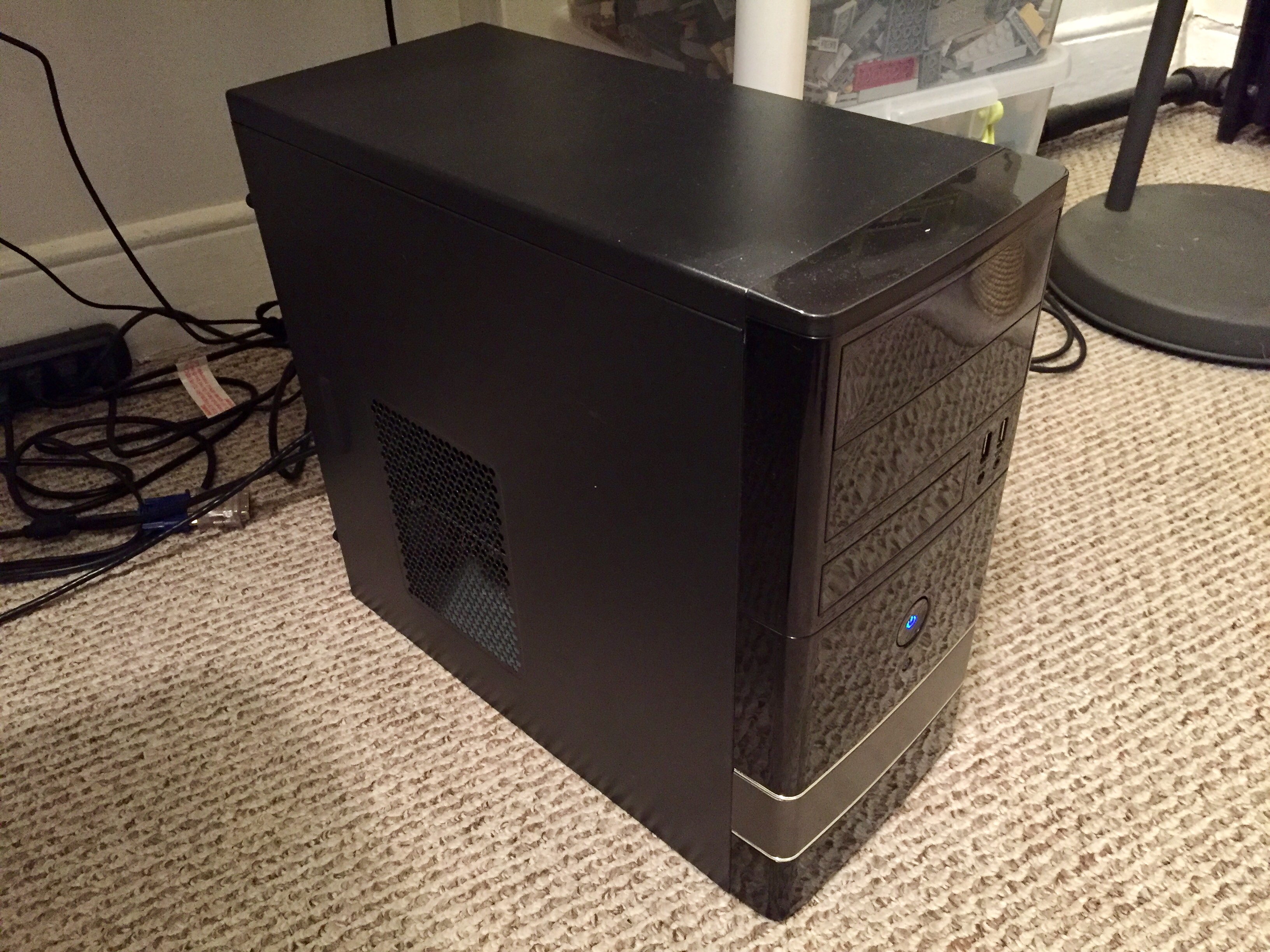
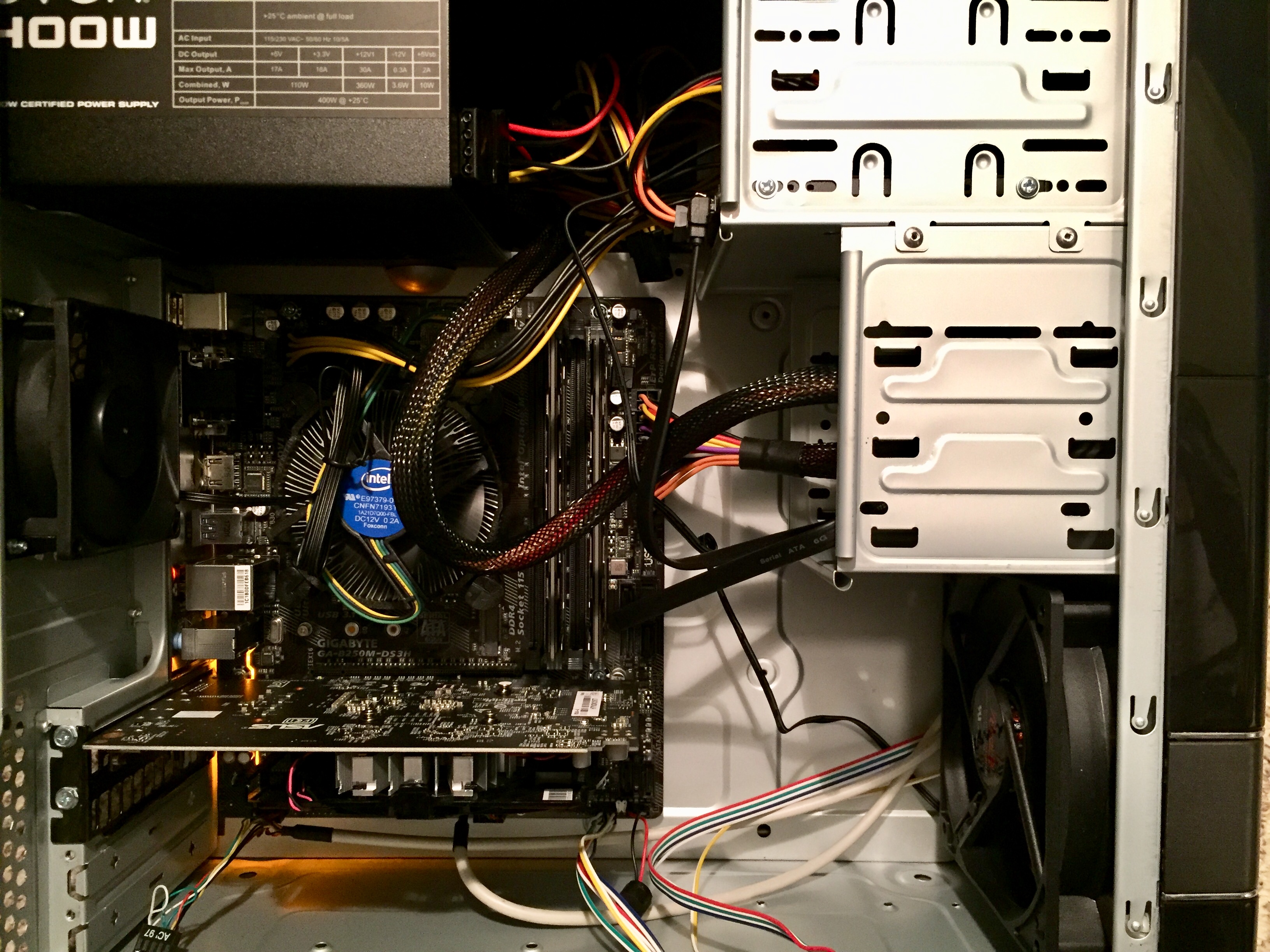
Over the past two weeks, I built a new desktop computer to replace my i5-based Intel NUC, because I wanted more CPU horsepower and a dedicated graphics card.
The NUC6i5SYH has a soldered i5-6260U CPU. This part has only two CPU cores, which support two threads each for a total of four threads. With this new build, I use a socket-based i7-7700, which has four CPU cores, each of which supports two threads for a total of eight threads. Coupled with a higher, maximum clock rate, this i7 processor can do more work in less time than the i5-6260U CPU in the Intel NUC.
For watching 1080p videos and lower resolution 3D graphics, the i5-6260U’s integrated graphics are more than sufficient. However, I wanted to play some 3D games and use Unreal Engine 4 for a project. The entry-level graphics of AMD Radeon’s RX 550 coupled with a design that does not require a higher-wattage PSU seemed adequate for this particular build.
My new computer’s specs, sourcing, and pricing are:
With any computer build that I undertake, I am most interested in maintaining access to legacy software and operating systems for my research. While I haven’t tested everything, I have confirmed that Sheepshaver/MacOS 7.5.5 and VirtualBox/Windows 98 are up-and-running.
After this preliminary setup, I ran the following benchmarks to stress test and evaluate the system. The results are included below as a measure for anyone interested in how a system like mine performs.
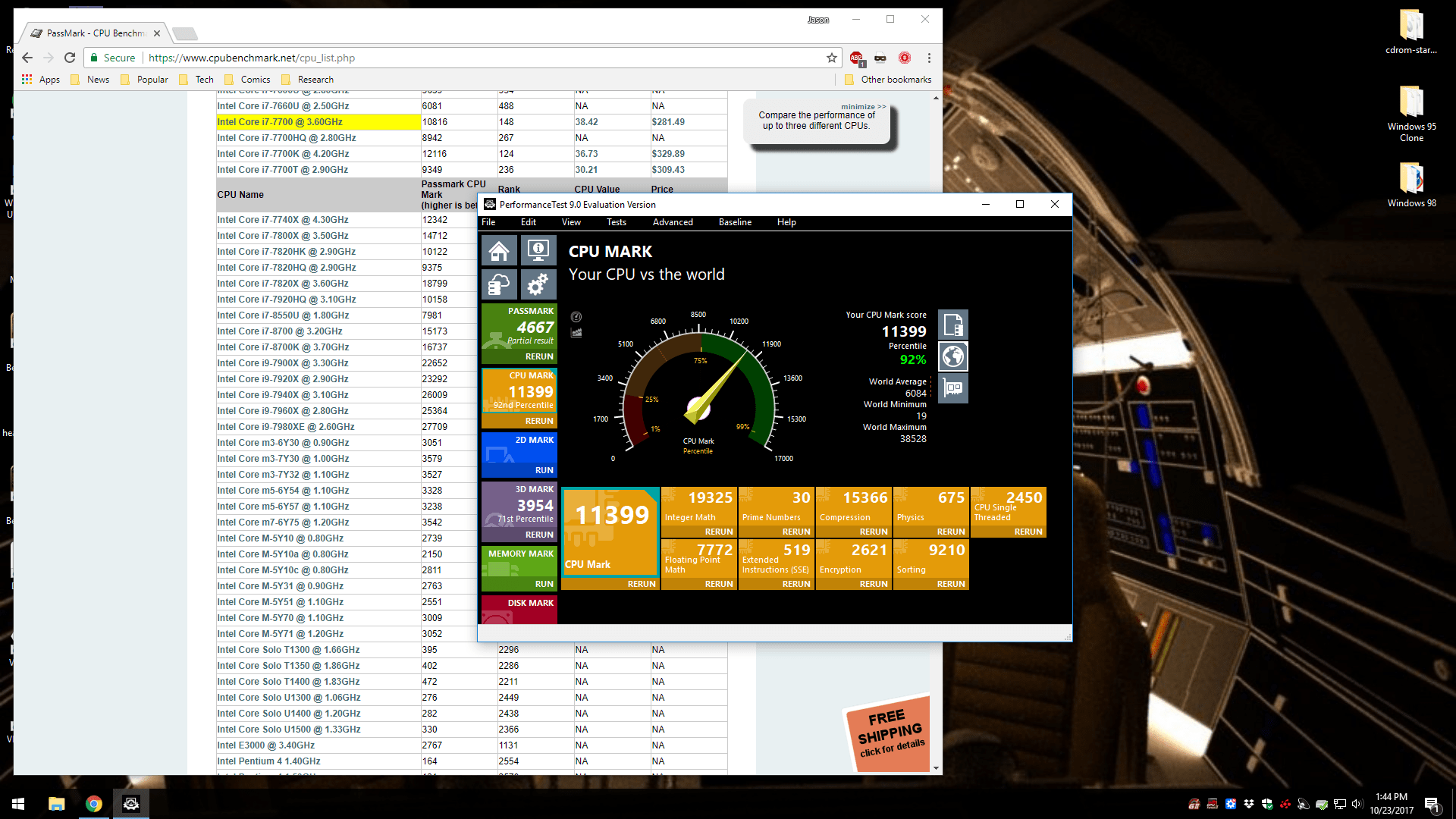
Performance Test 9, CPU Test
Using the evaluation copy of Performance Test 9, the CPU Test yielded a result of 11,399, which places the system above the average for this CPU and in the 92nd percentile.
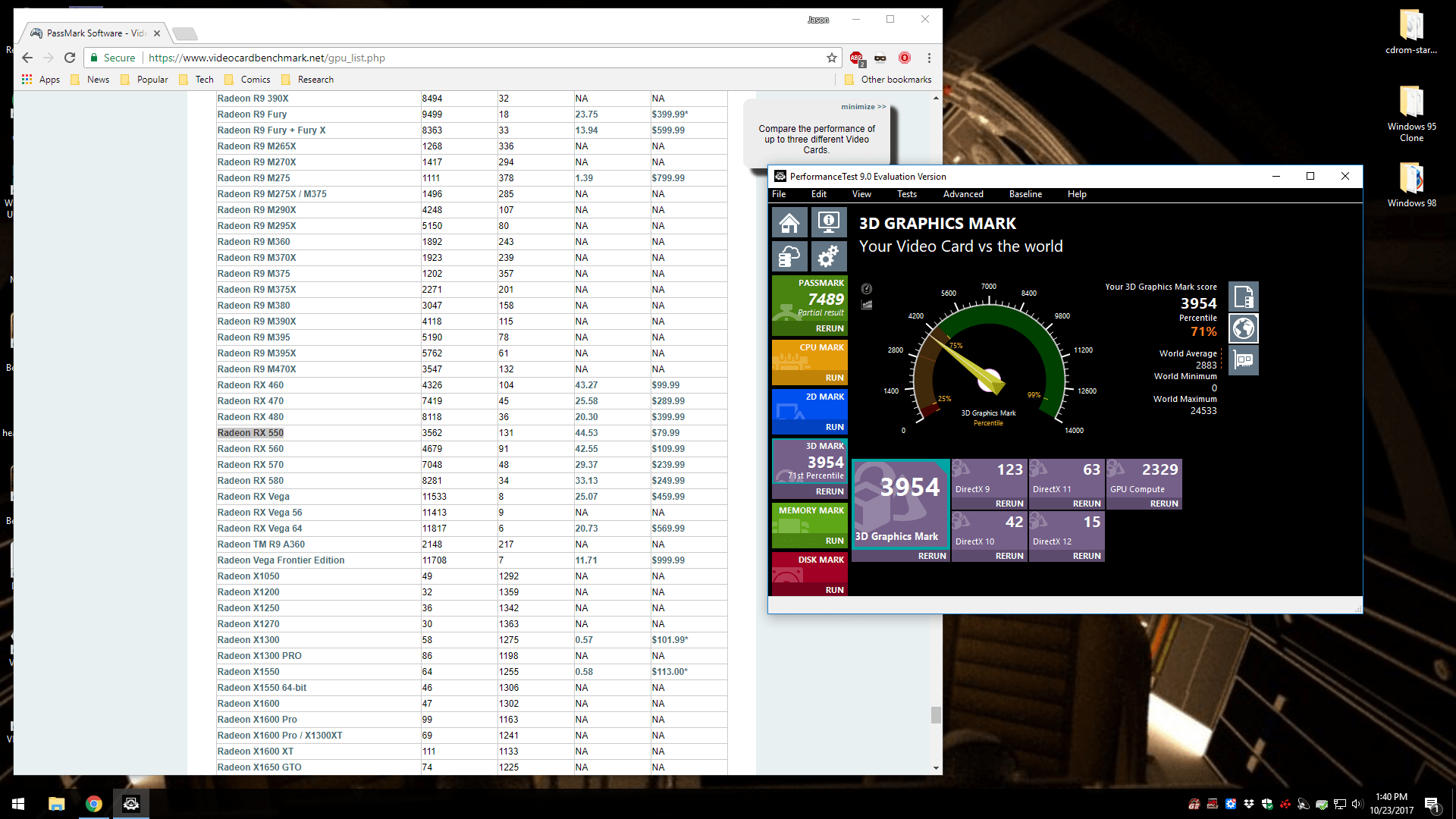
Performance Test 9, 3D Graphics Mark Test
I opted for the budget/entry-level RX 550 video card, because only a few games that I play would benefit from a greater investment in this part of the overall build. Nevertheless, I was pleased with the 3,954 3D Graphics Mark result, which places the system in the 71st percentile.
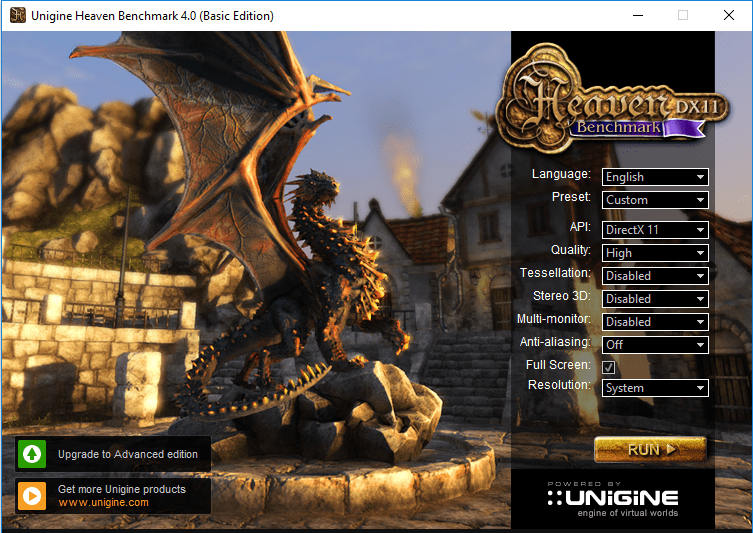
Unigen Heaven Benchmark 4.0
My system earned a Heaven Benchmark score of 843 and it sustained an average 33.5 frames per second.
Unigine Heaven Benchmark 4.0
FPS:
33.5
Score:
843
Min FPS:
17.9
Max FPS:
68.6
System
Platform:
Windows NT 6.2 (build 9200) 64bit
CPU model:
Intel(R) Core(TM) i7-7700 CPU @ 3.60GHz (3599MHz) x4
GPU model:
Radeon RX 550 Series 22.19.677.257 (4095MB) x1
Settings
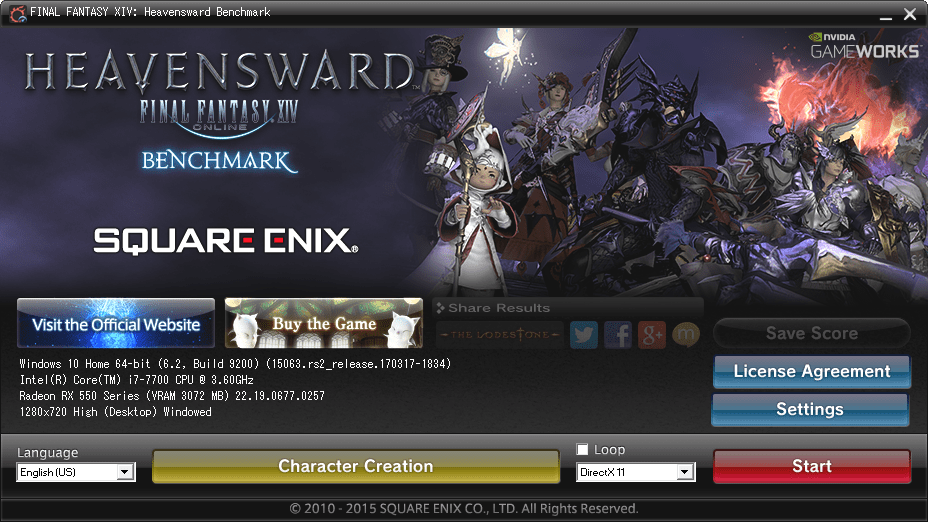
After creating a character and running the benchmark, my computer earned a score of 8077, Extremely High performance, and it maintained an average 59.933 frames per second.
FINAL FANTASY XIV: Heavensward BenchmarkFINAL FANTASY XIV: Heavensward
BenchmarkTested on: 10/27/2017 10:38:37
PMScore: 8077
Average Frame Rate: 59.933
Performance: Extremely High -Easily capable of running the game on the highest settings.
Loading Times by Scene Scene #1 1.251 sec Scene #2 5.183 sec Scene #3 3.822 sec Scene #4 3.259 sec Scene #5 4.570 sec Scene #6 1.514 secTotal Loading Time 19.600 sec
DAT:s20171027223837.dat
Screen Size: 1280x720Screen Mode: WindowedDirectX Version: 11Graphics Presets: High (Desktop)General-Wet Surface Effects: Enabled-Occlusion Culling: Enabled-LOD on Distant Objects: Disabled-Real-time Reflections: Highest Quality (DirectX 11 Only)-Edge Smoothing (Anti-aliasing): FXAA-Transparent Lighting Quality: High-Grass Quality: High-Background Tessellation: High Quality-Water Tessellation: High QualityShadows-Self: Display-Other NPCs: DisplayShadow Quality-LOD on Shadows: Enabled-Shadow Resolution: High – 2048p-Shadow Cascading: Best-Shadow Softening: StrongTexture Detail-Texture Filtering: Anisotropic-Anisotropic Filtering: x8Movement Physics-Self: Full-Other NPCs: FullEffects-Limb Darkening: Enabled-Radial Blur: Enabled-Screen Space Ambient Occlusion: HBAO+: Standard Quality (DirectX 11 Only)-Glare: NormalCinematic Cutscenes-Depth of Field: Enabled
SystemWindows 10 Home 64-bit (6.2, Build 9200) (15063.rs2_release.170317-1834)Intel(R) Core(TM) i7-7700 CPU @ 3.60GHz8151.770MBRadeon RX 550 Series (VRAM 3072 MB) 22.19.0677.0257
Benchmark results do not provide any guarantee FINAL FANTASY XIV: A Realm Reborn (Windows version) and FINAL FANTASY XIV: Heavensward (Windows version) will run on your system.
FINAL FANTASY XIV: Heavensward Official Website http://na.finalfantasyxiv.com/pr/(C) 2010-2015 SQUARE ENIX CO., LTD. All Rights Reserved.
Share ResultsType 1http://sqex.to/ffxiv_bench_na #FFXIV Score: 8077 1280×720 High (Desktop) DX11 Intel(R) Core(TM) i7-7700 CPU @ 3.60GHz Radeon RX 550 Series Type 2http://sqex.to/ffxiv_bench_na #FFXIV Score: 8077 1280×720 High (Desktop) DirectX11 Windowed Radeon RX 550 Series Type 3http://sqex.to/ffxiv_bench_na #FFXIV 1280×720 High (Desktop) DirectX11 Score: 8077 Extremely High Type 4http://sqex.to/ffxiv_bench_na #FFXIV 1280×720 High (Desktop) DirectX11 Windowed Score: 8077 Full ResultsFINAL FANTASY XIV: Heavensward Benchmark Score: 8077 Extremely High 1280×720 High (Desktop) DirectX11 Windowed Intel(R) Core(TM) i7-7700 CPU @ 3.60GHz Radeon RX 550 Series http://sqex.to/ffxiv_bench_na #FFXIV
Then, I ran the test again in 1080p resolution in full-screen mode. This resulted in a lower rating of “high” with a numerical score of 4,416.
Final Fantasy XIV Stormblood Benchmark
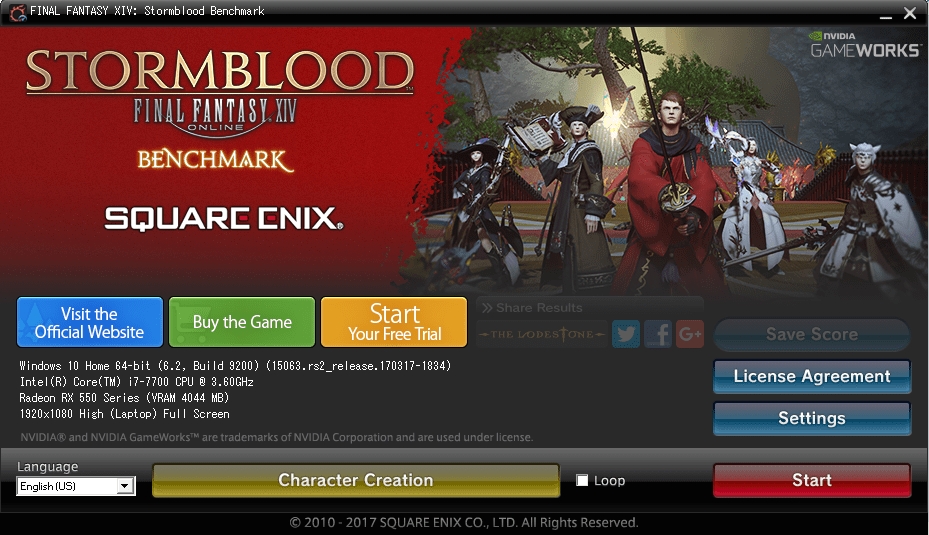
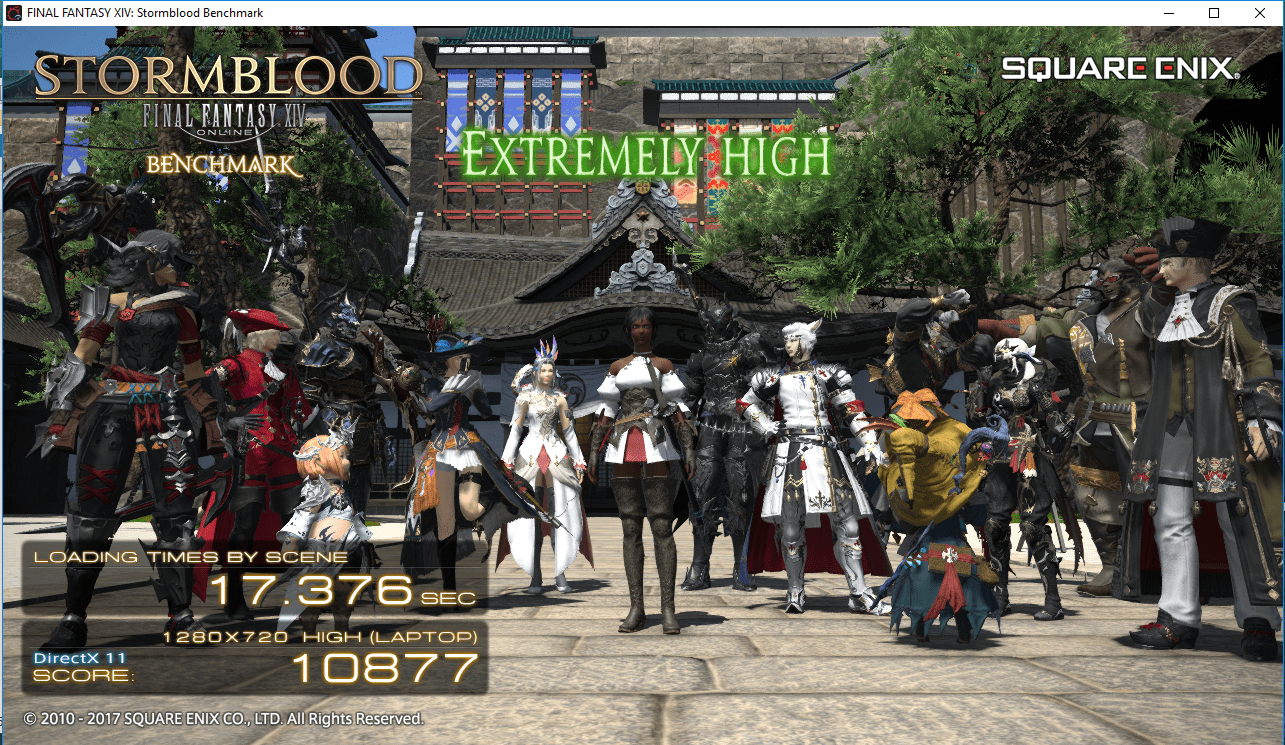
I ran the Final Fantasy XIV Stormblood benchmark twice–once at 720p in windowed mode (default) and once at 1080p in full screen mode. I imported my created character from Heavensward into Stormblood.
In 720p, windowed mode, my system scored 10,877 (extremely high).
FINAL FANTASY XIV: Stormblood BenchmarkFINAL FANTASY XIV: Stormblood BenchmarkTested on: 10/28/2017 3:58:19 PMScore: 10877Average Frame Rate: 73.707Performance: Extremely High -Easily capable of running the game on the highest settings.Loading Times by Scene Scene #1 2.109 sec Scene #2 2.956 sec Scene #3 2.329 sec Scene #4 3.194 sec Scene #5 5.589 sec Scene #6 1.192 secTotal Loading Time 17.373 sec
DAT:s20171028155819.dat
Screen Size: 1280x720Screen Mode: WindowedDirectX Version: 11Graphics Presets: High (Laptop)General-Wet Surface Effects: Enabled-Occlusion Culling: Enabled-LOD on Distant Objects: Enabled-Real-time Reflections: Off-Edge Smoothing (Anti-aliasing): FXAA-Transparent Lighting Quality: Normal-Grass Quality: Normal-Background Tessellation: High Quality-Water Tessellation: High Quality-Glare: OffShadows-Self: Display-Other NPCs: DisplayShadow Quality-LOD on Shadows: Enabled-Shadow Resolution: Normal – 1024p-Shadow Cascading: Best-Shadow Softening: StrongTexture Detail-Texture Filtering: Anisotropic-Anisotropic Filtering: x4Movement Physics-Self: Full-Other NPCs: FullEffects-Limb Darkening: Enabled-Radial Blur: Enabled-Screen Space Ambient Occlusion: HBAO+: Standard-Glare: NormalCinematic Cutscenes-Depth of Field: Enabled
SystemWindows 10 Home 64-bit (6.2, Build 9200) (15063.rs2_release.170317-1834)Intel(R) Core(TM) i7-7700 CPU @ 3.60GHz8151.770MBRadeon RX 550 Series (VRAM 4044 MB)
This software does not guarantee that your system will run the Windows versions of FINAL FANTASY XIV: A Realm Reborn, FINAL FANTASY XIV: Heavensward, and FINAL FANTASY XIV: Stormblood.
FINAL FANTASY XIV: Stormblood Official Website http://na.finalfantasyxiv.com/pr/(C) 2010-2017 SQUARE ENIX CO., LTD. All Rights Reserved.
Share ResultsType 1http://sqex.to/ffxiv_bench_na #FFXIV Score: 10877 1280×720 High (Laptop) DX11 Intel(R) Core(TM) i7-7700 CPU @ 3.60GHz Radeon RX 550 Series Type 2http://sqex.to/ffxiv_bench_na #FFXIV Score: 10877 1280×720 High (Laptop) DirectX11 Windowed Radeon RX 550 Series Type 3http://sqex.to/ffxiv_bench_na #FFXIV 1280×720 High (Laptop) DirectX11 Score: 10877 Extremely High Type 4http://sqex.to/ffxiv_bench_na #FFXIV 1280×720 High (Laptop) DirectX11 Windowed Score: 10877 Full ResultsFINAL FANTASY XIV: Stormblood Benchmark Score: 10877 Extremely High 1280×720 High (Laptop) DirectX11 Windowed Intel(R) Core(TM) i7-7700 CPU @ 3.60GHz Radeon RX 550 Series http://sqex.to/ffxiv_bench_na #FFXIV
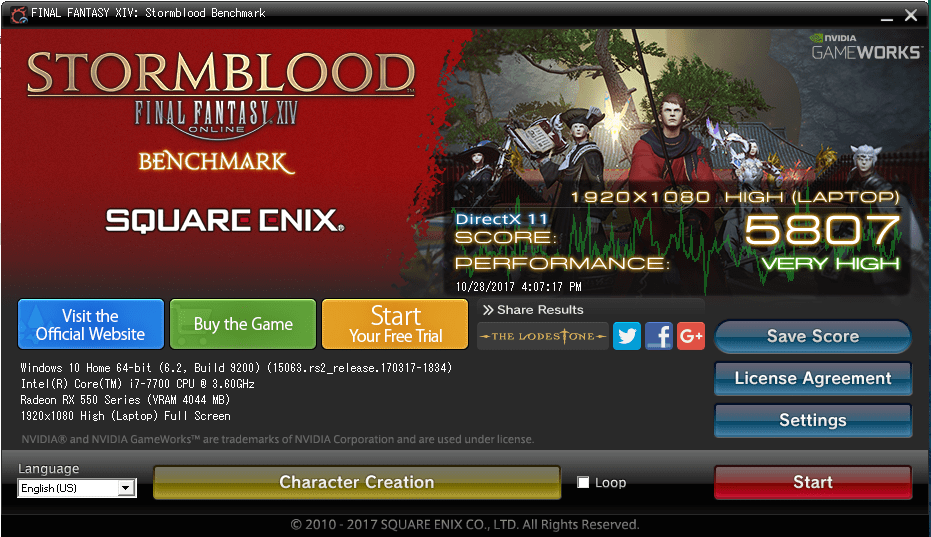
Next, I ran the benchmark again but in 1080p resolution and in full-screen mode.
This time, my computer scored only 5,807 (very high). Watching the benchmark demo unfold on my monitor was exciting, and the game looked gorgeous!
FINAL FANTASY XIV: Stormblood BenchmarkFINAL FANTASY XIV: Stormblood BenchmarkTested on: 10/28/2017 4:07:17 PMScore: 5807Average Frame Rate: 39.137Performance: Very High -Easily capable of running the game. Should perform exceptionally well, even at higher resolutions.Loading Times by Scene Scene #1 2.298 sec Scene #2 2.920 sec Scene #3 2.417 sec Scene #4 3.088 sec Scene #5 5.725 sec Scene #6 1.032 secTotal Loading Time 17.484 sec
DAT:s20171028160717.dat
Screen Size: 1920x1080Screen Mode: Full ScreenDirectX Version: 11Graphics Presets: High (Laptop)General-Wet Surface Effects: Enabled-Occlusion Culling: Enabled-LOD on Distant Objects: Enabled-Real-time Reflections: Off-Edge Smoothing (Anti-aliasing): FXAA-Transparent Lighting Quality: Normal-Grass Quality: Normal-Background Tessellation: High Quality-Water Tessellation: High Quality-Glare: OffShadows-Self: Display-Other NPCs: DisplayShadow Quality-LOD on Shadows: Enabled-Shadow Resolution: Normal – 1024p-Shadow Cascading: Best-Shadow Softening: StrongTexture Detail-Texture Filtering: Anisotropic-Anisotropic Filtering: x4Movement Physics-Self: Full-Other NPCs: FullEffects-Limb Darkening: Enabled-Radial Blur: Enabled-Screen Space Ambient Occlusion: HBAO+: Standard-Glare: NormalCinematic Cutscenes-Depth of Field: Enabled
SystemWindows 10 Home 64-bit (6.2, Build 9200) (15063.rs2_release.170317-1834)Intel(R) Core(TM) i7-7700 CPU @ 3.60GHz8151.770MBRadeon RX 550 Series (VRAM 4044 MB)
This software does not guarantee that your system will run the Windows versions of FINAL FANTASY XIV: A Realm Reborn, FINAL FANTASY XIV: Heavensward, and FINAL FANTASY XIV: Stormblood.
FINAL FANTASY XIV: Stormblood Official Website http://na.finalfantasyxiv.com/pr/(C) 2010-2017 SQUARE ENIX CO., LTD. All Rights Reserved.
Share ResultsType 1http://sqex.to/ffxiv_bench_na #FFXIV Score: 5807 1920×1080 High (Laptop) DX11 Intel(R) Core(TM) i7-7700 CPU @ 3.60GHz Radeon RX 550 Series Type 2http://sqex.to/ffxiv_bench_na #FFXIV Score: 5807 1920×1080 High (Laptop) DirectX11 Full Screen Radeon RX 550 Series Type 3http://sqex.to/ffxiv_bench_na #FFXIV 1920×1080 High (Laptop) DirectX11 Score: 5807 Very High Type 4http://sqex.to/ffxiv_bench_na #FFXIV 1920×1080 High (Laptop) DirectX11 Full Screen Score: 5807 Full ResultsFINAL FANTASY XIV: Stormblood Benchmark Score: 5807 Very High 1920×1080 High (Laptop) DirectX11 Full Screen Intel(R) Core(TM) i7-7700 CPU @ 3.60GHz Radeon RX 550 Series http://sqex.to/ffxiv_bench_na #FFXIV
Conclusion
While I certainly understand choosing components for overclocking, I opted for a build that was stable first and provided performance second.
I am very happy with my system’s stability and performance. If your processing needs outweigh your graphics needs, I recommend building a system similar to this one.
Before Thanksgiving 2016, I purchased an Intel NUC 6I5SYH ($319.99 on sale at Microcenter, late-November 2016) to serve as my new home desktop computer. This review/guide is based on my initial setup of the 6I5SYH.
The Intel NUC 6I5SYH is a small form factor (SFF) bare-bones personal computer from Intel’s “Next Unit of Computing” line.
The 6I5SYH includes an enclosure (approximately 4 1/2″ wide x 4 3/8″ deep x 2″ tall), motherboard with a soldered i5-6260U CPU (Skylake, or 6th-gen architecture–1.9GHz up to 2.8GHz Turbo, Dual Core, 4MB cache, 15W TDP), wall-mount power adapter with multi-country AC plugs, and VESA mount bracket.
The 6I5SYH’s motherboard supports the i5’s integrated Iris 540 graphics over a built-in HDMI 1.4b or Mini DisplayPort 1.2, and it includes 2x USB 3.o ports (back), 2x USB 3.0 ports (front and one supports charging), 2x USB 2.0 headers (on motherboard), IR sensor, Intel 10/100/1000Mbps ethernet, Intel Wireless-AC 8260 M.2 (802.11ac, Bluetooth 4.1, and Intel Wireless Display 6.0), headphone/microphone jack (front, or 7.1 surround sound via HDMI and Mini DisplayPort/back), and SDXC slot with UHS-I support (left side).
The 6I5SYH requires the user to supply a hard drive or SSD, and RAM. For permanent storage, it has internal support for an M.2 SSD card (22×42 or 22×80) and SATA3 2.5″ HDD/SSD (up to 9.5mm thick). For memory, it supports dual-channel DDR4 SODIMMs (1.2V, 2133MHz, 32GB maximum) across two internal slots.
For my 6I5SYH’s RAM, I installed one Crucial 8GB DDR4 2400 BL SODIMM ($44.99 on sale at Micro Center, late-November 2016), and for its SSD, I installed a Silicon Power S60 240GB SATA3 SSD ($67.99 on sale on Amazon, December 2015). Excluding the costs of a monitor, keyboard, and trackball, this system cost $432.97.
After first assembling the 6I5SYH with its RAM and SSD, I booted it and went into the BIOS (press F2 at the boot/Intel screen) to check its BIOS version. Based on everything that I had read about this and past Intel NUCs, it is always advisable to have the most up-to-date BIOS installed. Sure enough, it reported having BIOS 0045, and a newer BIOS had been released (0054) according to the Intel Download Center page for the 6I5SYH.
I downloaded the new BIOS binary file to a FAT-formatted USB flash drive on my Mac, inserted the USB flash drive into a front USB port on the NUC, pressed F7 to update BIOS, and followed the prompts. After confirming the BIOS had updated, I turned the 6I5SYH off by holding down the power button on its top plate.
After the media creation was completed, I inserted my Fedora 25 bootable USB flash drive into a front USB port of the 6I5SYH, powered it on, pressed F10 for the boot menu, and followed the prompts. If you need an installation guide for Fedora 25 check out the Fedora Documentation here, or if you need a screenshot walkthrough of installing Fedora 25, check out this guide.
After installing Fedora 25 with full disk encryption, I installed updates and began installing additional software. The guides here and here offer great advice (there are others for “what to do after installing fedora 24” that have useful info, too) on what to install and configure after a fresh installation of Fedora. Some that I recommend include Gnome Tweak Tool (available within Software app), Yum Extender (DNF) (available within Software app), VeraCrypt, and VLC. Remember to install RPM Fusion free and nonfree repositories–directions here, too.
So far, Fedora 25 has performed wonderfully on the 6I5SYH! Out of the box, the graphics, WiFi, Bluetooth, USB ports, and SD card reader have worked without error. I am using a Mini DisplayPort to VGA adapter to connect the 6I5SYH to a less expensive VGA-input LCD monitor. I am watching 1080p Rogue One trailers without a hiccup, and I listen to Beastie Boy MP3s while doing work in GIMP or LibreOffice. I have not yet fully tested virtualization or emulation (consoles or vintage computing)–these are my next steps.
The 6I5SYH is snappy about doing work, and it is quiet nearly always except when it first boots up (and the fans spin up high momentarily). For the features, size, and price, I highly recommend the 6I5SYH as a desktop replacement that runs Fedora 25 and common Linux programs quite well!
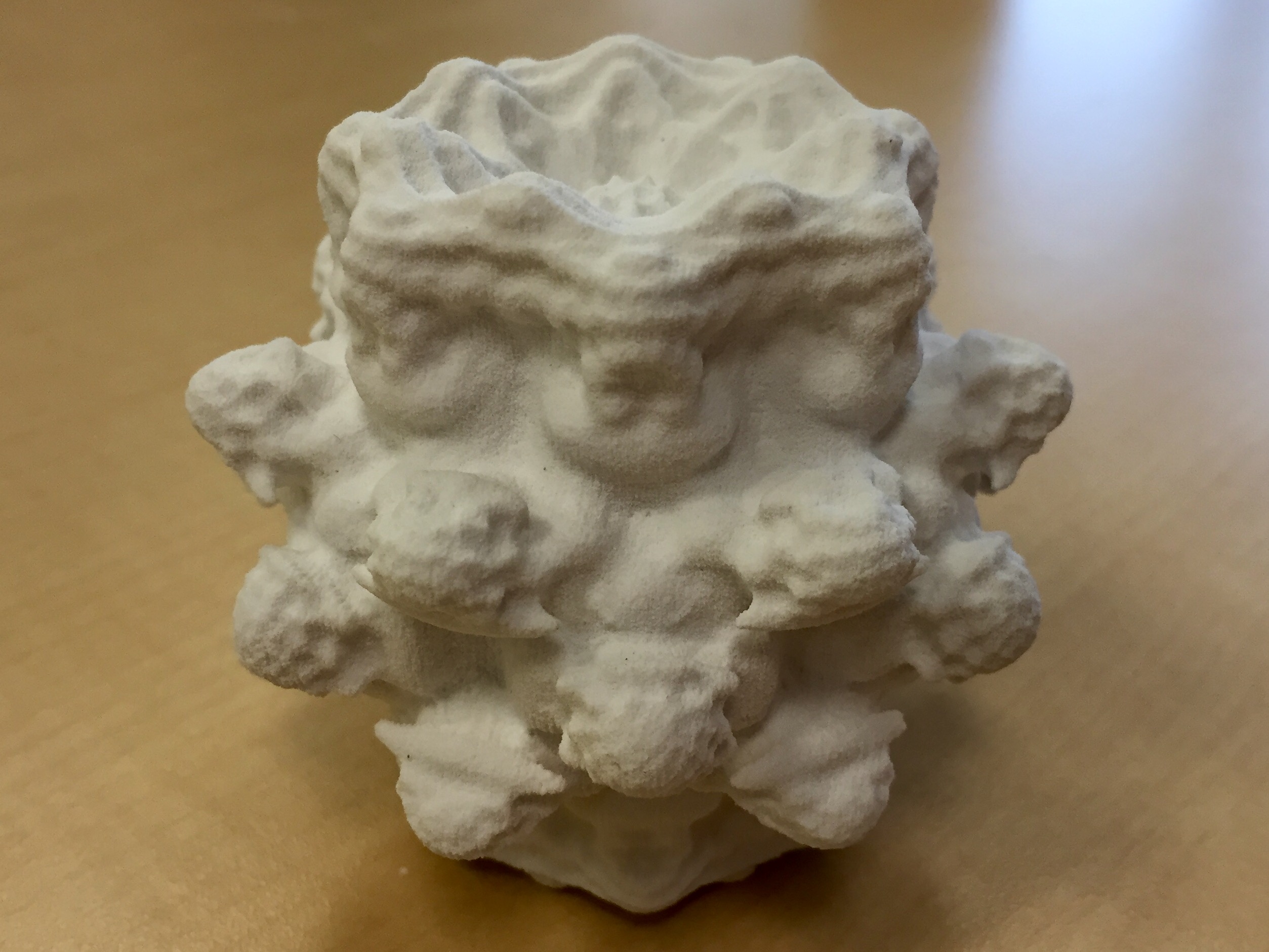
This is a 3D print of a Mandelbulb that I created with Mandelbulb3D, Fiji, and meshlab.
I’m an NEH Fellow for City Tech’s “A Cultural History of Digital Technology” project. It brings together faculty from across the college to design humanities-course modules and a new course proposal that brings the six modules together. I am contributing to the Digital Fabrication Module of the course curriculum that the team will develop.
I put together the following bibliography of Science Fiction, critical work, video games, and software as part of my contribution to the project and the upcoming curricular work. Following my bibliography, I have included the preliminary viewings and readings for this module (which were selected before I joined the project as a fellow) for those interested in learning more about these topics.
Working Bibliography
Fiction: 3D Printing (chronological)
Heinlein, Robert A. “Waldo.” Astounding Science Fiction Aug. 1942: 9-53.
Smith, George O. “Identity.” Astounding Science Fiction Nov. 1945. 145-180.
Russell, Eric F. “Hobbyist.” Astounding Science Fiction Sept. 1947: 33-61.
Sheckley, Robert. “The Necessary Thing.” Galaxy Science Fiction June 1955. 55-66.
Clarke, Arthur C. The City and the Stars. Harcourt Brace/SFBC, 1956.
Stephenson, Neal. The Diamond Age, or, A Young Lady’s Illustrated Primer. Bantam Spectra, 1995.
Gibson, William. All Tomorrow’s Parties. Viking Press, 1999.
Brin, David. Kiln People. Tor, 2002.
Marusek, David. Counting Heads. Tor, 2005. [expansion of his novella We Were Out of Our Minds with Joy, 1995].
Rucker, Rudy. “As Above, So Below.” in The Microverse. Ed. Byron Preiss. Bantam Spectra, 1989. 334-340.
Shiner, Lewis. “Fractal Geometry.” in The Edges of Things. WSFA Press, 1991. 59.
Anthony, Piers. Fractal Mode. Ace/Putnam, 1992. [second novel in his Mode series].
Di Filippo, Paul. “Fractal Paisleys.” The Magazine of Fantasy and Science Fiction May 1992: 72-106.
Charnock, Graham. “On the Shores of a Fractal Sea.” in New Worlds 3. Ed. David Garnett. Gollancz, 1993. 125-136.
Luckett, Dave. “The Patternmaker.” in The Patternmaker: Nine Science Fiction Stories. Ed. Lucy Sussex. Omnibus Books, 1994. 3-18.
Pickover, Clifford A. Chaos in Wonderland: Visual Adventures in a Fractal World. St. Martin’s Press, 1994.
Turzillo, Mary A. “The Mandelbrot Dragon.” in The Ultimate Dragon. Eds. Keith DeCandido, John Betancourt, and Byron Preiss. Dell, 1995. 167-172.
Williamson, Jack. “The Fractal Man.” 1996. in At the Human Limit. Haffner Press, 2011. 187-204.
Leisner, William. “Gods, Fate, and Fractals.” in Strange New Worlds II. Eds. Dean Wesley Smith, John J. Ordover, and Paula M. Block. Pocket Books, 1999. 166-183.
Thompson, Douglas. Ultrameta: A Fractal Novel. Eibonvale Press, 2009.
Strasser, Dirk. “The Mandelbrot Bet.” in Carbide Tipped Pens: Seventeen Tales of Hard Science Fiction. Eds. Ben Bova and Eric Choi. Tor, 2014. 365-378.
Non-Fiction (chronological)
Snow, C.P. The Two Cultures and the Scientific Revolution. Cambridge UP, 1961.
Rucker, Rudy. “In Search of a Beautiful 3D Mandelbrot Set.” RudyRucker.com. 5-14 Sept. 1988 (revised 24 Sept. 2009).
Hayles, N. Katherine. How We Became Posthuman: Virtual Bodies in Cybernetics, Literature, and Informatics. University of Chicago Press, 1999.
Thurs, Daniel Patrick. “Tiny Tech, Transcendent Tech: Nanotechnology, Science Fiction, and the Limits of Modern Science Talk.” Science Communication vol. 29, no. 1 (Sept. 2007): 65-95.
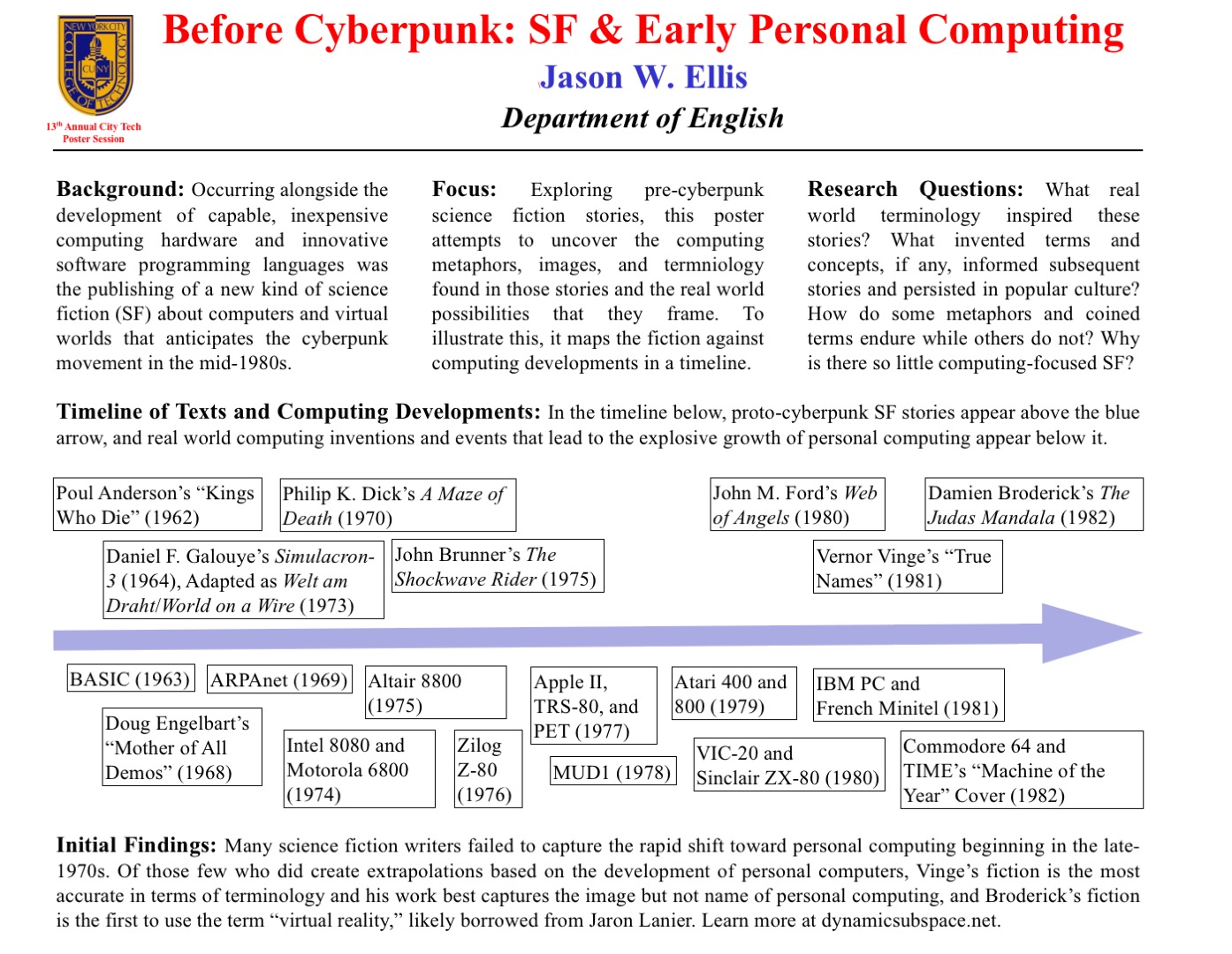
For the New York City College of Technology, CUNY’s 13th Annual Research Poster Session, I created the poster embedded above to illustrate my current research on pre-cyberpunk science fiction (SF) about computing and personal computing. The poster discusses my focus and provides a timeline with SF about computing matched with key technological innovations that made the personal computing revolution in the late-1970s possible.
What I am interested in is the fact that William Gibson’s “cyberspace” captured the popular imagination about the metaphorical place where computing, processing, navigating, interacting, and communicating occurs, but some of the very good SF about computing that predates Gibson’s coining the term cyberspace failed to leave an indelible impression. Certainly, these stories were read and circulated, but the reach of their images and metaphors seem to have been limited in scope as compared to Gibson’s writing.
One of the ideas that I have had since creating the poster is that the idea of hidden computing or outlaw computing is something central to Vernor Vinge’s “True Names.” This, of course, features large in Gibson’s fictions, and it is the image that I am looking for in other SF of this transitional era.
At the poster session, I will carry my Raspberry Pi-based touchscreen-computer-in-a-Suntory-box-from-Japan to demonstrate the idea of hidden computing. I will post a step-by-step instruction post soon about assembling the Raspberry Pi-based computer and offer some additional thoughts about how I would like to use them in my technical communication classes.
In this post, I want to provide some of my notes and links to relevant resources as a record of the initial research that I did in preparation of this poster. It is my hope that it might lead to conversations and collaborations in the future.
Fiction Sources
Murray Leinster’s “A Logic Named Joe” (1946): Home computers connected to a large scale network. [Couldn’t fit within poster dimensions, but a significant work that needs mentioning.]
Isaac Asimov’s “The Fun They Had” (1951): Children discovering a print book are agog at what it represents while their classroom/desktop teaching computers flash mathematical fractions at them. [Couldn’t fit within poster dimensions, but another important work in this genealogy.]
Poul Anderson’s “Kings Who Die” (1962): Human-computer interface, according to Asimov and Greenberg in The Great SF Stories #24, “one of the first stories to address this question” (69).
Daniel F. Galouye’s Simulacron-3 (1964): Also published as Counterfeit World. Adapted as Welt am Draht/World on a Wire (1973). Simulated reality for artificial beings programmed to believe (except in the case of one character) that they are real and living in the “real world.”
Philip K. Dick’s A Maze of Death (1970): A crew in a disabled spacecraft while awhile their remaining lives in a computer generated virtual world.
John Brunner’s The Shockwave Rider (1975): Computer programming and hacking. First use of the term “worm” to describe a type of self-propagating computer program set loose on the computer network. Protagonist as outlaw.
[Five year gap during the personal computing revolution. Were the SF writers playing with their new personal computers?]
John M. Ford’s Web of Angels (1980): The “Web” is a communication and computing network connecting humanity. “Webspinners” are an elite group of programmers who can manipulate the Web in unique and unexpected ways. Protagonist as outlaw.
Vernor Vinge’s “True Names” (1981): Computing power hidden from view of a watchful government–literally under the floor boards. Early MMORPG/virtual reality experience of what was later called cyberspace. Protagonist as outlaw.
Damien Broderick’s The Judas Mandala (1982): First SF to use the terms “virtual reality” and “virtual matrix.” Protagonist as conspirator/outlaw?
Nonfiction Sources
Cavallaro, Dani. Cyberpunk and Cyberculture: Science Fiction and the Work of William Gibson. New Brunswick, NJ: Athlone Press, 2000. Print.
Ferro, David L. and Eric G. Swedin. Eds. Science Fiction and Computing: Essays on Interlinked Domains. Jefferson, NC: McFarland, 2011. Print.
Kay, Alan C. “A Personal Computer for Children of All Ages.” ACM ’72 Proceedings of the ACM Annual Conference – Volume 1. New York: ACM, 1972. n.p. Web. 18 Nov. 2015.