Category: Computers

  • How I Guide Stable Diffusion with ControlNet and Composite Images

    GIMP showing a multi-layer image of Lynn Conway on the right and her co-authored textbook Introduction to VLSI Systems on the left.

    For the illustration of Lynn Conway and her co-authored textbook Introduction to VLSI Systems at the top of yesterday’s post, I used a locally hosted installation of Automatic1111’s stable-diffusion-webui, the finetuned model Dreamshaper 5, which is based on StabilityAI’s Stable Diffusion 1.5 general model, and the ControlNet extension for A1111.

    Stable Diffusion is an image generating AI model that can be utilized with different software. I used Automatic1111’s stable-diffusion-webui to instruct and configure the model to create images. In its most basic operation, I type into the positive prompt box what I want to see in the output image, I type into the negative prompt box what I don’t want to see in the output image, and click “Generate.” Based on the prompts and default parameters, I will see an image output on the right that may or may not align with what I had in mind.

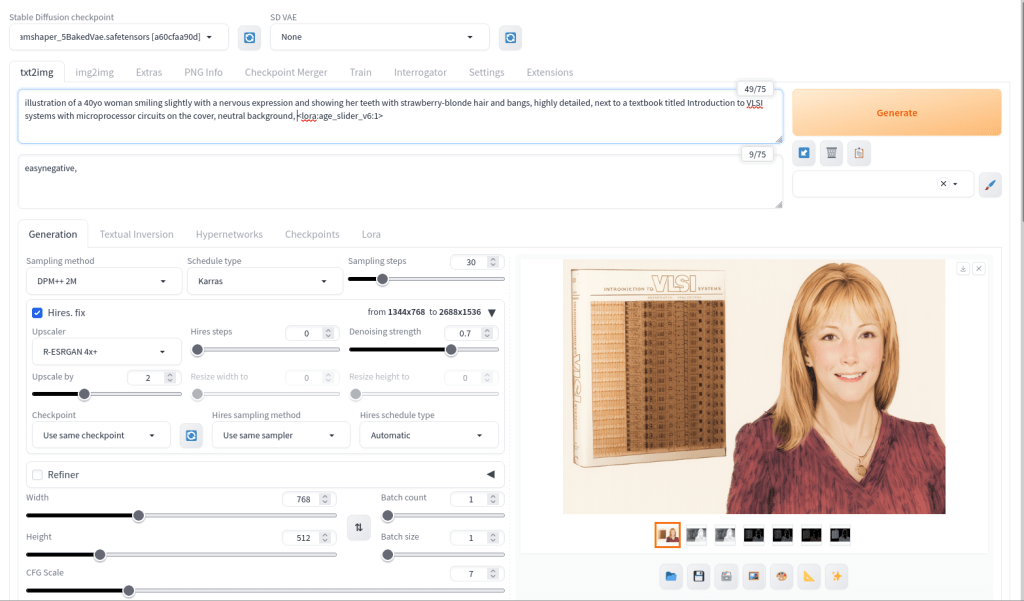
    Automatic1111's stable-diffusion-webui image generating area

    For the positive prompt, I wrote:

    illustration of a 40yo woman smiling slightly with a nervous expression and showing her teeth with strawberry-blonde hair and bangs, highly detailed, next to a textbook titled introduction to VLSI systems with microprocessor circuits on the cover, neutral background, <lora:age_slider_v6:1>

    I began by focusing on the type of image (an illustration), then describing its subject (woman), other details (the textbook), and the background (neutral). The last part in angle brackets is a LoRA or low rank adaptation. It further tweaks the model that I’m using, which in this case is Dreamshaper 5. This particular LoRA is an age slider, which works by inputting a number that corresponds with the physical appearance of the subject. A “1” presents about middle age. A higher number is older and a lower/negative number is younger.

    Automatic1111's stable-diffusion-webui ControlNet extension area

    ControlNet, which employs different models focused on depth, shape, body poses, etc. to shape the output image’s composition, is an extension to Automatic1111’s stable-diffusion-webui that helps guide the generative AI model to produce an output image more closely aligned with what the user had in mind.

    For the Lynn Conway illustration, I used three different ControlNet units: depth (detecting what is closer and what is further away in an image), canny (one kind of edge detection for fine details), and lineart (another kind of edge detection for broader strokes). Giving each of these different levels of importance (control weight) and telling stable-diffusion-webui when to begin using a ControlNet (starting control step) and when to stop using a ControlNet (ending control step) during each image creation changes how the final image will look.

    Typically, each ControlNet unit uses an image as input for its guidance on the generative AI model. I used the GNU Image Manipulation Program (GIMP) to create a composite image with a photo of Lynn Conway on the right and a photo of her co-authored textbook on the left (see the screenshot at the top of this post). Thankfully, Charles Rogers added his photo of Conway to Wikipedia under a CC BY-SA 2.5 license, which gives others the right to remix the photo with credit to the original author, which I’ve done. Because the photo of Conway cropped her right arm, I rebuilt it using the clone tool in GIMP.

    I input the image that I made into the three ControlNets and through trial-and-error with each unit’s settings, A1111’s stable-diffusion-webui output an image that I was happy with and used on the post yesterday. I used a similar workflow to create the Jef Raskin illustration for this post, too.

  • Lynn Conway, the VLSI Revolution, and Hacking Pedagogy

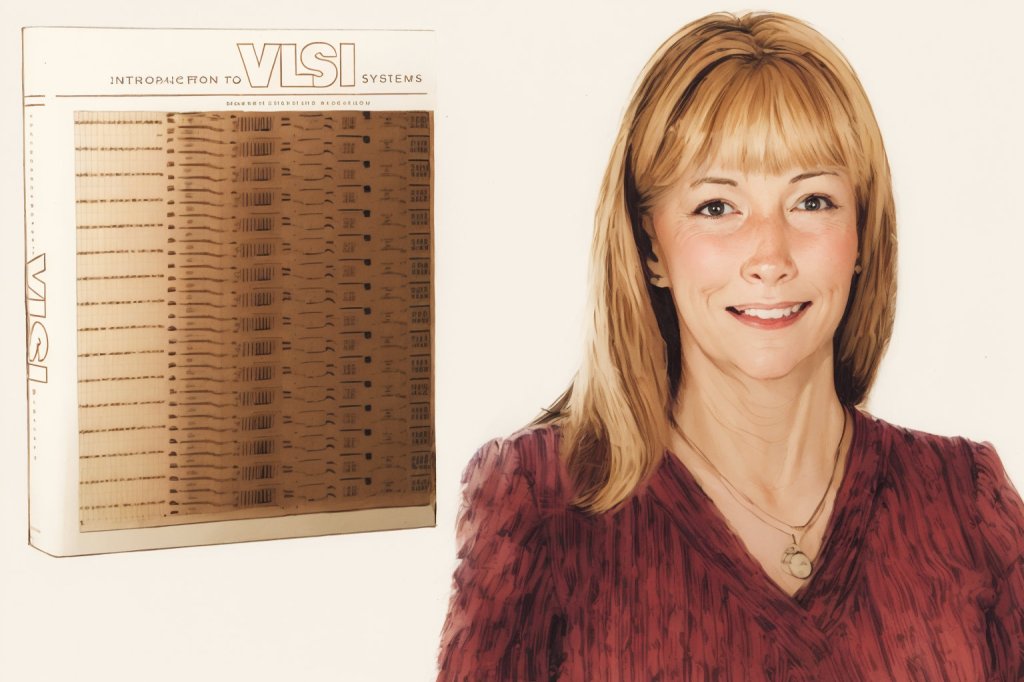
    Illustration of Lynn Conway and a copy of her textbook with Carver Mead: Introduction to VLSI Systems. Image created with Stable Diffusion.
    Illustration of Lynn Conway with a copy of Mead and Conway’s Introduction to VLSI Systems. Conway’s likeness is based on Charles Roger’s photo on Wikipedia, which he released under a CC BY-SA 2.5 License. Image created with Stable Diffusion.

    This past weekend, The New York Times ran an obituary for Lynn Conway, half of the namesake for the Mead-Conway VLSI Revolution and co-author of the groundbreaking textbook Introduction to VLSI Systems (1980). She died at the age of 86.

    What is so cool about the Mead-Conway VLSI chip design revolution was not only that it was the paradigm shift that made possible the next step in microprocessor design and fabrication by enabling electrical engineering and computer science students to do the work that was previously the domain of physicists and the high tech industry, but also that it was a under-the-radar pedagogical hack. Conway writes in the October 2018 issue of Computer:

    "With all the pieces in place, an announcement was made on ARPANET to electrical engineering and computer science departments at major research universities about what became known as "MPC79." On the surface, while appearing to be official and institutionally based, it was done in the spirit of a classic "MIT hack"--a covert but visible technical stunt that stuns the pubic, who can't figure out how it was done or what did it. (I'd been an undergrad at MIT in the 1950s).
    
    The bait was the promise of chip fabrication for all student projects. Faculty members at 12 research universities signed on to offer Mead-Conway VLSI design courses. This was bootleg, unofficial, and off the books, underscoring the principle that "it's easier to beg forgiveness than to get permission" (p. 69).

    While this was a huge contribution to the development of the computer industry leading into the 1980s and beyond, it was only one of her many accomplishments–innovating an out-of-order queuing processing system for IBM only to be fired in 1968 when she began transitioning to become a woman, starting her career over and eventually making her way to Xerox PARC, later joining the University of Michigan as a professor of electrical engineering and computer science and serving as associate dean of engineering, and becoming a transgender advocate later in life. She was recognized with many awards and honorary doctorates for her contributions to the field as an engineer and educator.

  • Syntrend Creative Park in Taipei, Taiwan

    Syntrend Creative Park in Taipei, Taiwan

    Y sent me this photo of Syntrend Creative Park in Taipei, Taiwan. The whole complex is the funky, weird-ass building in the foreground and the highrise in the background.

    It’s kind of like a more integrated version of Brooklyn’s Industry City + Microcenter area.

    Syntrend has across its many floors shopping (computers, gaming, pop culture, toys, music, etc.) and dining experiences. It has maker spaces, co-working spaces, and event spaces. It’s definitely on my list of places to visit when I get a chance to go to Taiwan again!

  • Riding Amtrak’s Silver Meteor from Savannah to New York City in a Private Roomette, April 2024

    Amtrak Silver Meteor Train, Savannah to Penn Station, NYC.

    I decided to ride Amtrak back home after visiting my folks, because I dislike the indignity of traveling by air in the United States. I’ve had more than my fair share of “random bag checks,” and I disagree with the security theater at TSA checkpoints that does more to insult than protect.

    While a train obviously takes longer than an airplane flight, it provides the individual with a dignified travel experience. You walk from the station to the tracks, board your train, and off you go.

    I opted for a roomette aboard Amtrak’s Silver Meteor so that I could sleep more easily on the overnight train ride. The scheduled trip time was about 14 hours, but the actual trip time was closer to 17. For one-way travel, the cost was only a little more than a plane ticket.

    Overall, I enjoyed the experience. Perhaps because the experience was new, I had trouble staying asleep. When I ride again, I might take a sleep aid like Melatonin to help with my sleep. Also, as others have remarked online, there were delays. My train’s delays meant that I missed the dinner service, and since the train was designated only with dinner and breakfast service, there was no lunch service despite arriving 3 hours late in NYC the next day. Thankfully, I had learned from other train travelers and came prepared with extra water and snacks to tide me over. However, I might pack an MRE for a meal next time to have something more substantial to eat if needed.

    Below are some photos of my trip aboard the Silver Meteor and my roomette. I tried to capture the roomette’s features and amenities as well as demonstrate how much/little leg room there is if you are traveling with another person. Also, this train has a toilet in the roomette–something you would need to negotiate its use if traveling with someone else. Finally, I have some photos of the dining car and the early morning breakfast that I enjoyed (as the dining options are limited, the earlier you go to a meal, the more likely the option you want will still be available).

    Savannah Amtrak Station

    Train tracks at Savannah Amtrak Station
    One of two murals painted inside the Savannah Amtrak Station.
    Two of two murals painted inside the Savannah Amtrak Station.
    Savannah Amtrak Station entrance as seen from train when leaving

    Sleeping Car

    Amtrak Silver Meteor Train, Sleeping Car, Savannah to Penn Station, NYC.
    Amtrak Silver Meteor Train, Sleeping Car hallway, Savannah to Penn Station, NYC.
    Amtrak Silver Meteor Train, Sleeping Car hallway, Savannah to Penn Station, NYC.

    Roomette

    Amtrak Silver Meteor Train, Roomette door, Savannah to Penn Station, NYC.
    Amtrak Silver Meteor Train, Roomette right side seat, Savannah to Penn Station, NYC.
    Amtrak Silver Meteor Train, Roomette left side seat with toilet and sink, Savannah to Penn Station, NYC.

    Roomette Toilet and Folding Sink

    Amtrak Silver Meteor Train, Roomette toilet seat, Savannah to Penn Station, NYC.
    Amtrak Silver Meteor Train, Roomette toilet seat up, Savannah to Penn Station, NYC.
    Amtrak Silver Meteor Train, Roomette sink folded down for use, Savannah to Penn Station, NYC.

    Roomette Interior Door and Window to Hallway

    Amtrak Silver Meteor Train, Roomette sliding door and interior window with curtains pulled, Savannah to Penn Station, NYC.

    Roomette Legroom

    Amtrak Silver Meteor Train, Roomette leg room when sitting straight, Savannah to Penn Station, NYC.
    Amtrak Silver Meteor Train, Roomette leg room legs crossed and relaxed, Savannah to Penn Station, NYC.

    Roomette Folding Table

    Amtrak Silver Meteor Train, Roomette metal folding table, Savannah to Penn Station, NYC.
    Amtrak Silver Meteor Train, Roomette folding table supporting a 16" Lenovo ThinkPad P1, Savannah to Penn Station, NYC.

    Roomette Bunk Bed

    Amtrak Silver Meteor Train, Roomette bunk bed pulled down and made up for sleep, Savannah to Penn Station, NYC.

    Dining Car

    Amtrak Silver Meteor Train, Dining car, Savannah to Penn Station, NYC.
    Amtrak Silver Meteor Train, Dining car breakfast, Savannah to Penn Station, NYC.

    Passing Through Washington, DC

    Jefferson Memorial and Washington Memorial seen from Amtrak passenger train
    Capital Building seen from Amtrak passenger train

    Passing Train

    Side of passing Amtrak passenger train
  • Thinking About My Friend Chris Lee: Macintosh Aficionado, Music Guru, and Eidetic Memory Man for Movie Dialog

    Chris hanging out in Brunswick. This was my second photo with my Sony Cybershot 2MP camera.

    Recently, I was telling my City Tech colleague Kate Falvey about a habit of thought that I have when I encounter things that I would ordinarily want to share with a specific person who I think would be interested in that thing even though that person might have passed away. That kind of thought happens more often with my friend Chris Lee, who passed away in 2016. Our mutual interest in computers, pop culture, and video games was the currency of our friendship over many years that began when he saw me pull out my Apple Powerbook 145B in Mr. Norris’ Graphic Design class at Brunswick High School. Later, after we had a falling out around 2000, he mended the bridge and we became good friends again.

    Me in a green hoodie and Chris in a blue jacket outdoors at night.

    When we were younger, our great ambition was to open a computer repair shop and publicize it with a video of us marching through flames as Rammstein’s “Du Hast” blasts in the background. He pushed the limits of good sense by loading what I believe to be a record number of Control Panels and Extensions that would dance along the bottom of his Mac’s boot screen–at least three full lines of icons at 1024 x 768. He created archives of sound that surpassed mortal lifespans capable of listening to it all. He mastered anything released for the Nintendo GameCube. He had a phenomenal memory for movie dialog–a specialized eidetic memory that would have been a superpower at trivia night.

    Chris Lee dancing in his parents' living room.

    The last thing that we talked about was how much had gone on in our lives so far. I texted him, “Too bad we don’t have a time traveling DeLorean. We could stop by and blow our younger selves’ minds 😎.” His reply and last text to me was, “I wish I had a DeLorean.”

    LEGO time travel DeLorean with the driver side door open and Doc Brown hanging out.

    Not long after that, I got a call from our friend Kenny. Chris had died. He was back in Brunswick where our friendship had started. I couldn’t really write about it then, and even now, it’s difficult. I’m not able to say all that I feel and how I wish that I could share just a few things with Chris again.

    Chris Lee's grave stone embossed with UGA's G logo and the Apple Computer apple with a bite taken out logo.

    When I visit my parents, I try to visit Chris’s grave in Smyrna Cemetery, which is between Nahunta and Hortense. His grave marker highlights some of his life’s loves, including Apple Computer. Of course, I wish that Chris could hear when I talk, but I know that what I say is only heard by regret.