Despite being scrawled with a paint marker by an anonymous tagger on a filthy concrete support column in the Home Depot parking lot on 3rd Avenue in Brooklyn, NY, I paused to ruminate on its written message, “Stop Being Afraid Ⓐ.” Perhaps contemplating this message will be beneficial to you, too.
An anthropomorphic cat wearing coveralls, working with advanced computers. Image generated with Stable Diffusion.
As I wrote about recently about my summertime studying and documented on my generative artificial intelligence (AI) bibliography, I am learning all that I can about AI–how it’s made, how we should critique it, how we can use it, and how we can teach with it. As with any new technology, the more that we know about it, the better equipped we are to master it and debate it in the public sphere. I don’t think that fear and ignorance about a new technology are good positions to take.
I see, like many others do, that AI as an inevitable step forward with how we use and what we can do with computers. However, I don’t think that these technologies should only be under the purview of big companies and their (predominantly) man-child leaders. Having more money and market control does not mean one is a more ethical practitioner with AI. In fact, it seems that some industry leaders are calling for more governmental oversight and regulation not because they have real worries about AI’s future development but instead because they are in a leadership position in the field and likely can shape how the industry is regulated through industry connections with would-be regulators (i.e., the revolving door of industry-government regulation in other regulatory agencies).
Of course, having no money or market control in AI does not mean one is potentially more ethical with AI either. But, ensuring that there are open, transparent, and democratic AI technologies creates the potential for a less skewed playing field. While there’s the potential for abuse of these technologies, having these available to all creates the possibility for many others to use AI for good. Additionally, if we were to keep AI behind locked doors, only those with access (legally or not) will control the technology, and there’s nothing to stop other countries and good/bad actors in those countries from using AI however they see fit–for good or ill.
To play my own small role in studying AI, using generative AI, and teaching about AI, I wanted to build my own machine learning-capable workstation. Before I made any upgrades, I maxed out what I could do with a Asus Dual RTX 3070 8GB graphics card and 64GB of RAM for the past few months. I experimented primarily with Stable Diffusion image generation models using Automatic1111’s stable-diffusion-webui and LLaMA text generation models using Georgi Gerganov’s llama.cpp. An 8GB graphics card like the NVIDIA RTX 3070 provides a lot of horsepower with its 5,888 CUDA cores and memory bandwidth across its on-board memory. Unfortunately, the on-board memory is too small for larger models or adjusting models with multiple LORA and the like. For text generation, you can layer some of the model on the graphic’s card memory and your system’s RAM, but this is inefficient and slow in comparison to having the entire model loaded in the graphics card’s memory. Therefore, a video card with a significant amount of VRAM is a better solution.
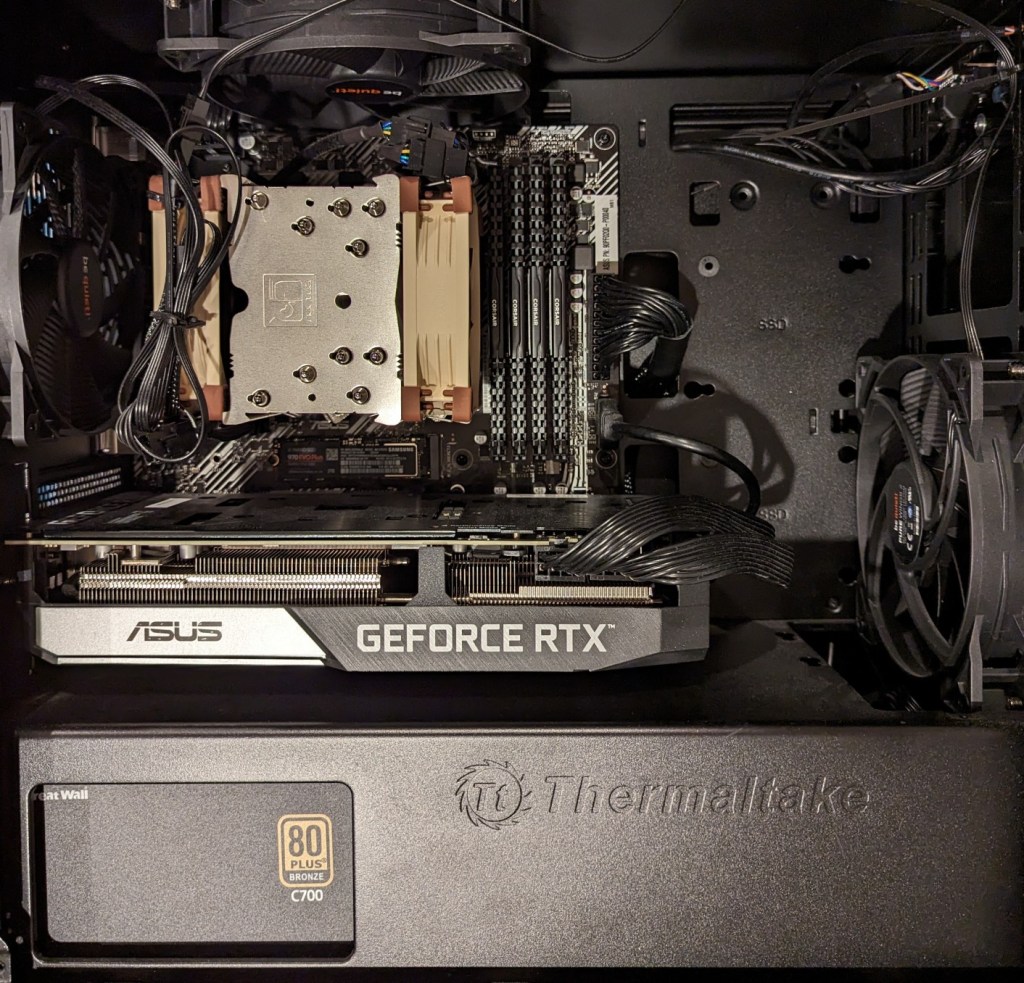
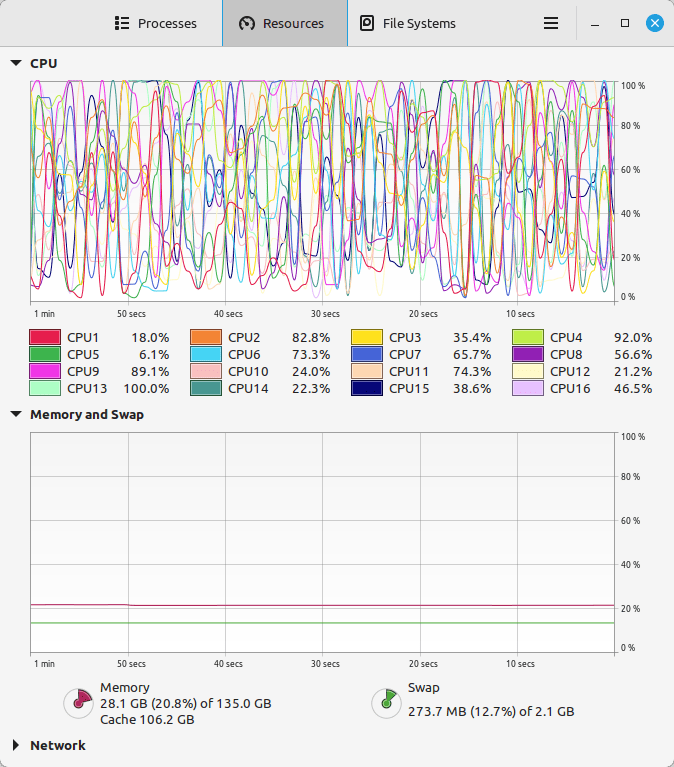
For my machine learning focused upgrade, I first swapped out my system RAM for 128GB DDR4-3200 (4 x 32GB Corsair shown above). This allowed me to load 65B parameters into system RAM with my Ryzen 7 5800X 8 core/16 thread CPU to perform the operations. The CPU usage while it is processing tokens on llama.cpp looks like an EEG:
While running inference on the CPU was certainly useful for my initial experimentation and the CPU usage graph looks cool, it was exceedingly slow. Even an 8 core/16 thread CPU is ill-suited for AI inference in part due to how it lacks the massive parallelization of graphics processing units (GPUs) but perhaps more importantly due to the system memory bottleneck, which is only 25.6 GB/s for DDR4-3200 RAM according to Transcend.
Video cards, especially those designed by NVIDIA, provide specialized parallel computing capabilities and enormous memory bandwidth between the GPU and video RAM (VRAM). NVIDIA’s CUDA is a very mature system for parallel processing that has been widely accepted as the gold standard for machine learning (ML) and AI development. CUDA is unfortunately, closed source, but many open source projects have adopted it due to its dominance within the industry.
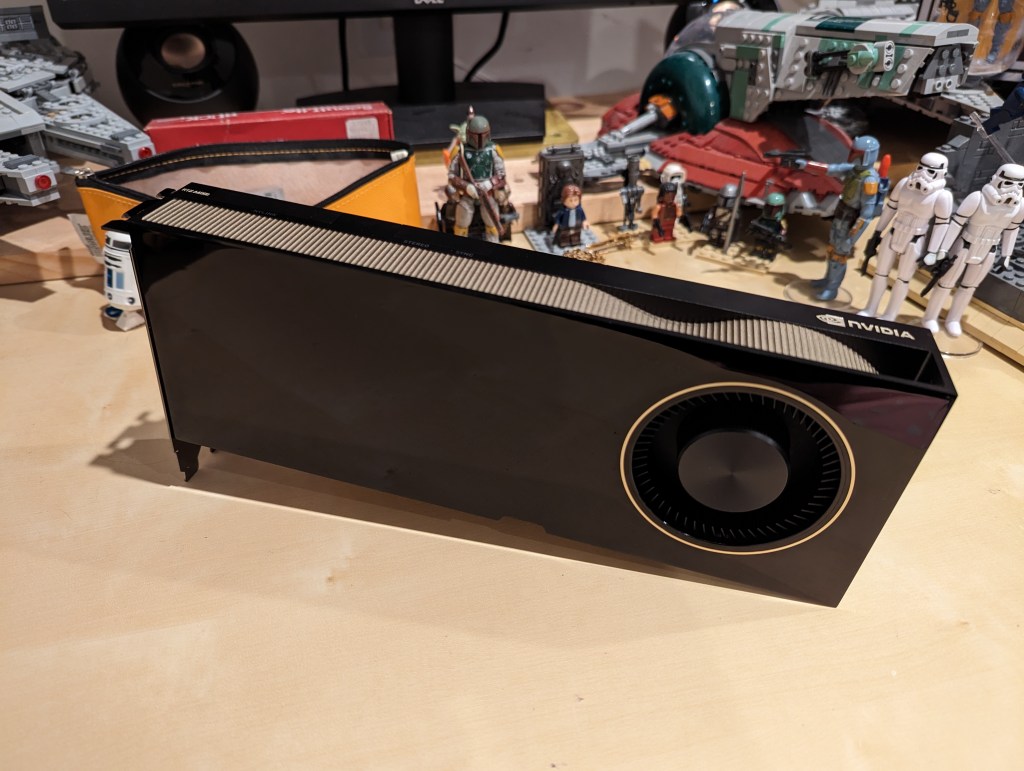
My primary objective when choosing a new video card was that it had enough VRAM to load a 65B LLaMA model (roughly 48GB). One option for doing this is to install two NVIDIA RTX 3090 or 4090 video cards with each having 24GB of VRAM for a total of 48GB. This would solve my needs for running text generation models, but it would limit how I could use image generation models, which can’t be split between multiple video cards without a significant performance hit (if at all). So, a single card with 48GB of VRAM would be ideal for my use case. Three options that I considered were the Quadro 8000, A40, and RTX A6000 Ampere. The Quadro 8000 used three-generation-old Turing architecture, while the A40 and RTX A6000 used two-generation-old Ampere architecture (the latest Ada architecture was outside of my price range). The Quadro 8000 has memory bandwidth of 672 GB/s while the A40 has 696 GB/s and the A6000 has 768 GB/s. Also, the Quadro 8000 has far fewer CUDA cores than the other two cards: 4,608 vs. 10,572 (A40) and 10,752 (A6000). Considering the specs, the A6000 was the better graphics card, but the A40 was a close second. However, the A40, even found for a discount, would require a DIY forced-blower system, because it is designed to be used in rack mounted servers with their own forced air cooling systems. 3D printed solutions that mate fans to the end of an A40 are available on eBay, or one could rig something DIY. But, for my purposes, I wanted a good card with its own cooling solution and a warranty, so I went with the A6000 shown below.
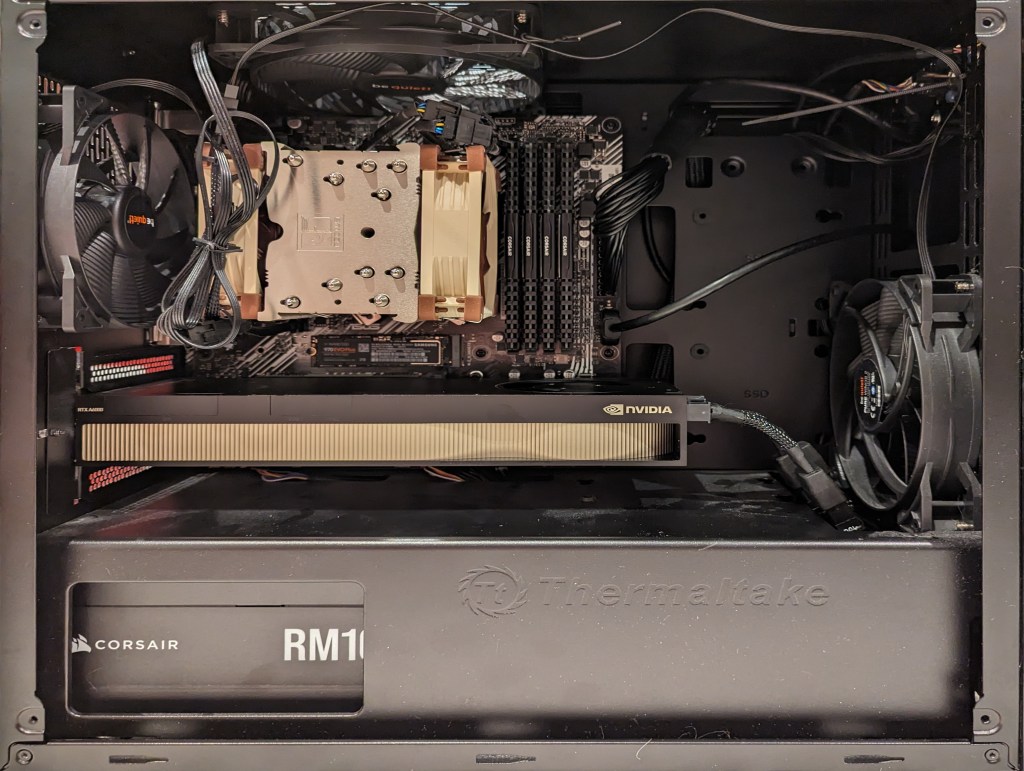
Another benefit to the A6000 over the gaming performance-oriented 3090 and 4090 graphics cards is that it requires much less power–only 300 watts at load (vs ~360 watts for the 3090 and 450 watts for the 4090). Despite this lower power draw, I only had a generic 700 watt power supply. I wanted to protect my investment in the A6000 and ensure it had all of the power that it needed, so I opted to go with a recognized name brand PSU–a Corsair RM1000x. It’s a modular PSU that can provide up to 1,000 watts to the system (it only provides what it is needed–it isn’t using 1000 watts constantly). You can see the A6000 and Corsair PSU installed in my system below.
Now, instead of waiting for 15-30 minutes for a response to a long prompt ran on my CPU and system RAM, it takes mere seconds to load the model on the A6000’s VRAM and generate a response as shown in the screenshot below of oobabooga’s text-generation-webui using the Guanaco-65B model quantized by TheBloke to provide definitions of science fiction for three different audiences. The tool running in the terminal in the lower right corner is NVIDIA’s System Management Interface, which can be opened by running “nvidia-smi -l 1”.
Y began using Postcrossing in 2013 when we still lived in Atlanta. She liked the concept of connecting with others around the world via mailed postcards.
The way Postcrossing works is you setup a profile with your mailing address. Then, you request an address of another Postcrossing user for you to send a postcard to. When that person whose address you just got receives and registers your postcard online, then another, different Postcrossing user will be given your address randomly to send a postcard to you. Some users offer to do direct swaps, but most do not. In some cases, you might make a connection with someone that leads to becoming pen pals (Y and I each have different pen pals in Germany).
I began helping Y with her Postcrossing account before the pandemic began. We share and trade off duties, which include requesting addresses, choosing a postcard that someone might like, selected and affixing the correct postage (in the past, we purchased unused stamps on eBay and at philatelic/stamp collecting shows at significant discounts), and of course, writing a message, the postcard ID, and recipient’s address.
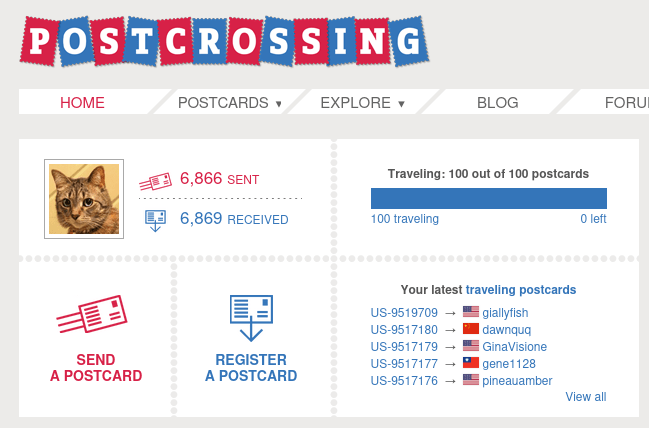
As you can see below, we’ve had 6,866 sent cards (we’ve sent more than this–this number reflects the number that were successfully registered by their recipients), and 6,869 received cards (this is how many cards we’ve received and registered–as you can imagine that number would be higher if some cards sent to us had not been lost in the mail).
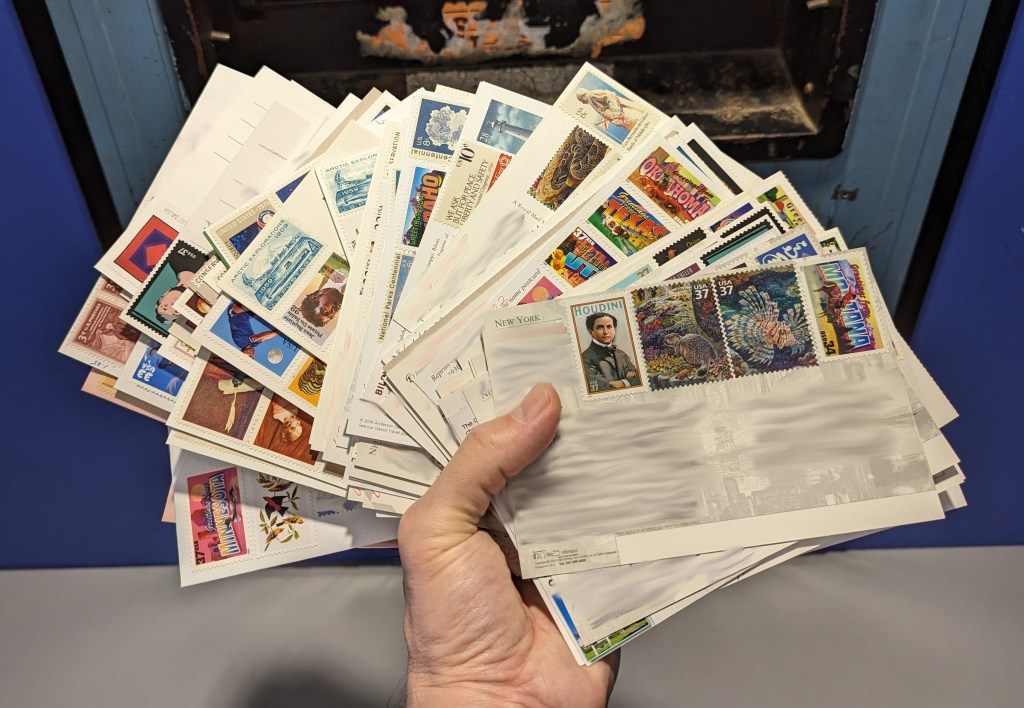
The picture at the top of this post is our most recent batch of 100 sent postcards. We had let the account go dormant during this past school year. Over the past few days, Y requested 100 addresses, selected cards, and affixed postage. As she would complete a small batch of cards, she handed them to me and I wrote the message to the recipient. For selecting the postcard and writing the message, Y and I would read the recipient’s profile and view their favorite postcards to get a sense of who they are and what we would like to send/say to them.
Of these 100 postcards, we sent 1 to Bulgaria, 2 to Canada, 13 to China, 1 to Czechia, 1 to Denmark, 1 to Finland, 23 to Germany, 1 to Ireland, 1 to Italy, 3 to Japan, 1 to Kazakhstan, 5 to Netherlands, 2 to Poland, 1 to Portugal, 1 to Spain, 1 to Taiwan, 41 to the United States, and 1 to Ukraine. The distribution depends on how many users there are in a given country and how many have just had cards registered. Postcrossing tries to balance the distribution across its user base. Also, you can select to not send cards to your own country. However, it’s worth noting that the price of sending a postcard overseas is about 3 times the price to send a postcard domestically.
I encourage my students to try out Postcrossing as a way to connect with others and practice their writing. Also, learning about others’ lived experience and sharing your own with others can serve to break down barriers to understanding and bridge arbitrary divisions between people.
Anyone can join and the service is free. The only costs are for postcards and postage. If you are interested in Postcrossing, you can get involved in whatever way suits you.
An anthropomorphic cat taking notes in a lecture hall. Image created with Stable Diffusion.
I tell my students that I don’t ask them to do anything that I haven’t done or will do myself. A case in point is using the summer months for a learning boost. LinkedIn Learning offers new users a free trial month, which I’m taking advantage of right now.
While I’ve recommended students to use LinkedIn Learning for free via the NYPL, completion certificates for courses don’t include your name and they can only be downloaded as PDFs, meaning you can’t easily link course completion to your LinkedIn Profile. Due to the constraints with how library patron access to LinkedIn Learning works, I opted to try out the paid subscription so that it links to my LinkedIn Profile. However, I wouldn’t let these limitations hold you back from using LinkedIn Learning via the NYPL if that is the best option for you–just be aware that you need to download your certificates and plan how to record your efforts on your LinkedIn Profile, your resume, and professional portfolio.
For those new to online learning, I would make the following recommendations for learning success:
Simulate a classroom environment for your learning. This means find a quiet space to watch the lectures while you are watching them. Don’t listen to music. Turn off your phone’s notifications. LinkedIn courses are densely packed with tons of information. Getting distracted for a second can mean you miss out on something vital to the overall lesson.
Have a notebook and pen to take notes. While watching the course, pause it to write down keywords, sketch charts, and commit other important information to your notes. The act of writing notes by hand has been shown to improve your memory and recall of learned information. Don’t keep notes by typing as this is less information rich learning than writing your notes by hand.
Even though a course lists X hours and minutes to completion, you should budget at least 50% more time in addition to that time for note taking, studying, quizzes, and exams (for those courses that have them).
While not all courses require you to complete quizzes and exams for a completion certificate, you should still take all of the included quizzes and exams. Research shows that challenging ourselves to recall and apply what we’ve learned via a test helps us remember that information better.
After completing a course, you should add the course certificate to your LinkedIn Profile, post about completing the course (others will give you encouragement and your success might encourage others to learn from the same course that you just completed), add the course certificate to your resume, and think about how you can apply what you’ve learned to further integrate your learning into your professional identity. On this last point, you want to apply what you’ve learned in order to demonstrate your mastery over the material as well as to fully integrate what you’ve learned into your mind and professional practices. This also serves to show others–managers, colleagues, and hiring personnel–that you know the material and can use it to solve problems. For example, you might write a blog post that connects what you’ve learned to other things that you know, or you might revise a project in your portfolio based on what you’ve learned.
Bring what you’ve learned into your classes (if you’re still working toward your degree) and your professional work (part-time job, internship, full-time job, etc.). Learning matters most when you can use what you’ve learned to make things, solve problems, fulfill professional responsibilities, and help others.
Illustration of skateboarders skating a halfpipe, surrounded by night sky. Created with Stable Diffusion.
While working on the Generative AI and Pedagogy Bibliography the other day, I realized that I had neglected the Skateboarding Studies Bibliography for the past few years. To bring it up to speed, I updated it with some new rigorous books and articles along with some lighter, reference works for the would-be skateboarder (or researcher who needs the name and steps for a particular trick). The book section more than doubled in size to 33 sources, and the articles and book chapter section grew by a handful to number 87 now. Going forward, I plan to break the bibliography into focused sections as I did on the Generative AI and Pedagogy Bibliography. I’ll post an update when that gets done. In the meantime, I hope that you find something useful to read on the list!