Category: Technical Communication

  • Customize Xfce on Debian 12 Bookworm to Look Like BeOS and Haiku OS

    BeOS desktop image

    This weekend, I installed Debian 12 Bookworm with Xfce desktop environment on my desktop computer, because I wanted a pure Xfce installation on top of a distro running a 6.0 or higher kernel to theme as close to BeOS as I can get.

    As I’ve written about before here, I have fond memories of using BeOS on my old PowerMacintosh 8500/120. When I used it on that hardware, it felt like the future. Many of its features were ahead of its time for a desktop computing environment. It was also incredibly easy to navigate and interact with due to its colors, icons, and textured UI elements.

    I believe that BeOS and Haiku OS have GUIs that are easy to see and interact with, because they aren’t flattened to death like most contemporary operating systems, which have less contrast and textured borders that hinder visual comprehension and interaction.

    I tried installing Xubuntu, but after installation, I was greeted by the login prompt, I entered my credentials, received a black screen (NB: not rebooting–for some reason the DE wouldn’t launch and it would kick me back to the login screen), and was greeted again by the login prompt. Since that was a fresh installation, I was concerned about the long-term stability of it on my computer. Hence, I tried out Debian 12, which installed and booted without a hitch!

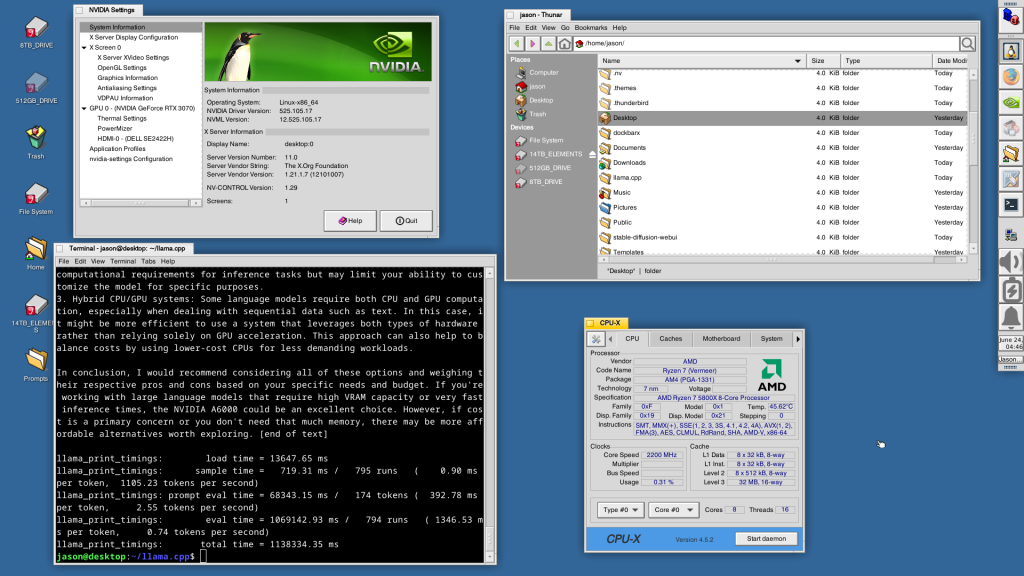
    In addition to reinstalling Automatic1111 for Stable Diffusion for AI image generation and Llama.cpp for AI text generation, I set about theming Xfce to look as much like BeOS as possible.

    I describe step-by-step how to make Xfce mimic BeOS in the sections below.

    Window Manager Theme

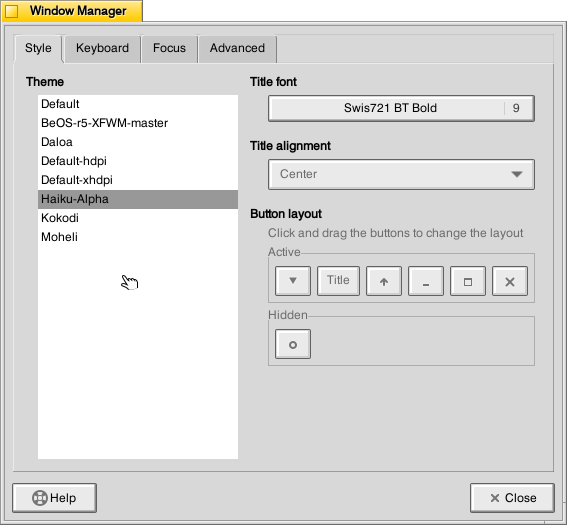
    Window Manager window

    Perhaps the most notable aspect of BeOS/Haiku’s look-and-feel is the yellow, tabbed window title bar. Some tutorials suggest using the BeOS-r5-XFWM theme, but I opted for the Haiku-Alpha theme, because it only keeps the close window tic box and eliminates the other options such as minimize, maximize, etc., which you can still operate by setting one option to title bar double clicks and others from the drop-down right-click menu.

    Decompress the downloaded file and move the resulting folder into ~/.themes (remember to turn on “show hidden files and folders” in your file manager, and create the .themes folder if it does not already exist). Then, go to Settings > Window Manager > select Haiku-Alpha. Also, set the font to Swis721 BT Bold size 9 (see font section below for more info).

    Appearance Theme

    Appearance window

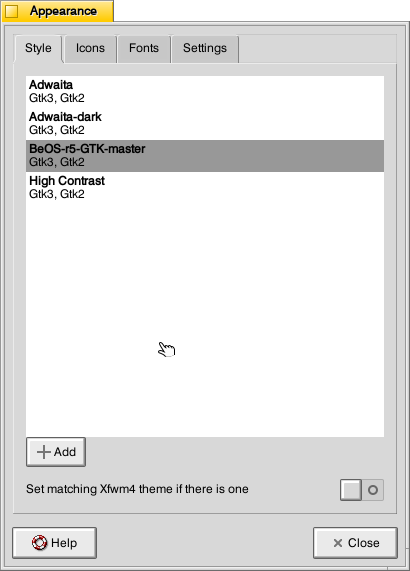
    To give Xfce the general look-and-feel of BeOS’s relatively high contrast interface (by today’s modern, flat interface standards), I installed the BeOS-r5-GTK theme.

    Decompress the downloaded file and move the resulting folder into ~/.themes. Then, go into Settings > Appearance > Style > select BeOS-r5-GTK-master.

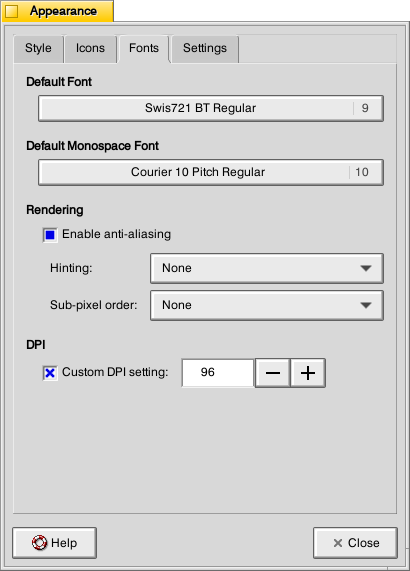
    Next, click on the Fonts tab. For Default Font, select Swis721 BT Regular size 9, and for Default Monospace Font, select Courier 10 Pitch Regular size 10 (see Font section below for more info).

    Fonts

    There are two essential fonts, which can be easily found through Google searches: Swis721 BT Roman and Courier 10 Pitch for Powerline.

    Once downloaded, move the ttf files into ~/.fonts (remember to turn on “show hidden files and folders” in your file manager, and create the .themes folder if it does not already exist).

    There are two main areas where the fonts need to be set. First, go to Settings > Window Manager > Style tab and set the Title font to Swis721 BT Bold size 9. Then, go to Settings > Appearance > Fonts tab and set the Default Font to Swis721 BT Regular size 9 and set the Default Monospace Font to Courier 10 Pitch Regular size 10.

    Mouse Cursors

    Mouse and Trackpad theme window

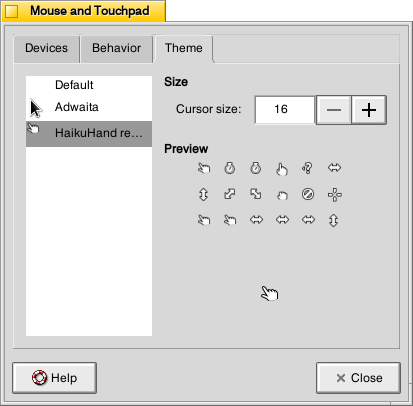
    The hand mouse cursor is an integral element of BeOS’s look-and-feel. I opted to use HaikuHand reHash.

    Decompress the downloaded file and move its folder into ~/.icons (remember to turn on “show hidden files and folders” in your file manager, and create the .themes folder if it does not already exist). Then, select HaikuHand reHash in Settings > Mouse and Touchpad > Theme.

    Icons

    Appearance Icons tab

    The isometric view icons for BeOS capture that mid-to-late-1990s era of gesturing towards 3D through 2D designs. Vaporware Mac System 8 Copland exemplified this aesthetic, too (but aspects of it found its way into the eventual MacOS 8 and others incorporated its design elements into shareware like Aaron and the Iconfactory’s innovative icon sets. I created some icons in this style, too.

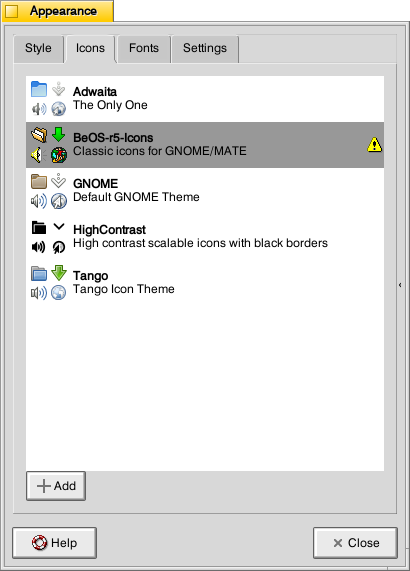
    To make Xfce as BeOS-like as possible, I used the BeOS-r5-Icons pack.

    Decompress the downloaded file and move it into ~/.icons (remember to turn on “show hidden files and folders” in your file manager, and create the .themes folder if it does not already exist). Then, go to Settings > Appearance > Icons tab > select BeOS-r5-Icons.

    Desktop

    Desktop settings window

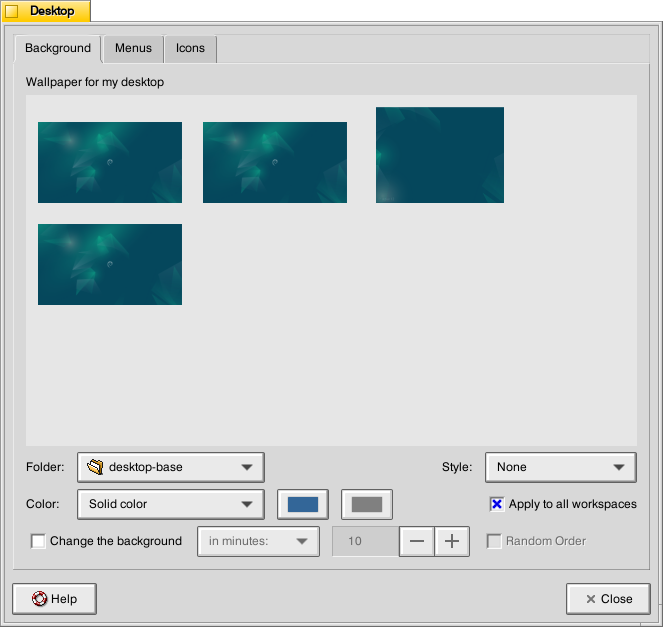
    There are BeOS desktop wallpaper pictures that you can download and set as your wallpaper. However, I wanted a simpler solid color background. To achieve this, go to Settings > Desktop. Set Style to “None,” and set Color to “Solid color.” Then, click on the color rectangle to the right of Color, and next, click on the “+” under Custom and enter this hex value for the default deep blue BeOS desktop color: #336698.

    Dock

    Dock Preferences window

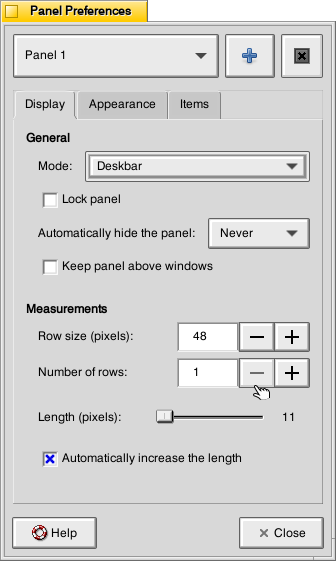
    After a lot of head-hitting-the-desk, I settled on using the Xfce’s Panel instead of a more visually interesting dock that used a BeOS-inspired theme (e.g., BeOS-dr8-DockbarX). I was able to get DockbarX installed from source eventually, but I couldn’t get the Xfce4 DockbarX plugin to work with the Xfce Panel. It wasn’t from a lack of trying! It’s worth trying to get those installed–you might have better luck. For me, I needed to move on, so I settled on customizing the Xfce panel to meet my needs and fit the BeOS aesthetic well enough. I went to Settings > Panel > Display tabl to set Panel 1 in Deskbar Mode, set the Row size to 48 with 1 row and ticked “Automatically increase the length. On the Appearance tab, I set the Fixed icon size to 48.

    Applications Menu settings within Panel settings

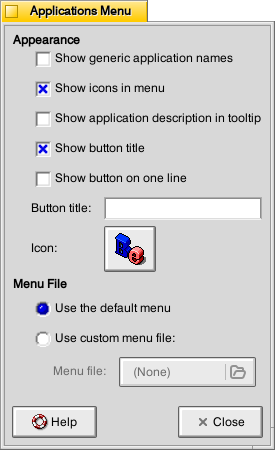
    On the Items tab, I clicked the preferences for the Applications Menu, removed the Button title and changed the Icon to the isometric 3D Be logo (this will be an option after you’ve installed the icons pack as described above in the Icons section).

    It would be easy to configure the panel to be more like the original Deskbar in BeOS, too. The main changes needed would be to increase the Number of rows to 4 or 5, change the Application menu icon to the flat “BeOS” logo icon (included in the icon pack installation in the Icons section above).

    And, it’s important to remember that there was not one, eternal version of BeOS. As with any developed software, it changed over time with its UI and look-and-feel changing with it. For me, the 1996 Developer Release is what I remember most because I ran it on bare metal on my PowerMacintosh 8500/120. It continued to evolve and change after that in ways that I am less familiar with.

    QMMP/Winamp Skin

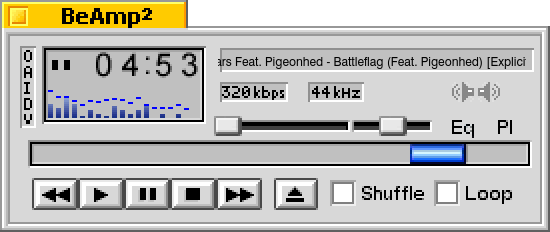
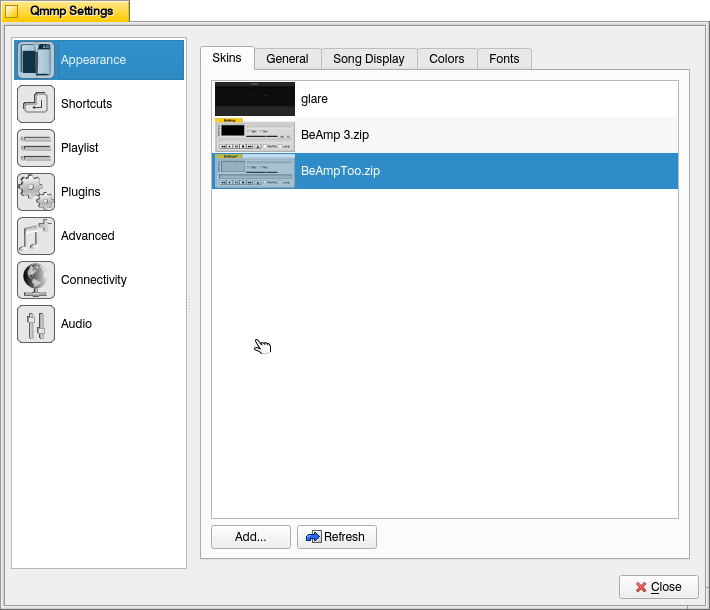
    If you use QMMP for listening to music on your computer, you’ll need to grab a Winamp skin to give it the BeOS look and title bar. BeAmp Too is my favorite. There are a few others available if you search for “beos” on the Winamp Skin Museum.

    Whichever one you choose, download the zip file for the theme to your Downloads folder. Then, open QMMP, right click on the title bar and choose Settings, click on the Appearances section on the left, click the Skins tab, and then click on “Add…” at the bottom, navigate to your downloaded theme zip file and select it. QMMP will copy the file into the ~/.qmmp/skins directory for you. Select the theme on the Appearances > Skins tab to activate the theme.

    Other Tweaks

    The following are other tweaks to Xfce that I prefer for daily use.

    Disable overlay/auto hiding scrollbars

    Edit /etc/environment and add the line

    GTK_OVERLAY_SCROLLING=0 

    Save the file. Logout and login to see the change take effect.

    White font for desktop items

    Go to ~/.config/gtk-3.0/ and create a file named gtk.css (edit this file if it already exists). Add these lines to it:

    XfdesktopIconView.label {
        color: white;
    }

    Save the file. Logout and login to see the change take effect.

    Consistent Scroll Bar Speed

    In folders with many files, I have noticed that if I begin scrolling but slow down a little, the speed of scrolling after that point for the rest of my mouse-down drag will be EXCEEDINGLY slow. This is by design–a feature called zoom scrolling. Well, I don’t like it. If you don’t like it either, you can tame it by setting the trigger time to longer than the default of 500 milliseconds. To do this, go to ~/.config/gtk-3.0/ and create a file named settings.ini (edit this file if it already exists). Add these lines to it:

    [Settings]
    gtk-long-press-time=5000

    Save the file. Logout and login to see the change take effect.

    Thanks to:

    An unnamed Reddit user (their account has been deleted) posted an excellent write up of their BeOS-r5-XFCE theming of XFCE in r/unixporn that gave me a roadmap for what was possible.

    Metsatron, Roberto21, Retardtonic, and Xu Zhen for their respective work on the components that make this customization possible.

    The Debian community for Bookworm.

    And thanks to the Haiku OS developers who are keeping the BeOS dream alive!

  • Updates to the Generative AI and Pedagogy Bibliography

    A cute humanoid robot writing at a desk with bookshelf in background. Image created with Stable Diffusion.

    Over the weekend, I made some significant updates to the Generative AI and Pedagogy Bibliography and Resource List page, which includes background, debates, teaching approaches, applications, disciplinary research, and a list of online resources. I started it as a place to organize my own research while sharing it back out to others.

    It now features a table of contents at the top of the page under the introduction.

    I added about 50 articles and books to the bibliography, which now contains 232 sources.

    And, I added three links to the resource list at the bottom of the page which brings it to 42 links.

    I will periodically add more entries to the list as my own research progresses. But, it’s important to note that this bibliography isn’t meant to be exhaustive.

  • Brief Technical Communication Program Administration Reading List

    Classroom arranged in rows with computer monitors at each chair.

    The City Tech English Department asked me to step up as Director of the B.S. in Professional and Technical Writing Program at the start of Spring 2021.

    The following list of books, anthologies, and articles have been helpful to me as I work to better understand program administration, development, assessment, and internships.

    Bridgeford, Tracy, Karla Saari Kitalong, and Bill Williamson, editors. Sharing Our Intellectual Traces: Narrative Reflections from Administrators of Professional, Technical, and Scientific Communication Programs. Baywood Publishing Company, 2014.

    Elliot, Norbert and Margaret Kilduff. “Technical Writing in a Technological University: Attitudes of Department Chairs.” Journal of Technical Writing and Communication, vol. 21, no. 4, 1991, pp. 411-424.

    Franke, David, Alex Reid, and Anthony DiRenzo, editors. Design Discourse: Composing and Revising Programs in Professional and Technical Writing. WAC Clearinghouse, 2010.

    Huot, Brian. (Re) Articulating Writing Assessment for Teaching and Learning. Utah State UP, 2002.

    O’Neill, Peggy, Cindy Moore, and Brian Huot. A Guide to College Writing Assessment. Utah State UP, 2009.

    Sapp, David Alan. “The Lone Ranger as Technical Writing Program Administrator.” Journal of Business and Technical Communication, vol. 20, no. 2, April 2006, pp. 200-219.

    Selting, Bonita R. “Conversations with Technical Writing Teachers: Defining a Problem.” Technical Communication Quarterly, vol. 11, no. 3, 2002, pp. 251-266.

    Sides, Charles H. and Ann Mrvica, editors. Internships: Theory and Practice. Baywood Publishing Company, 2007.

  • Publishing Studies

    img_20190124_170140
    Printing press on display at City Tech.

    Recently, I had an opportunity to speak with colleagues about what Publishing Studies means to me. I edited my thoughts into the following note.

    Publishing Studies: Theory and Praxis

    Publishing Studies is an interdisciplinary field of study that encompasses rhetoric and composition, media studies, history of the book/newspaper/magazine/websites/etc., and practical skills including writing, editing, design, layout, production, marketing, business administration, etc. Publishing Studies programs prepare students for publishing industry careers.

    Publishing Studies should be grounded in theory and praxis. Theory provides a foundation for understanding the field and its development. It gives ways of seeing and thinking about the process and purpose behind publishing. Theory helps one be a confident problem solver, an open-minded thinker, and a dynamic life-long learner who can adapt to changing work conditions and challenges. Balancing theory is practical skills. These skills are what help students build a portfolio, gain experience through internships and entry level positions, and obtain a job on their desired career path. Through their understanding of theory, students will understand that the skills they have when leaving a program will only go so far as the publishing industry changes. They can leverage their current skills to grow their skill set over time and be engaged members in their profession so that they know what new trends they should pay attention to and what new skills will keep them competitive in the job market.

    Rhetoric

    Publishing Studies is founded on rhetoric and composition. Publishing is all about communicating particular ideas to a particular audience using a particular (production scale/mass communication) medium. Knowing audience, rhetorical techniques, modes of communication (WOVEN=written, oral, visual, electronic, and nonverbal), and the writing process are essential skills for anyone interested in the publishing industry. Furthermore, being a reflective practitioner–using journal writing and reflection–supports the acquisition, integration, and improvement of the use of rhetoric and composition principles in the work place. There is a lot of overlap in this regard (as well as in the tools employed in the publishing field mentioned below) with Technical Communication.

    Media Studies

    Media and materiality are really big components of Publishing Studies, because publishing is all about using mass communication media technologies to reach an audience. Important issues for Publishing Studies from a Media Studies perspective might include: the effect/affect of media on audiences, how does media change over time, how does media influence other media, what biases are built into particular media or how those media are used, and are there issues with particular media at scale (e.g., Facebook and Twitter’s role in Brexit and the 2016 US election). Aesthetics, design, layout, and UX are important, too, and they overlap (as do many aspects of theory) with practical skills.

    History of the Book/Newspaper/Magazine/Website/Etc

    Perhaps under the umbrella of Media Studies, the History of the Book and other produced media such as newspapers, magazines, websites, social media, and others, are key to a fundamental understanding of Publishing Studies. The field encompasses many different forms of mass communication technologies, and the intertwined histories of these media provide a useful context for how we are at this particular moment in publishing history while also revealing how the history of publishing is not a Whig historical progression, but in fact, contains many interesting dead ends and forgotten technologies whose time might not have been right but contained some aspects that were useful and might deserve revisiting in the present. Layered in these histories are issues of labor, capital, production technologies, world historical events, and societal movements, all of which have influenced the development of the publishing history.

    Practical Skills

    Praxis is tempered by theory. Theory is made meaningful by praxis. The two support one another and enrich one’s experience of the publishing field in a way that helps propel students toward dynamic careers instead of cookie-cutter jobs. Publishing careers include writing, editing, design, layout, printing, IT, programming, procurement, representation, marketing, fact checking, research, and business administration. All of these rely on a basic set of writing, communication, and interpersonal skills, and each branches off into a discrete set of current (but always changing) skills involving knowledge-based work (e.g., planning, research, summarizing, extrapolating, etc.) and tool-based work (e.g., Adobe Creative Suite, Microsoft Office, CMS, etc.). Each career path’s set of widely accepted skills (i.e., those skills that employers are looking for in employees) are those that should be researched and taught by faculty. Besides their course work, students can learn more about these through trade publications and books, mentors, and internships.

  • Engagement, Learning and Inspiration in SF: Use Cases for the City Tech Science Fiction Collection

    I delivered this presentation at the James Madison University Pulp Studies Symposium on October 7, 2016. The video above shows my presentation’s images, and the script of my talk is included below.

    The paper is about introducing new audiences to old ideas for the benefit of two different City Tech audiences: 1) frame the historical publication context of science fiction short stories for students, and 2) illuminate the deep history of technological ideas for faculty fellows in the NEH-funded “Cultural History of Digital Technology” project.

    [UPDATE: The symposium was a great success! Thank you to everyone who had questions and comments during our session. I posted photos taken by colleague Caroline Hellman over at the Science Fiction at City Tech website.]


    Engagement, Learning and Inspiration in SF: Use Cases for the City Tech Science Fiction Collection

    Jason W. Ellis


    In the first issue of Amazing Stories dated April 1926, Hugo Gernsback writes:

    By ‘scientifiction’ I mean the Jules Verne, H. G. Wells and Edgar Allan Poe type of story—a charming romance intermingled with scientific fact and prophetic vision … Not only do these amazing tales make tremendously interesting reading—they are always instructive. (Gernsback 3)

    According to Gernsback, the literary genre that would become known as science fiction combines romance, scientific fact, and prophetic vision. The romance engages the reader in an interesting story. The facts instruct the reader in science and technology. The prophetic vision extrapolates from what is known into the not-yet-known and simultaneously inspires readers to realize that vision. I believe that Gernsback’s vision of SF is fundamental to arguments for SF collections at colleges with a pedagogical and community-serving commission like City Tech. Our college occupies several buildings in downtown Brooklyn and serves the educational needs of over 17,000 students. Historically a trade and vocational school, it has over time and by design developed into a senior college of the City University of New York (CUNY) system. Nevertheless, the students it serves and the fields it attempts to prepare them for are primarily focused on STEM career paths. While not all stakeholders recognize the importance that the humanities have to STEM graduates’ success and overall outlook, the administration’s support of the City Tech Science Fiction Collection signals at least one way in which the humanities—in this case via SF—is seen as supportive to the otherwise STEM-focused educational work of the college. In effect, SF and the collection serves as a source for engagement, learning, and inspiration for students who have much to gain from it as a literary genre that reveals the inextricable linkages between STEM and the humanities. While I cannot within the scope of this presentation explore all of these functions of SF, I will restrict myself to discussing how I have used the collection to support my teaching and pedagogical work at City Tech.


    Teaching Science Fiction from a Historical Perspective

    For students, my SF syllabus takes a historical approach to the genre. Following Brian Aldiss, I point to Mary Shelley’s Frankenstein as the genre’s beginning, because its plot pivots upon on an extrapolation of science and technology. Following this novel, I have students read a chronological progression of short stories that correspond with the movements in the genre: proto-science fiction and SF’s influences, H.G. Wells and his scientific romances, Jules Verne and his Voyages extraordinaires, Hugo Gernsback’s scientifiction and the pulps, John W. Campbell, Jr. and the Golden Age, the New Wave, Feminist SF, Cyberpunk, and contemporary SF. Looking at my current syllabus, which draws on readings from the Wesleyan Anthology of Science Fiction and a few stories in PDF form that are not in the anthology, over half appear for the first time in magazines held in the City Tech Science Fiction Collection, including: Isaac Asimov’s “Reason,” Astounding Science Fiction, April 1941; Tom Godwin’s “The Cold Equations,” Astounding Science Fiction August 1954; Robert Heinlein’s “All You Zombies—,“ The Magazine of Fantasy and Science Fiction, March 1959; Harlan Ellison’s “Repent, Harlequin! Said the Ticktockman,” Galaxy Magazine, December 1965; Philip K. Dick’s “We Can Remember It For You Wholesale,” The Magazine of Fantasy and Science Fiction April 1966; James Tiptree, Jr’s “The Women Men Don’t See,” The Magazine of Fantasy and Science Fiction December 1973; William Gibson’s “Burning Chrome,” Omni July 1982; and Octavia Butler’s “Speech Sounds,” Isaac Asimov’s Science Fiction Magazine Mid-December 1983. In addition to discussing each story in its historical context and its addressing Gernsback’s tripartite definition (along with other definitions, too), I show students photos of the magazines and their contents. I relate how these magazines were a big deal that introduced readers to engaging stories, new science and technology, and inspirational ideas via the haptic and tactile experience of reading printed magazines. Furthermore, the contents of a given magazine add an anthropological context to the magazines via editorials, letters, fandom, and advertising. Finally, the magazines help situate the readings for students, because they empower me to point at the library and take the readings out of the abstract realm of anthologization.


    NEH-sponsored “Cultural History of Digital Technology” Project

    While my students’ experience of SF is enriched by the historical materiality of our readings, City Tech’s faculty, who are engaged in pedagogical planning that bridges STEM and the humanities, share some of the same needs as my students. I have learned that my STEM-focused colleagues are experts in their fields, but many do not conceptualize SF on one level as a literary genre that addresses Gernsback’s tripartite definition: romance, scientific facts, and prophetic vision, or on another level as a literary form built on interdisciplinary STEM methodologies (i.e., building assemblages of ideas and constructing extrapolations) and focused on the effects of science and technology on humanity and vice versa (e.g., Asimov’s concept of “social science fiction” or Philip K. Dick’s epistemological and ontological adventures). Professor Anne Leonhardt of Architectural Technology and director of the NEH-funded project titled, “The Cultural History of Digital Technology: Postulating a Humanities Approach to STEM,” asked me to join and contribute my humanities-focused perspective. The project’s goal is to create six interdisciplinary pedagogical modules—on maps, fractals, robotics and sociality, geotagging, topology, and finally, robotics and the workplace. We do this by inviting speakers, holding reading groups, and participating in pedagogical workshops. The student-facing modules will integrate readings, classroom lecture and demonstration, and a hands-on activity. Initially, I helped with finding readings for two modules—fractals and topology, but as I describe below, I have leveraged the City Tech Science Fiction Collection’s magazine holdings and demonstrated that humanities folks can do more than find interesting readings. Also, I will use Gernsback’s definition as a measure of each considered story’s usefulness to the module’s goals.


    3D Printing

    The first module that I contributed readings to is called “Fractals: Patterning, Fabrication, and the Materiality of Thinking.” Its purpose is to bridge students’ understanding of mathematics to the natural world by using fractal geometry—the notion that Benoit Mandelbrot introduced as the process and principle of order and structure underlying the physical world. We teach students the underlying principles of fractal geometry, help them create a workflow using open-source tools to generate a 3D printable STL, or STereoLithography model, and finally, have them print their model using one of City Tech’s powder or plastic 3D printers.

    Initially, I did not consider the City Tech Science Fiction Collection’s holdings, because everything was sitting in 160 boxes stacked floor to ceiling in my office and my former colleague, Alan Lovegreen’s office. Rudy Rucker’s “As Above, So Below” (1989), a story not widely anthologized but available on the author’s website, first came to mind, because I knew that both sides of his professional work touched on this topic. Rucker, a cyberpunk SF writer and mathematician, had written this story after his own attempts at discovering what is now called a “Mandelbulb,” or a three-dimensional plot of the Mandelbrot set, the recognizable image based on a simple iterative function explored in the work of Benoit Mandelbrot. In Rucker’s story, a mathematican hacks together a program that creates a three-dimensional Mandelbrot set that breaks out of his computer screen and takes him on a trippy voyage away from life and into a crabmeat can in his pantry where he can code and enjoy energy drinks for the rest of his life—as long as no one get hungry for canned crab. While it is an interesting story and Rucker’s work on the Mandelbulb is noted in the module, his story is more romantic and possibly prophetic, but less instructive.

    Shortly thereafter, Alan and I finished moving and shelving the City Tech SF Collection, and I began searching for a better story in the collection’s magazines—a story that fulfills the Gernsbackian requirements and connects to both of the module’s topics: fractals and 3D printing. One such contender was Robert Heinlein’s “Waldo,” which tended to capture the materiality-emphasis of the module better than Rucker’s much later story. Published in August 1942 in Astounding Science Fiction as by Heinlein’s pseudonym Anson MacDonald, “Waldo” features on the cover with art by Hubert Rogers and story illustration by Paul Orban. The story is where the term for a remote manipulator system is coined—a waldo. However, the story is about a man named Waldo Jones who invents remote manipulators to enable his weakened body to act on the world. With his invention, he sets out to make smaller ones and smaller ones until they were capable of manipulating microscopic neural tissue and investigate the cause of his physical handicap. The idea then is that waldoes could be used to build up matter in the same way they were used to build smaller versions of themselves. Heinlein’s story fulfills Gernsback’s requirements—romance (intrigue and revenge), scientific fact (cybernetics), and prophetic vision (what possibilities might waldoes enable), but it does not fulfill both module topics as strongly.

    Eventually, I found the story that is credited as the first SF describing 3D printing in detail: Eric Frank Russell’s “Hobbyist,” in the September 1947 issue of Astounding Science Fiction. Unlike “Waldo,” “Hobbyist” is not as widely anthologized, so having access to it in its original magazine was a bonus. If you are familiar with the contemporary video game, No Man’s Sky, then you have an idea about what “Hobbyist” is generally about. Astronaut Steve Ander and his companion parrot Laura crash land on a distant world and are in need of nickel-thorium alloy for fuel, which will hopefully get them a little closer to home. While scavenging around the crash site, Ander notices unsettling patterns of repetition in the world around him and discovers a structure that houses what amounts to a collection of life forms created in a 3D printer of sorts and maintained by an omnipotent being. The narrator describes it thus:

    It was done by electroponics, atom fed to atom like brick after brick to build a house. It wasn’t synthesis because that’s only assembly, and this was assembly plus growth in response to unknown laws. In each of these machines, he knew, was some key or code or cipher, some weird master-control of unimaginable complexity, determining the patterns each was building—and the patterns were infinitely variable. (Russell 56)

    “Hobbyist” satisfied the Gernsbackian requirements—romance (escape the planet), scientific fact (small scale engineering, iterative and fractal growth), and prophetic vision (might this technology make us gods?) and united both module topics. Capturing “Hobbyist” with my iPhone and Scanner Pro app, I shared the story with the other NEH Fellows— the story’s text and in-story illustrations by Edd Cartier and cover art by Alejandro de Cañedo. During meetings, I related the history of the magazine and how that adds to the importance of the story as a nodal point of STEM ideas expressed through SF long before 3D printing was first innovated in the 1980s, and even before it was described in theoretical terms by Richard Feynman in his well-known December 1959 American Physical Society presentation, “There’s Plenty of Room at the Bottom.”


    Topology

    The second module that I contributed to is called “Topology: Behind Escher’s Wizardry, A Look at the Development of Modeling and Fabrication.” Unlike the earlier fractal module, the topology module would involve programming to create each student’s 3D printed model. In addition to my role as the humanist on the team, I made this a personal challenge to relearn Wolfram Mathematica, a symbolic computation program that supports a relatively easy-to-use programming language, because I wanted to demonstrate how its could satisfy all aspects of teaching, coding, and modeling. I began by creating a Mathematica workbook that demonstrated topology concepts, such as points, lines, polygons, and dimensionality, and easy-to-follow programming tutorials of topological surfaces. Additionally, I showed how Mathematica exported 3D printable STL files of the topological models students would create.

    Initially, we considered Edwin Abbott’s Flatland: A Romance of Many Dimensions (1884), but Professor Satyanand Singh, a colleague in the Mathematics department, suggested that we show a video based on Abbott’s story instead. This created an opportunity.

    While performing serious play with Mathematica, I recalled Robert Heinlein’s “—And He Built a Crooked House” from the February 1941 issue of Astounding Science Fiction. Featuring cover art by Hubert Rogers and story illustrations by Charles Schneeman, the story is about an ambitious architect who designs a house in the shape of an unfolded tesseract, or a four-dimensional cube. Unfolded means to create a geometric net or the interconnected, component elements of the object. For example, a three-dimensional cube unfolds into a net composed of two-dimensional squares arranged in eleven different configurations. On the other hand, a tesseract, which is four-dimensional, unfolds into a net of connected three-dimensional cubes with 168 possible configurations! The architect’s innovative design is such an arrangement of three-dimensional cubes, which in this case, resembles the Cross of St. Peter. Unfortunately, having been built in California, there is an earthquake and the house collapses into itself forming a nondescript house-like cube. The incredulous architect and his nonplussed clients enter the domicile to investigate and become trapped within the structure’s weird, higher-dimensional geometry. It is an improbable story, but it captures the strangeness of higher dimensions and introduces topics for discussion. “—And He Built a Crooked House” fulfills Gernsback’s definition—romance (escape the counter-intuitive house-turned-maze), scientific fact (higher dimensionality), and prophetic vision (let’s use math to build innovative buildings), and it tangentially fulfills the module’s focus on topology.

    The NEH project is on going, so there are opportunities to locate other stories and materials in the SF magazines held in the City Tech Science Fiction Collection. In my SF class, I hope to bring my students to the archives for special projects pre-arranged with the librarians. Professor Jill Belli is doing this now, and some of her students’ work will be features in a special session of the upcoming Symposium on Amazing Stories: Inspiration, Learning, and Adventure in Science Fiction on November 29 at City Tech, which I hope that you all will consider presenting or attending. Thank you for listening.

    Works Cited

    Gernsback, Hugo. “A New Sort of Magazine.” Amazing Stories April 1926: 3.

    Heinlein, Robert. “—And He Built a Crooked House. Astounding Science Fiction, February 1941, 68-83.

    Russell, Eric Frank. “Hobbyist.” Astounding Science Fiction, September 1947. 33-61